187
Contents
Preparation/
Setup
Print Using a
Computer
Appendix
IndexPrint/SaveInput/Edit
Names of
Components
Maintenance/
Printer Settings
Trouble-
shooting
Cleaning the Print Head
If printing is not clear or white streaks appear, the print head may be dirty. We recommend
cleaning the print head about once a month.
WARNIN
• Before cleaning, be sure to turn o the power and unplug the power supply. Also,
remove the batteries from the printer. Doing so may result in re or electric shock.
• Do not use alcohol, thinner, or other ammable solvents to clean the unit. Doing so
may result in re or electric shock.
1
Turn o the power and unplug the power plug from the power outlet.
If batteries are being used, remove them.
2
Open the cover and remove the ribbon cassette, and attachment (or label
tape cassette).
3
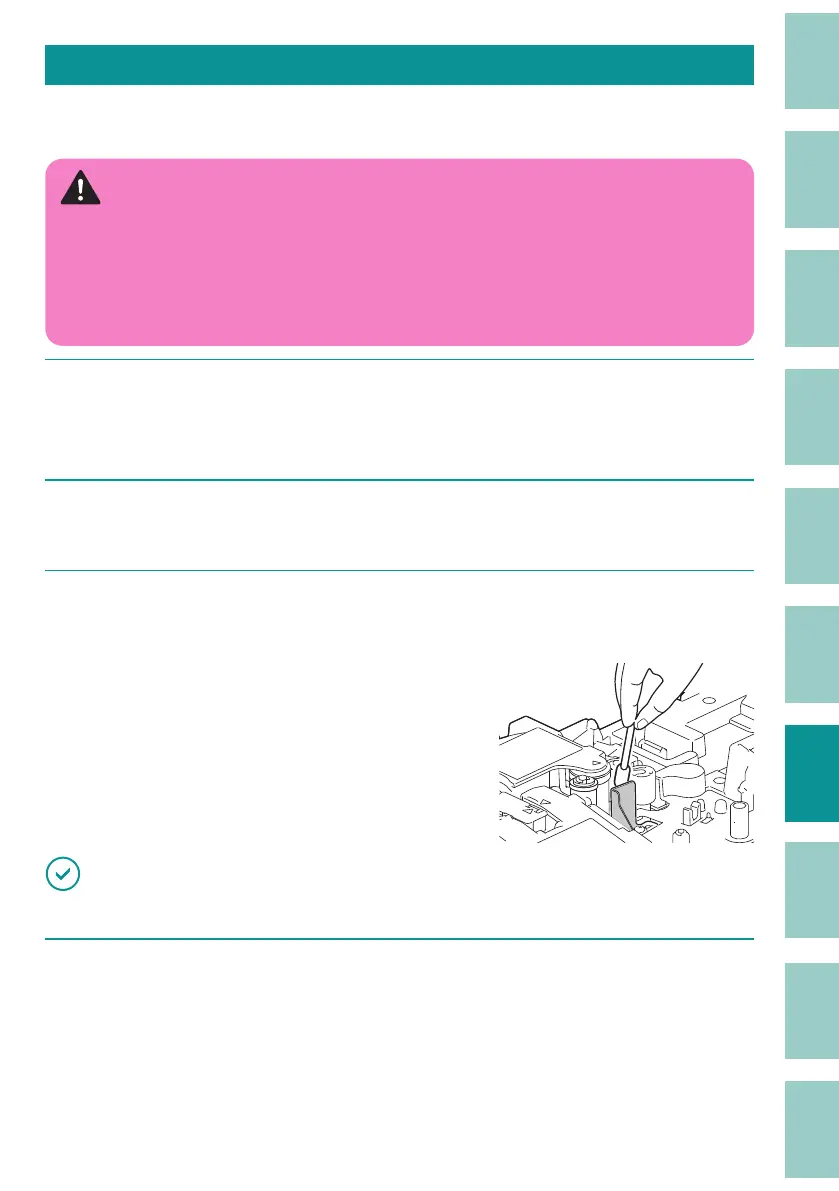
Wipe o any dirt on the print head with a cotton swab moistened with water
and wrung out tightly.
IMPORTANT
• Do not touch the print head directly. Doing so may result in malfunction of the product.
4
When cleaning is nished, close the cover.



 To Next Page