39
Contents
Preparation/
Setup
Print Using a
Computer
Appendix
IndexPrint/SaveInput/Edit
Names of
Components
Maintenance/
Printer Settings
Trouble-
shooting
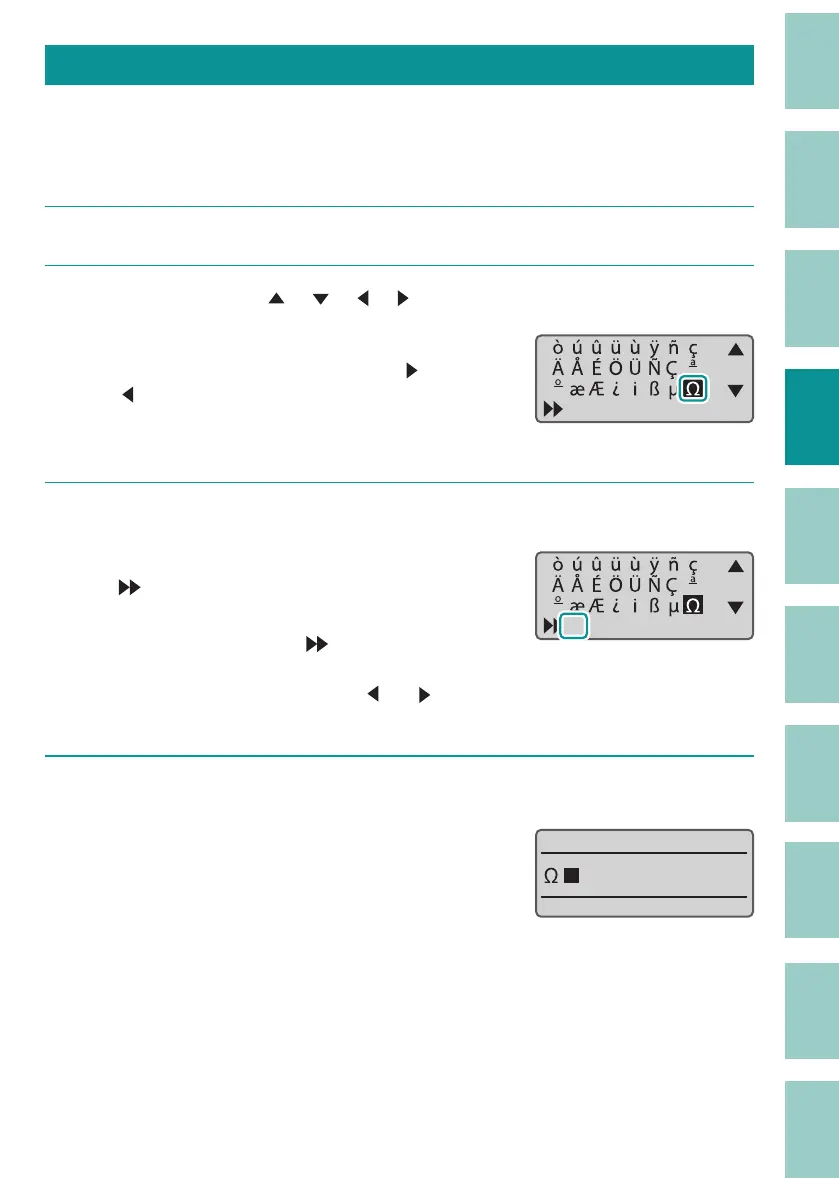
Entering Symbols
You can use the input symbol function to enter symbols that cannot be entered using the
keyboard.
[Example] Input "Ω."
1
Press the [Symbol 1] key.
2
Use the arrow keys ([
], [
], [ ], [ ]) to select "Ω" from the list of symbols.
The symbol screen is divided into two groups. To
switch between groups, press [Shift] + [
] (or
[
]).
For symbols that can be entered, see
"List of
Symbols (P.233)"
.
ɻ˛
3
Press the [Enter] key.
"Ω" will be displayed at the position indicated by
"
".
If you want to delete the character displayed at
the position indicat
ed by "
", press the [Back
Space] key while holding down [Alt]. You can
also move the cursor by pressing [
] or [ ]
while holding down [Alt].
ɻЌ˛
4
Press the [Alt] + [Enter] keys.
"Ω" will be entered.



 To Next Page