36
Contents
Preparation/
Setup
Print Using a
Computer
Appendix
IndexPrint/SaveInput/Edit
Names of
Components
Maintenance/
Printer Settings
Trouble-
shooting
Basic Input Operations
Before Input
■
About Pages
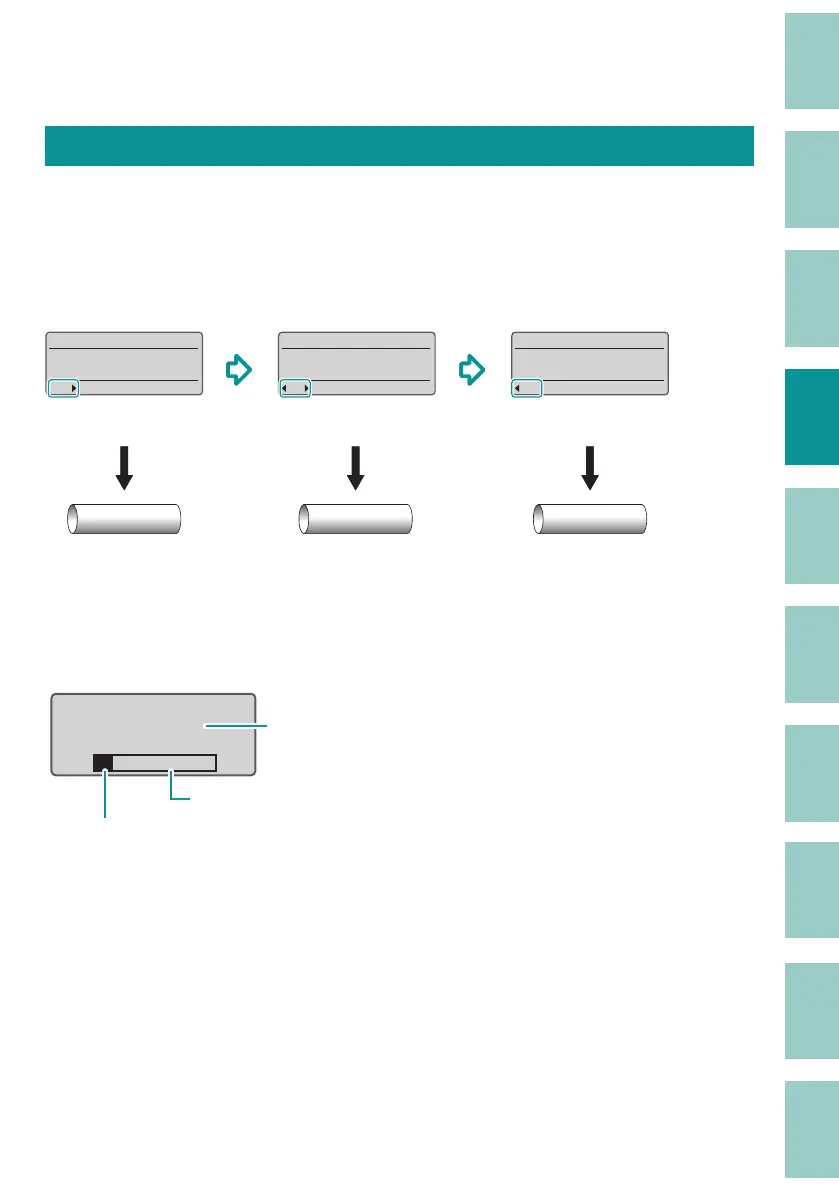
This product treats the string of characters to be printed on one tube (or one label) as a single
page. Press the [Enter] key to create a new page. ( Page Break)
200V˛
0001
Pump Room˛
0002
C1˛
0003
&
200V
(Page 1)
Pump Room
(Page 2)
C1
(Page 3)
Press
[Enter] key
Press
[Enter] key
200V
Pump Room C1
Also, if you press the [ Page] key, you can check the page number of the currently displayed page
and the total number of pages in the data. In addition, " Memory used" allows you to check the
available space on the character input display. Press any key to return to the character input
display.
Page Display
Page 41 of 53
Memory used
The page number of the currently
displayed page/ the total number of pages
Currently used capacity
The available space on the character input display



 To Next Page