179
Contents
Preparation/
Setup
Print Using a
Computer
Appendix
IndexPrint/SaveInput/Edit
Names of
Components
Maintenance/
Printer Settings
Trouble-
shooting
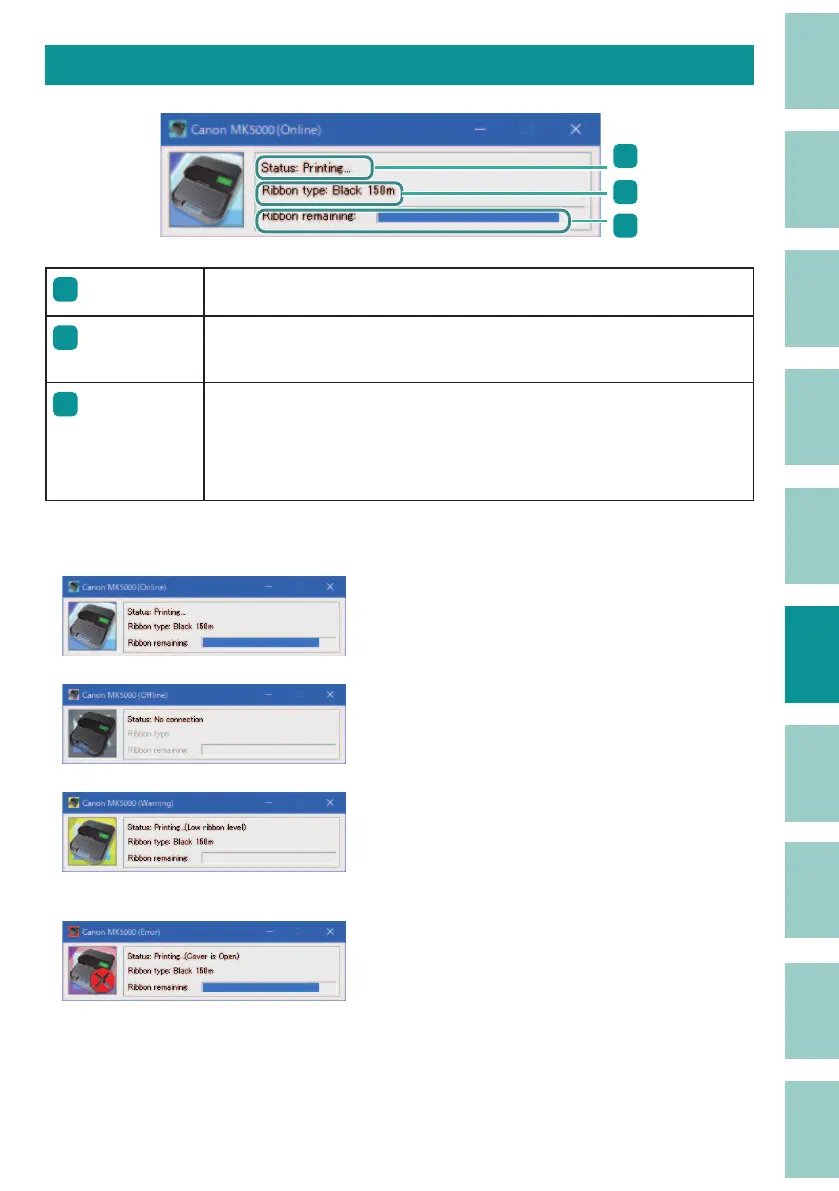
View Printer Status
3
1
2
1
Status
Displays a message informing you of the current printer status.
2
Ribbon type
Displays the type of ribbon cassette. There are three types: "White 85m,"
"Black 150m," and "Black 40m compatible with plate."
3
Ribbon
remaining
Displays the approximate remaining amount of ink ribbon. (There
may be a slight di erence from the actual remaining amount.) If the
remaining amount is not read correctly, the remaining amount is not
displayed.
The printer status is displayed in four images.
Indicates that the printer is in a normal state.
Indicates that the printer is online and can print.
Indicates that the printer is o ine.
Indicates that a warning has occurred.
A warning message is displayed in the [Status]
eld, but you can continue printing. Take action as
necessary.
Indicates that an error has occurred.
An error message is displayed in [Status], and
printing cannot be performed.



 To Next Page