192
Contents
Preparation/
Setup
Print Using a
Computer
Appendix
IndexPrint/SaveInput/Edit
Names of
Components
Maintenance/
Printer Settings
Trouble-
shooting
10
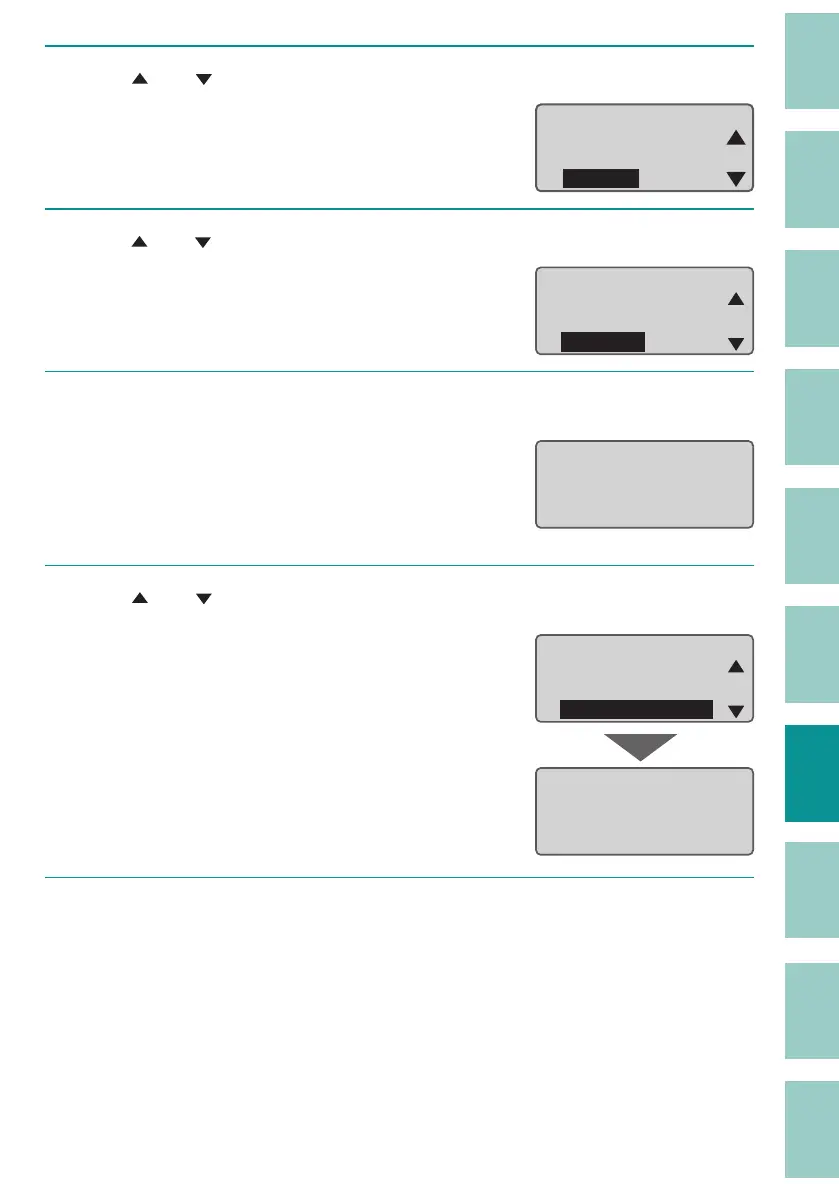
Use [ ] or [ ] to select "Others," then press the [Enter] key.
ɻɻ
Settings
Others
Print adjust
Setting
11
Use [ ] or [ ] to select "Counter," and then press the [Enter] key.
Others
Counter
Init. DeleteCheck
Page Display
ɻ
12
Record the Mounted Cutter Count, and then press the [Enter] key.
We recommend that you record the Mounted
Cutter Count in the "Cutter Operation Record"
in the Basic Operation Guide included with the
pr
oduct each time you change cutters.
Mounted Cutter Count
50000 times
10000 m
Total Feed Length
ɻ
13
Use [ ] or [ ] to select "Replace cutter" and press the [Enter] key.
After the following screen is displayed, the
display will return to the previous screen.
The mounted cutter count will be reset to "0".
The depth and motion of the cut will return to
"Nor
mal".
Othersɻ
Replace cutter
Forced full cut
Feed
ɻ
Cutter replacement
is accepted.
ɻ
14
Press [Shift] + [Canc] keys.
The display returns to the character input
display.


 To Next Page