207
Contents
Preparation/
Setup
Print Using a
Computer
Appendix
IndexPrint/SaveInput/Edit
Names of
Components
Maintenance/
Printer Settings
Trouble-
shooting
3
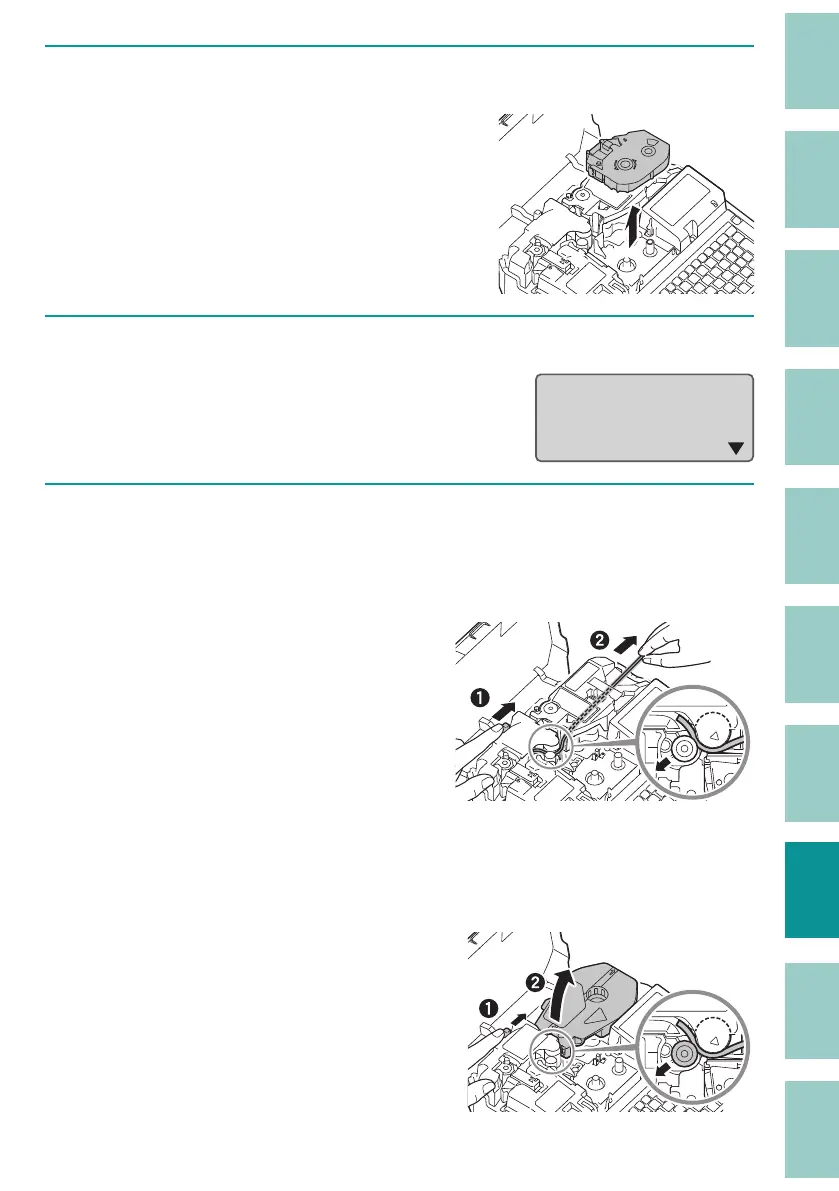
Remove the ribbon cassette.
If the ribbon is wound around the cassette
and cannot be removed, do not remove it
forcibly, and proceed to step 4.
4
Press any key.
After pressing a key, instructions will be
displayed on the screen.
While pushing the
Jam recovery lever,
remove print media
in the printer.
5
(When using tube or plate)
As shown in the gure, pull the tube (or plate) out while pressing the jam
recovery lever in the direction of the arrow.
If the tube (or plate) cannot be pulled out,
remove the attachment while pressing the
jam recovery lever in the direction of the
arrow.
If the ribbon cassette has not been removed
in the pr
evious step, remove the ribbon
cassette.
(When using a label tape)
Remove the cassette while pressing the jam recovery lever in the direction
of the arrow, as shown in the gure.
If the ribbon cassette has not been removed
in the previous step, remove the ribbon
cassette.



 To Next Page