23
Contents
Preparation/
Setup
Print Using a
Computer
Appendix
IndexPrint/SaveInput/Edit
Names of
Components
Maintenance/
Printer Settings
Trouble-
shooting
5
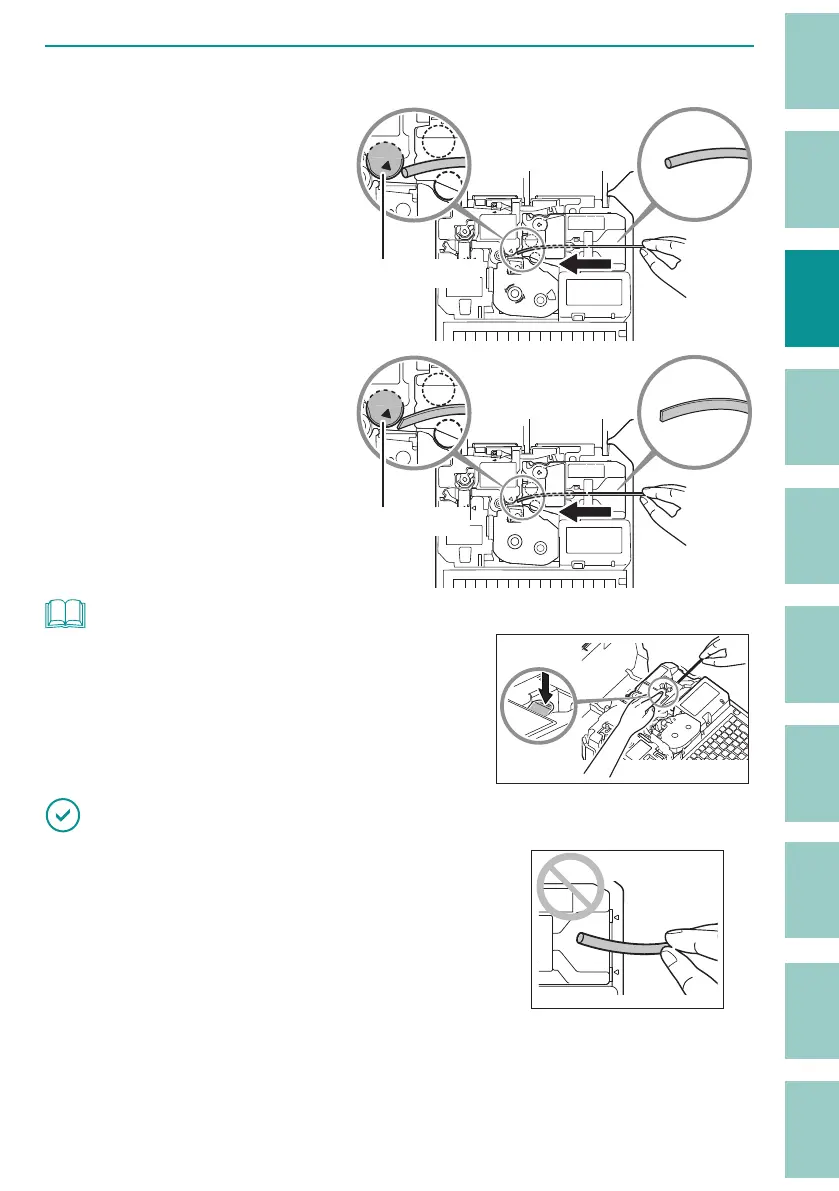
Insert the tube (or plate).
For tubes (round)
Insert the tip of the tube into
the media feed port in the
direction shown in the figure,
and push it in until it hits
transport roller 2.
Transport roller 2
For plates and flat tubes
Insert the tip of the plate (or
flat tube) into the media feed
port in the direction shown
in the figure, and push it in
until it hits transport roller 2.
Transport roller 2
NOT
• If it is di cult to pass the tube (or plate) through the
attachment, set the tube (or plate) in place while pressing
the tube retainer lever with your nger.
IMPORTANT
• If the tip of the tube (or plate) is inserted as shown in the
gure, the tube (or plate) may get stuck during printing,
the print may be chipped, or the cut position may be o .
• If the tip of the tube (or plate) is bent due to winding, etc., x it so that it is straight, or cut o the bent
portion before placing it in the printer.
• To prevent the print media from running out during printing, or to prevent the shortened print media



 To Next Page