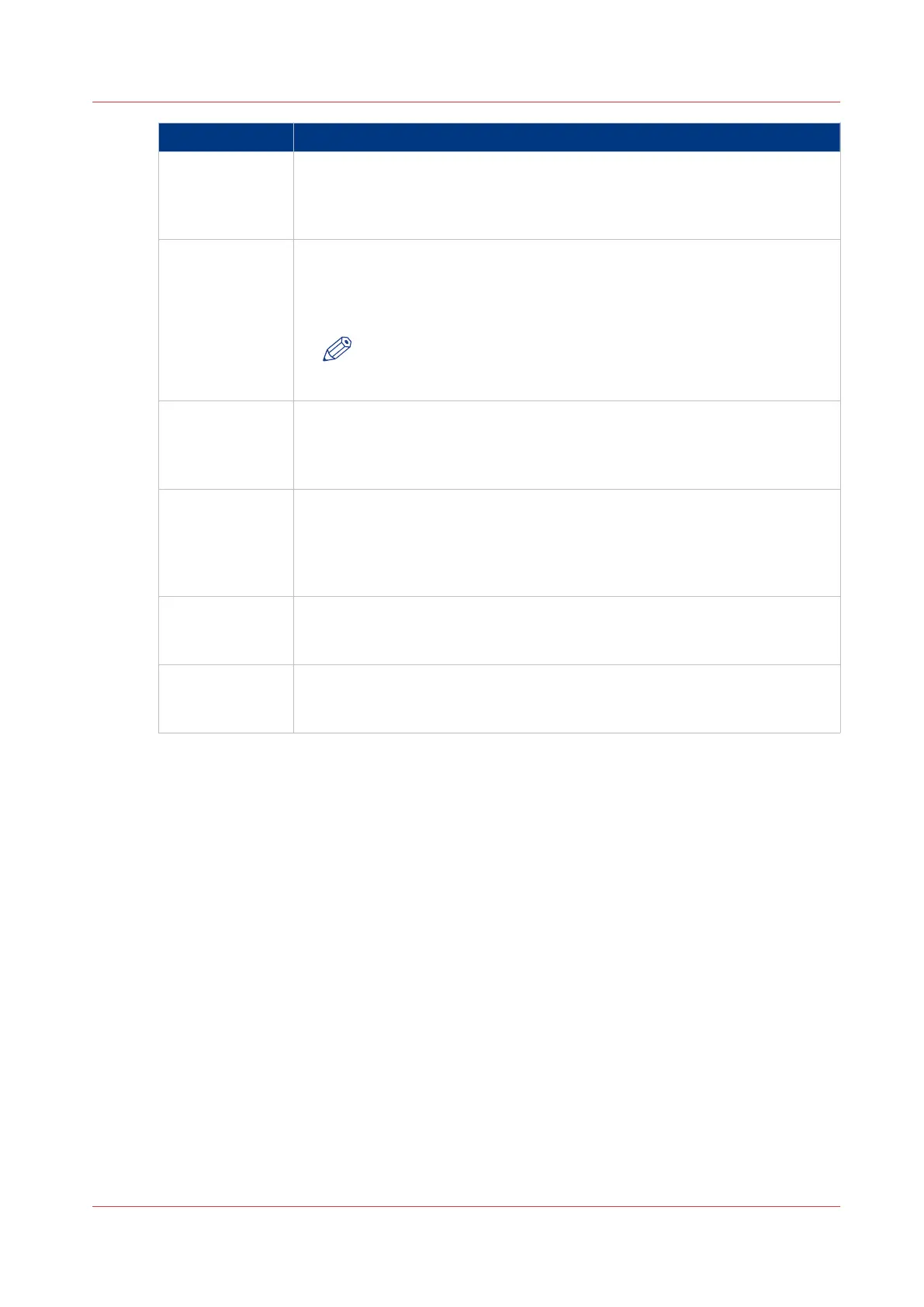
Record item Description
minnr
(minimum num-
ber of digits)
The minimum number of digits a user must enter when the scan profile is
selected in the [Copy/Scan] section. The digits entered are stored in the file
name.
Minimum 0, maximum 20 digits.
maxnr
(maximum num-
ber of digits)
The maximum number of digits a user must enter when the scan profile is
selected in the [Copy/Scan] section. The digits entered are stored in the file
name.
Minimum 0, maximum 20 digits.
NOTE
When minnr and maxnr are both 0, the system will not ask for a
user code.
name_nr_title
(dialogue title)
The title of the dialogue that appears when the user must enter a code to
use the scan profile, as defined in <minnr> and <maxnr>. The title must ex-
plain to the user which number is required.
Maximum 40 characters. Do not use , ; <CR> <LF>.
cfname
(file name feed-
back)
Activate an additional dialogue on the control panel after starting a new
scan job to write down the generated file name. The control panel displays
the dialogue title that is defined in name_nr_title.
y: show the additional dialogue.
n: do not show the additional dialogue.
subfolder
(subfolder on
scan server)
The path to a subfolder on the scan server where the files are stored.
Maximum 150 characters. Do not use * ? : < > | <CR> <LF>.
postfix
(file name post-
fix)
Add a postfix to the file name. For example, when the prefix is 'email', you
can add an email address as a postfix.
Maximum 30 characters. Do not use / \ : * ? " < > | <CR> <LF>.
4
Use the Scan Profiles File (sjt.csv)
Chapter 8 - Carry Out Scan Jobs
257
Canon varioPRINT 135 Series














 To Next Page