3-CONTROLSANDINSTRUMENTS
SettingcustomcontrollabilitysettingsforElectro–Hydraulic(EH)
NOTE:ThesesettingscanbeactivatedusingtheEasyElectro-Hydraulic(EZ-EH)menucustomsettingsSP-Cand
CR-C.
Allchangesmustbemadewiththeengineintheoffposi-
tionandtheelectronicsasleep.
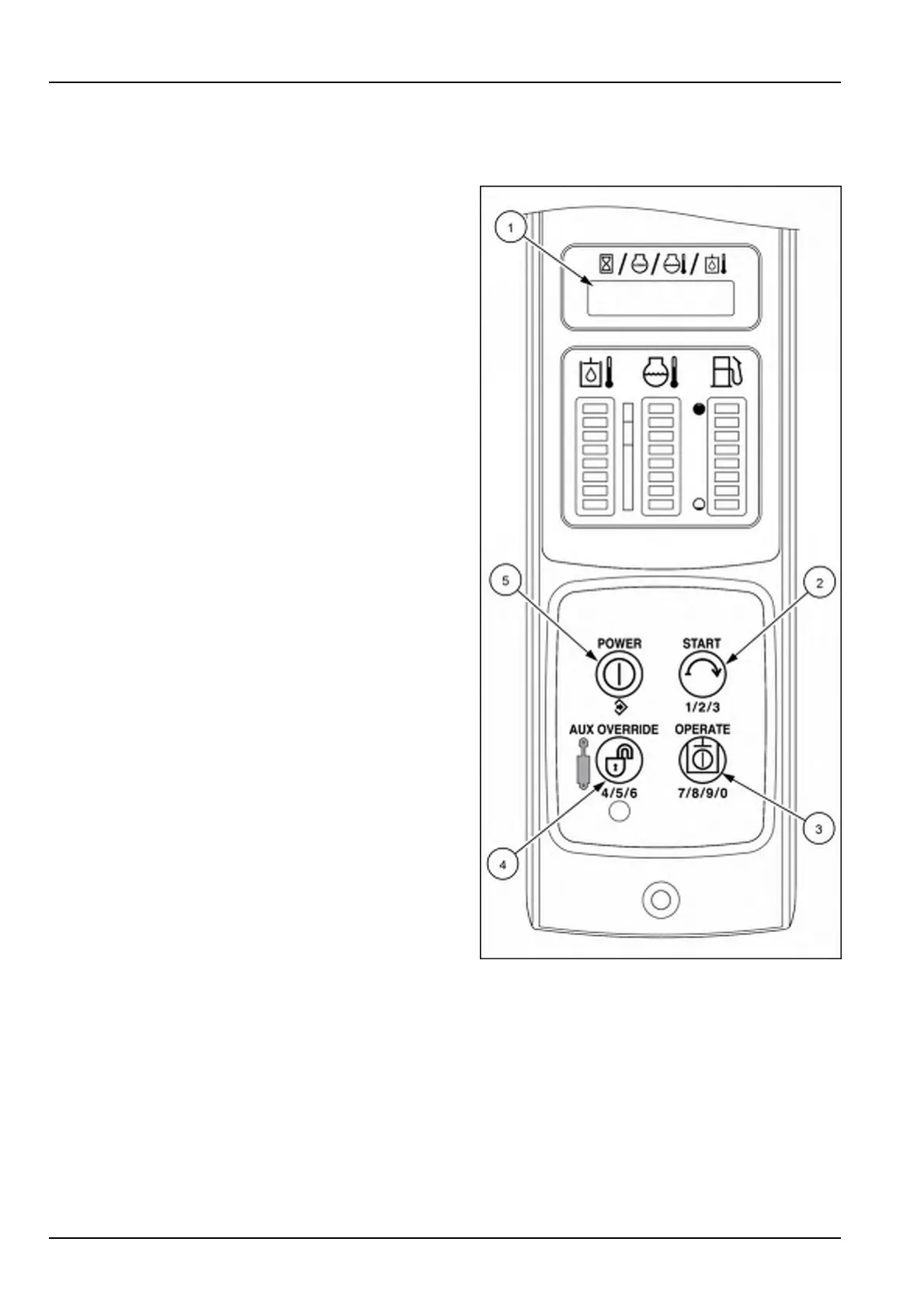
1.Beforesittingintheseat,pressandholdtheAUX
OVERRIDEbutton(4)andtheOPERATEbutton(3)at
thesametimeforvetosevensecondsuntilSETUP
(1)appearsinthedisplay.Afterseeingsetupinthe
display,youmaysitintheoperator’sseatandmake
changes.
2.PresstheSTARTbutton(2)toscrollbetweenthedif-
ferentmenusuntilEH(1)appearsonthedisplay.
3.PressthePOWERbutton(5)toenterthenextmenu.
4.PresstheSTARTbutton(2)toscrolltothesettingse-
lectionyouwanttoadjust(Speed:Drive,Lift,orTilt)or
(CTLR:DriveorL-ARM),thenpressthePOWERbut-
ton(5)tosavetheentry.ForDFLT,pressthePOWER
button(5)tosavethesettingsbacktothefactoryde-
faultsettings.Thedefaultsettingsareshownintables
foreachmodelonthefollowingpages.
NOTE:UsetheAUXOVERRIDEbutton(4)whenyou
wanttogoupalevel.
5.PresstheSTARTbutton(2)toscrolltothedesired
speedlevel(High,Med-2,Med-1,orLow)or(DRV1,
DRV2,orDRV3)or(LDR1,LDR2,orLDR3),then
pressthePOWERbutton(5)tosavetheentry.
6.Afteryouhavesavedyourselection;themonitorwill
revertbacktostep3soyoucanmakeanotherad-
justment.Ifnootheradjustmentsareneeded,usethe
AUXOVERRIDEbutton(4)toexitthemachinefunc-
tionmenu.YouwillnowbeinthemainSETUPmenu;
usetheSTARTbutton(2)toscrolltoEXITandthen
pushthePOWERbutton(5)againtoexitthesetup
menu.
7.Leavetheoperator’sseatfortensecondsbeforetrying
tostarttheunit.
RAIL15SSL0143CA4
3-54


 To Next Page