3-CONTROLSANDINSTRUMENTS
Usercodes
Onceinthe“Setup”menu,presstheSTARTbuttonto
movetotheLOCKmenu.PressthePOWERbuttonto
entertheLOCKmenu.
Tocreateormodifyausercode:
NOTE:Anownercodemustbesavedbeforeausercode.
OnceintheLOCKmenu,thedisplaywillshowtheword
OWNER.PresstheSTARTbuttontomovetotheUSER
menu.
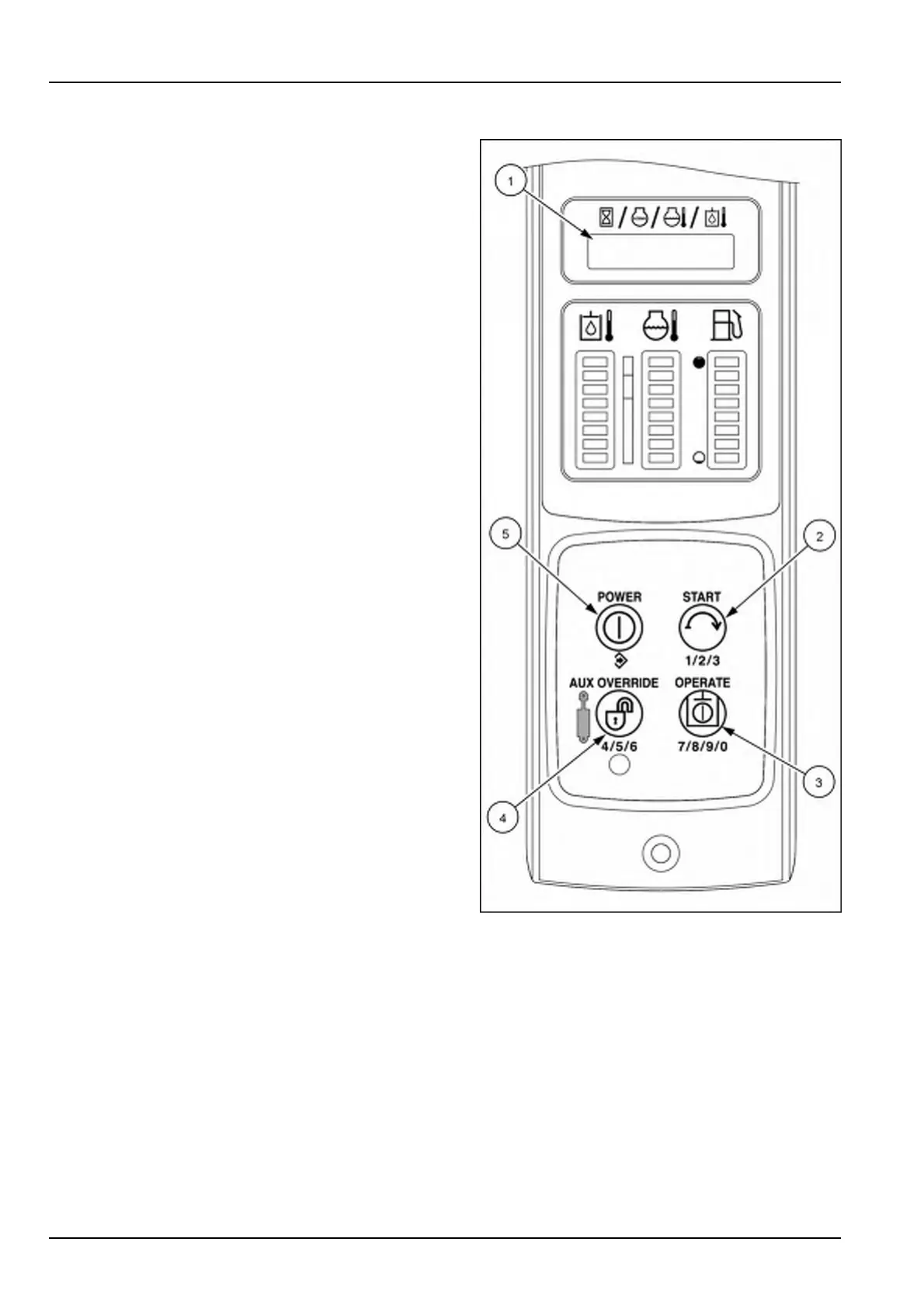
1.UsetheSTARTbutton(2)tomovetouser0through
user9.PressthePOWERbutton(5)tocreateor
changethatusercode.Thedisplay(1)willshowthe
wordUSRCR(usercreate)followedby00000.
2.Entertheownercode.00000ortheexistingusercode
willbedisplayed.
3.Enteranewusercodetoenteroroverwritetheexisting
code.Thepanelwillreturntothe“Setup”menu.
4.PresstheSTARTbutton(2)tomovetotheEXITmenu,
andpressthePOWERbutton(5)toexitthe“Setup”
menu.Thepanelisnotlockedatthispoint.
RAIL15SSL0143CA6
3-64


 To Next Page