3-CONTROLSANDINSTRUMENTS
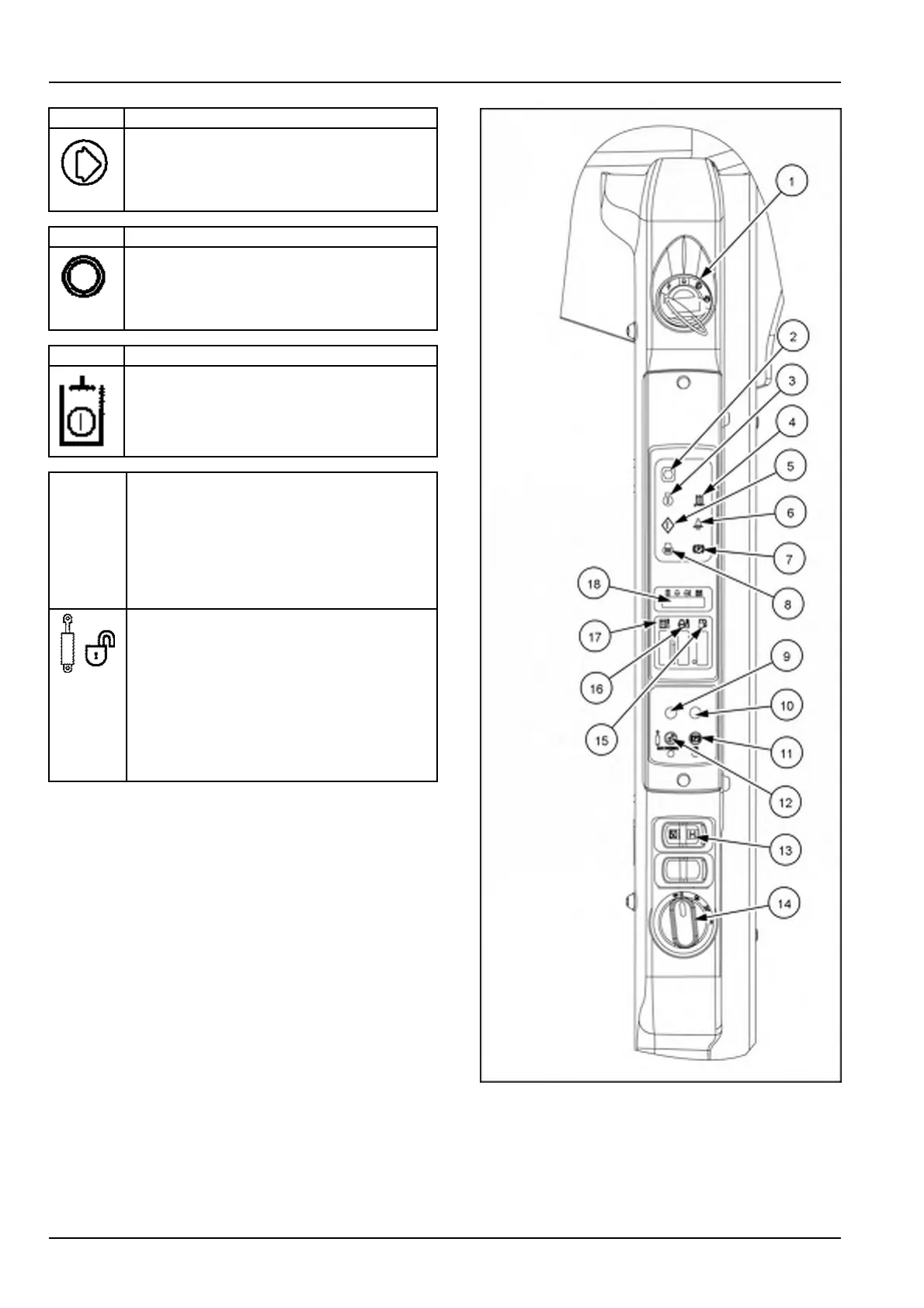
(9)FUNCTIONBUTTON
Usethis,wheninthe“Setup”menu,asthe
"enter"datakey
NOTE:Thisbuttonisusedforusercodelock
andunlock.
(10)FUNCTIONBUTTON
Usethiswheninthe“Setup”menu,also
usedtoscrollwithinthesetupmenu.
NOTE:Thisbuttonisusedforusercodelock
andunlock.
(11)OPERATE
Thisbuttonactivatesanddeactivatesthe
hydraulicsystemwhentheengineisrunning.
NOTE:Thisbuttonisusedforusercodelock
andunlock.
(12)AUXOVERRIDE–AUXILIARYHYDRAULIC
INTERLOCKOVERRIDE:
NOTE:Someattachmentshavetheirown
controlsandthisfeatureallowstheauxiliary
hydraulicoilowtocontinuewhentheoper-
atorisoutoftheseat.Themachine’scontrol
leverswillbeinactive.
Whentheoperatorleavestheseat,hydraulic
oilowandcontrolleversaredisabled.
PresstheAUXOVERRIDEbuttonandleave
theseatwithin30secondstooverridethe
auxiliaryhydraulicinterlock.Thesmallred
indicatorlampbelowtheswitchilluminates
whentheoverridefeatureisactive.
NOTE:Thisbuttonisusedforusercodelock
andunlock.
NOTE:Forafaultcodeassociatedwithayellowamber
light,recordthecodenumberandpresstheAuxOverride
buttontwicetosilencethecodeandreturntonormalop-
eration.Ifthecodeappearsagain,contactyourdealerfor
support.
93109329A4
3-38


 To Next Page