Chapter 4 – How to Use the Illuminator
Section 4.9 – Optional Printing Treatment Reports and Additional Labels
4-20
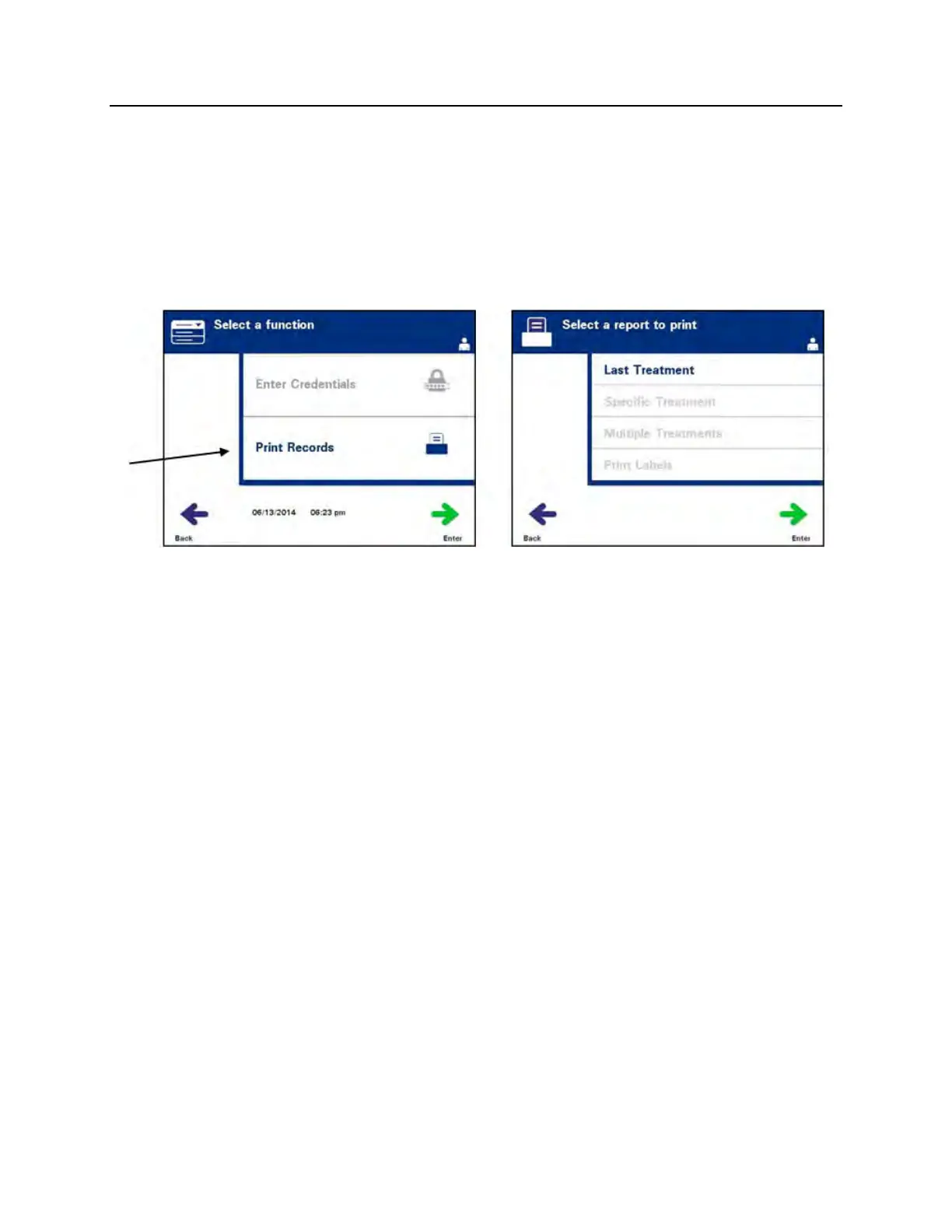
All of the following printing options are accessible from the ‘Select
a report to print’ screen. To access this screen, perform the
following:
1. Turn on the Illuminator and press the ‘Enter’ button once it is
displayed. The ‘Select a function’ screen will appear.
2. Use the arrow buttons to choose the ‘Print Records’ option and
press ‘Enter’. The ‘Select a report to print’ screen will appear.
Use these steps to access the report printing options or press the
‘Back’ button to get back to the previous screen or the ‘Select a
report to print’ screen while you are printing reports.
NOTE:
If the status of the treatment is unknown, review the treatment
report to verify the status.
Last Treatment
The Last Treatment option refers to the last procedure performed
on the illuminator. To print this report, perform the following:
1. While in the ‘Select a report to print’ screen, use the arrow
buttons to choose ‘Last Treatment’ option.
2. Press the ‘Enter’ button to select the option. The ‘Print the last
treatment report’ screen will appear.



 To Next Page