6 - USE AND OPERATION
Regolazione pressione punzonatura
ME2000S - User Manual
56 - 133
5
4
1
3
2
_
+
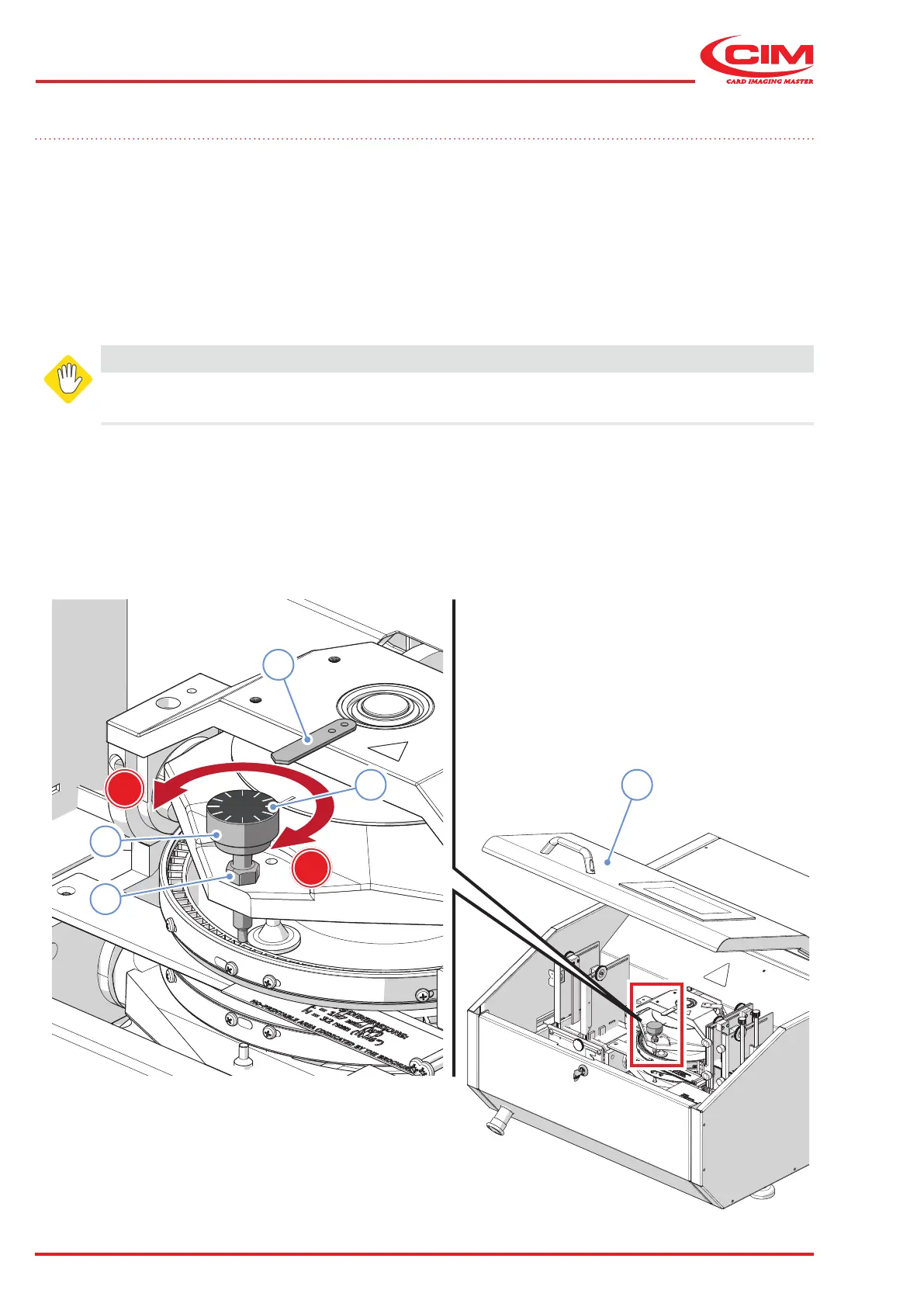
6.5 Embossing pressure adjustment
The machine is congured by the manufacturer during the nal testing stage to produce 0.5mm thick aluminium tags.
In order to produce sheet steel or for metal tags with a thickness greater than 0.5 mm, the embossing pressure has
to be increased using the adjustment knob (1):
1) Lift the front cover (2).
2) Loosen the nut (3) to release the knob (1).
3) Turn the knob (1) clockwise (+) to increase the embossing pressure or anticlockwise (-) to decrease it using
the notches (4) and the indicator (5).
4) Tighten the nut (3).
Once the pressure has been adjusted, we recommend that you emboss a tag to make sure that the result is perfectly
uniform, otherwise repeat the operation until you obtain the required result.
WARNING
Incorrect adjustment can aect the overall embossing result.
We recommended that this adjustment be performed by a qualied person or by technical support.



 To Next Page