Appendix
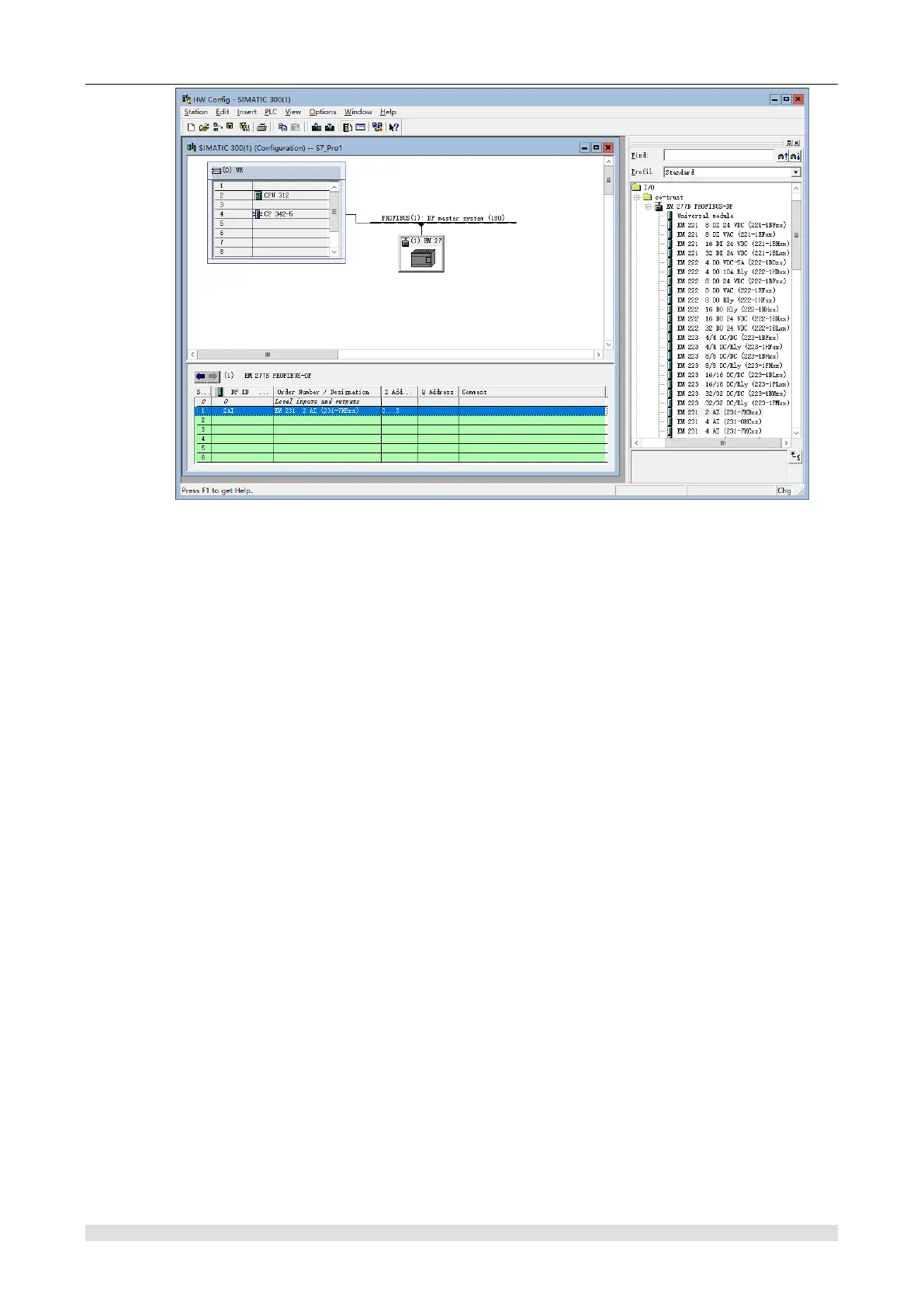
Figure H-19 Add expansion modules for SM 277B
※ Download hardware configuration to CPU of DP master station
Execute "Station" -> "Save and Compile" in of the HW Config interface.
Till now, STEP7 has completed the hardware configuration. Before sending the configuration,
confirm that you have established connection between the DP master station and PC/PG (MPI
connection), then execute "PLC" -> "Download" in the same interface to download the hardware
configuration to the CPU of DP master station.
H.3.2 Programming and Debugging
SM277B reads input of expansion module for DP master which offer SM277B output information
to write into expansion module by using LAD/STL/FBD editor to create program in OB1 and
download it into CPU of main system.
【Programming】
Steps:
1) Write program to call FC1 (DP_SEND) and FC2 (DP_RECV) in OB1 to realize the DP master
station reading and writing 16 bytes of data from slave station, as shown in the following figure:


 To Next Page