107
44000-UG-01-01-EN_CPI_Paypod Embedded Pay Station_User Guide_V1.1.pdf
Cleaning
Paypod™ Embedded Pay Station
Published by CPI
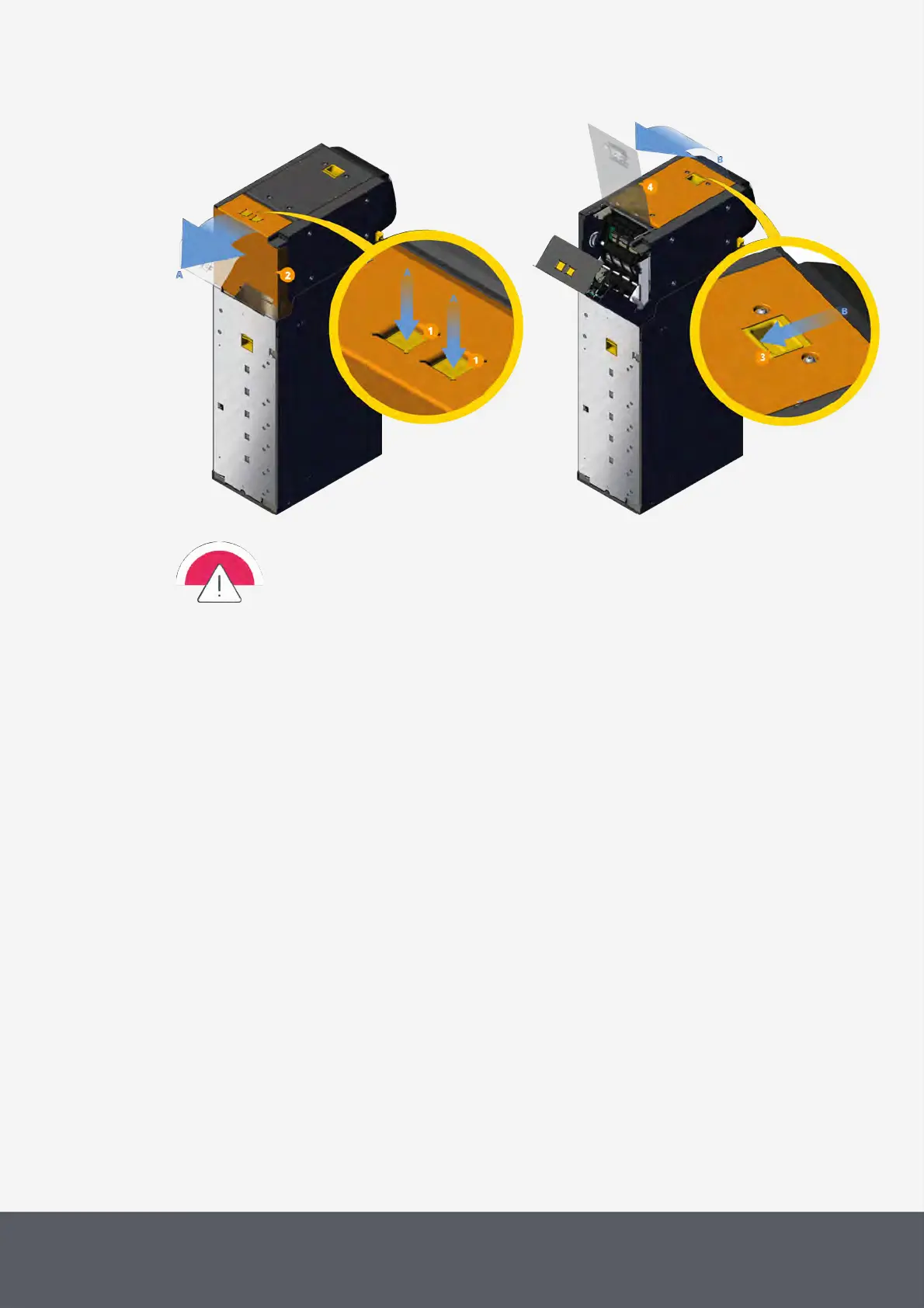
Unfolding E23/E24 Banknote Recycler's Upper Rear Flap
Unfolding E23/E24 Banknote Recycler's Top Flap
When using compressed air make sure to keep a distance of at least 20–30cm/8–12in to the
part to be cleaned. Please ensure that the compressed air cleaner does not produce any residue
or liquid that could wet or coat the recycler's optics.
This may result in a damaged banknote acceptance sensor.
7 Use compressed air to blow any dust or debris from
C and outside the banknote inlet[5].
D the top and bottom part of the positioner[6] towards the recycler's rear side.
E the inner part of the acceptance sensor[7] towards the gears[8] and away from the white flat cables[9].
F the outer (flap) part of the acceptance sensor[10], also towards the gear and away from the white flat
cables, while turning the coding wheel[11] to the front.
G the rotating diverters[12] at the bottom inside the flap.
All parts cleaned have to be free of dust and spray residues.



 To Next Page