58
44000-UG-01-01-EN_CPI_Paypod Embedded Pay Station_User Guide_V1.1.pdf
Paypod™ Embedded Pay Station
Operation
Published by CPI
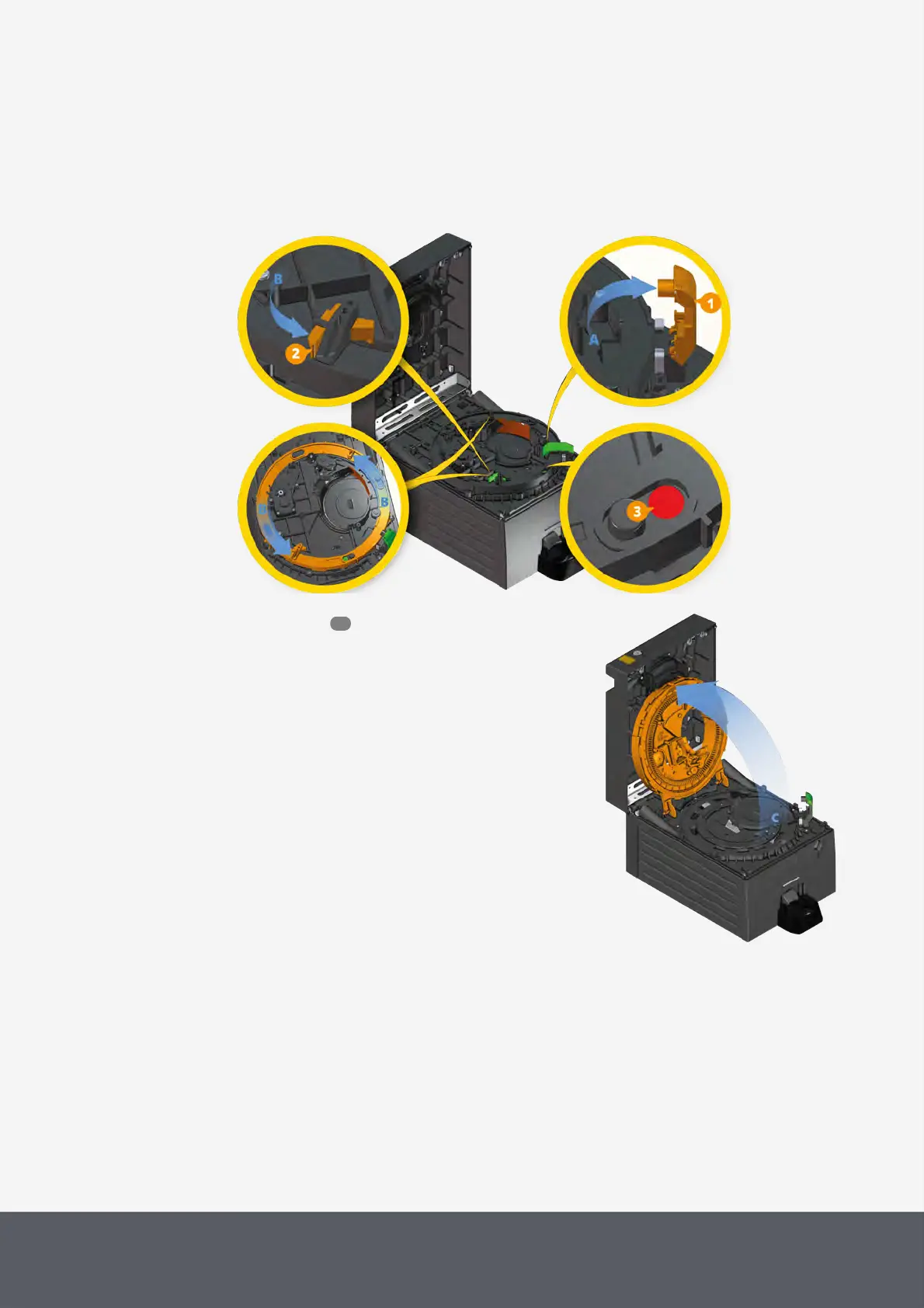
4.9.2 Opening and Closing the Coin Recycler's Acceptance Unit
The coin acceptance unit consists of an upper and a lower layer. The upper layer can be opened using a bayonet
mount to eliminate a jam for instance. The bayonet mount indication is green when it is properly closed. To disconnect
the mount:
Unlocking Coin Recycler's Acceptance Unit
1 Open the coin recycler lid .
2 Carefully lift the arm[1] of the coin validator[A].
3 Press the green lever[2] of the bayonet mount.
4 Keep the lever pressed and turn bayonet mount ring
counter-clockwise as far as it will go[B].
The bayonet mount indication is no longer green but
red[3].
5 Open up upper acceptance unit as far as it will
go[C].
Opening Coin Recycler's Acceptance Unit
56



 To Next Page