EasyManua.ls Logo

CPI Paypod Embedded - Clearing a Banknote Jam in the E23;E24 Cash Box (2)

CPI Paypod Embedded
140 pages
Print Icon
To Next Page IconTo Next Page
To Previous Page IconTo Previous Page
Loading...
128
44000-UG-01-01-EN_CPI_Paypod Embedded Pay Station_User Guide_V1.1.pdf
Paypod™ Embedded Pay Station
Troubleshooting
Published by CPI
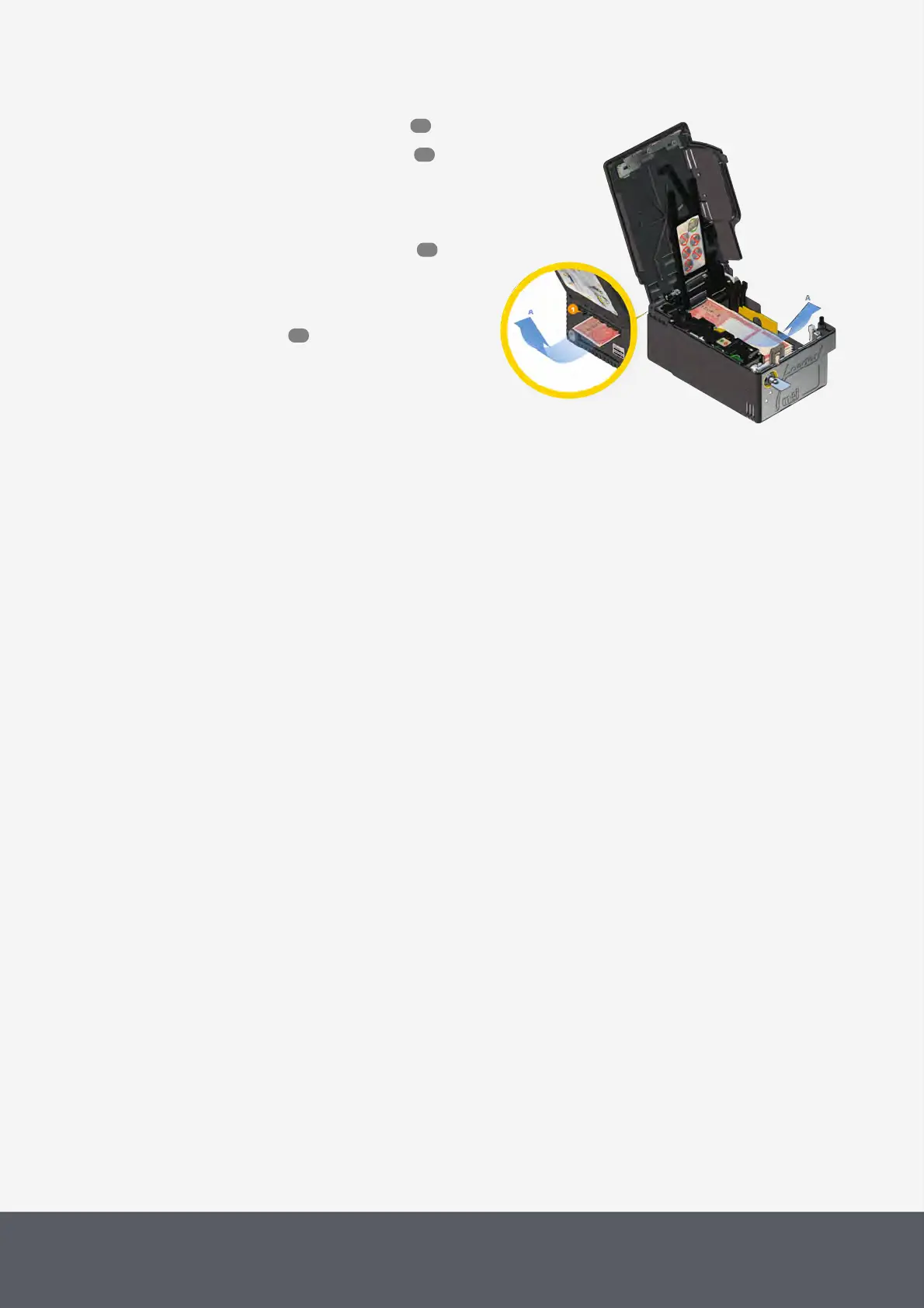
1 Gain access to the banknote recycler .
2 Remove and open the loader cassette .
3 Carefully withdraw the jammed banknote[A], if
present. Check also the rear side outlet of the loader
cassette for a possibly jammed banknote[1].
4 Close and reinstall the loader cassette .
5 If the banknote is not jammed in the loader cas-
sette, please contact your service partner being able
to clear a jam in the cash box or close the Pay-
pod™ pay station again.

Remove Jammed Banknote from E24 Banknote Loading Unit
7.2.2.4 Clearing a Banknote Jam in the E23/E24 Cash Box
Please contact your Service Partner whenever the POS screen signals that a banknote is jammed in the E23 or
E24cash box.
53
67
69
55

Table of Contents