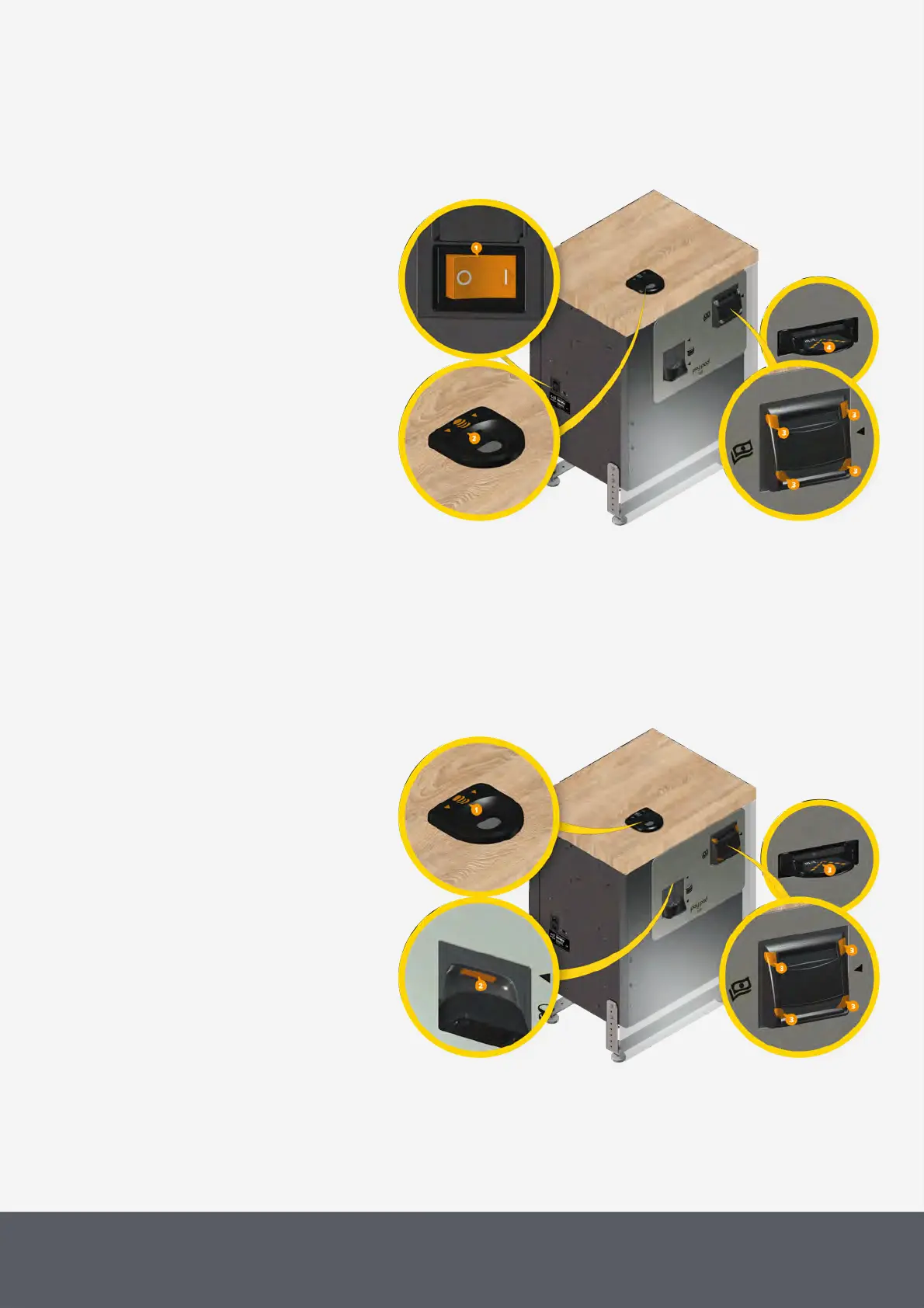
The Paypod™ pay station is
switched on and off using the on-
off (power) switch[1] on the left-
hand side of the chassis. Once the
pay station is switched on, it is
ready for initialization. The coin in-
put LED[2] is white, all four
E23/E24banknote bezel LEDs[3]
are flashing green (after red flash-
ing of the top ones), whereas the
E22banknote bezel LEDs[4] are
off.
Following the initialization process
and functional self test activated by
the POS software, the input funnel
LED is still white. Cash may be de-
posited and change can be paid
out.
To entirely disconnect the pay sta-
tion from supply, the switch must
be set to its OFF position.
The Paypod™ pay station is
equipped with a status LED at the
top around the coin input fun-
nel[1] and further LEDs above the
coin return cup[2] and around the
banknote insertion and return
slot[3] indicating
· the operating state of the pay
station
· that cash can now be deposited
in the coin input funnel and/or
banknote insertion slot or collec-
ted from the coin return cup
and/or banknote return slot.



 To Next Page