86
44000-UG-01-01-EN_CPI_Paypod Embedded Pay Station_User Guide_V1.1.pdf
Paypod™ Embedded Pay Station
Handling Cash
Published by CPI
5.3.2.2 Emptying the E22 Banknote Recycler
To empty the banknote recycler you should be logged on as an administrator and first of all
· transfer all banknotes from the recycling unit to the cash box ,
· dispense the minimum banknote stock from the recycling unit ,
· then remove the cash box
In order to guarantee that the system's cash box counter is reset you should always empty the cash
box by means of your POS software or the emptying process of the POSlinq™ middleware.
Dispensing minimum banknote stock from recycling unit
Most of the applications require a minimum stock of banknotes to remain in the recycling unit for the next day. This
minimum stock varies depending on the configuration and is not transferred to the cash box. However, for reconcili-
ation or inventory purposes you should dispense all banknotes to really empty the recycler.
To do so please read here .
Emptying cash box
To remove, open and empty the banknote cash box cassette you need the interlock key:
1 Ensure that the recycling unit is empty (cp. Transferring banknotes from recycling unit to cash box and
Stock screen ).
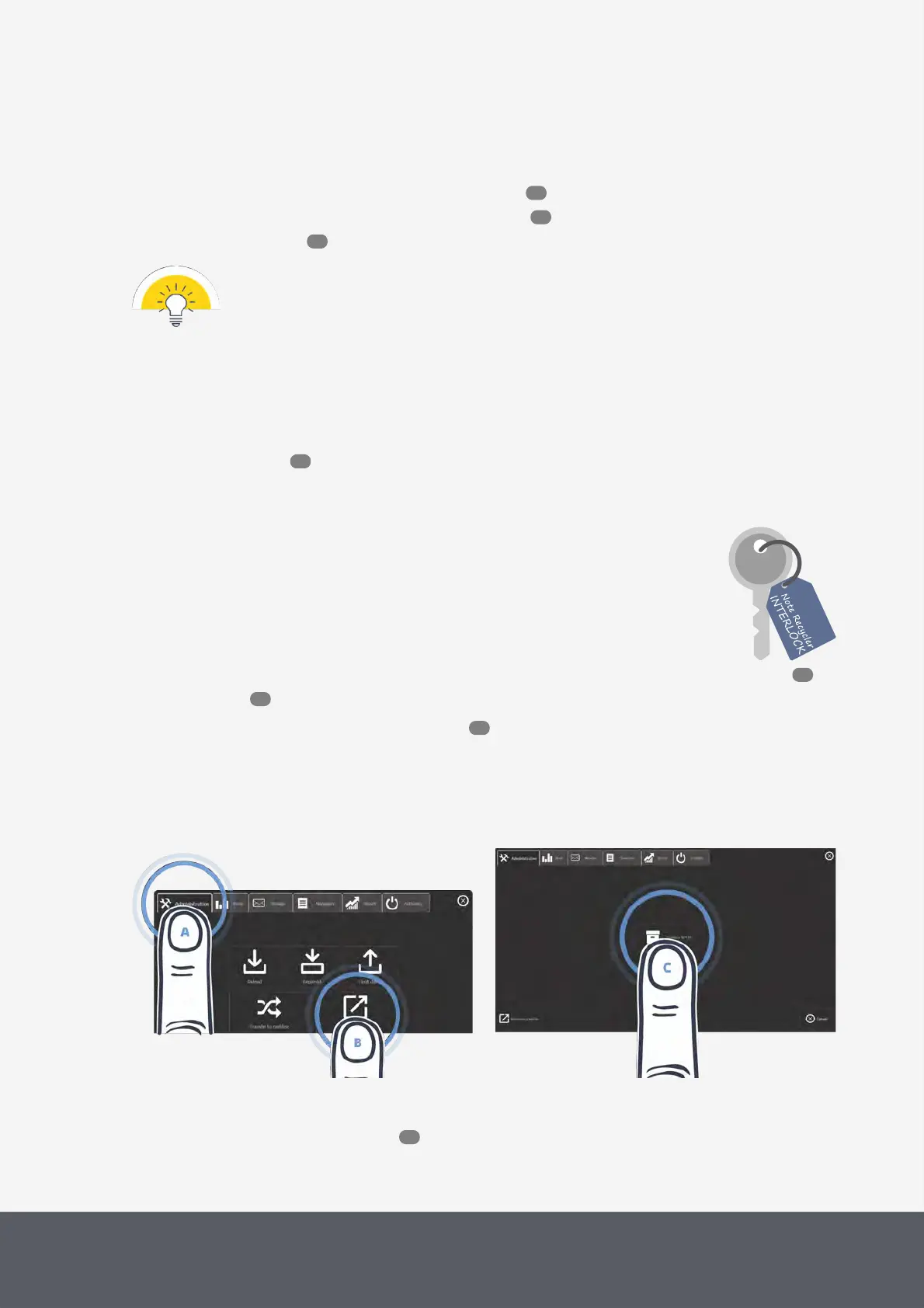
2 On the main screen of the POSlinq™ middleware , select the Administration tab[A] and then Cashbox Re-
moval[B].
The cash box removal screen is displayed:
3 Tap the Cashbox NOTES icon[C].
The middleware guides you how to empty the cash box.
Opening POSlinq™ Cash Box Removal Screen
Starting Removal Process of Banknote Cash Box
4 Follow the quick guide on the screen or the detailed next steps:
5 Gain access to the banknote recycler .
78
86
86
84
78
52
52
53



 To Next Page