76
44000-UG-01-01-EN_CPI_Paypod Embedded Pay Station_User Guide_V1.1.pdf
Paypod™ Embedded Pay Station
Handling Cash
Published by CPI
· POSlinq™ middleware version
This confirmation e-mail lists different parameters and numbers depending on the customized con-
figuration. It is also possible to configure various e-mails containing different details to be sent to dif-
ferent addresses.
5.1.2.2 Refilling the E24 Banknote Recycler
Provided that the E24 is configured for usage of the banknote recycler loading unit, the recycling cassettes are filled
through the loading unit. For this, the loading unit is filled directly by removal with a larger amount of banknotes
allowing the recycling cassettes to be filled automatically when required within the recycler system and depend-
ing on its configuration. However, the filling process should be started and ended by means of POSlinq or an alternative
POS software to ensure that the banknote counter is adapted.
Refilling the loading unit
In order to be able to lock the loader cassette correctly, the cassette should not be filled with more than 250bank-
notes. Depending on the currency, the state of the banknotes and the climatic conditions this number may vary by
50banknotes.
· The banknotes to be refilled have to meet quality requirements .
· For the filling procedure you have to be logged on as an administrator.
To refill the banknotes
1 If necessary, wait until a transaction has been fin-
ished.
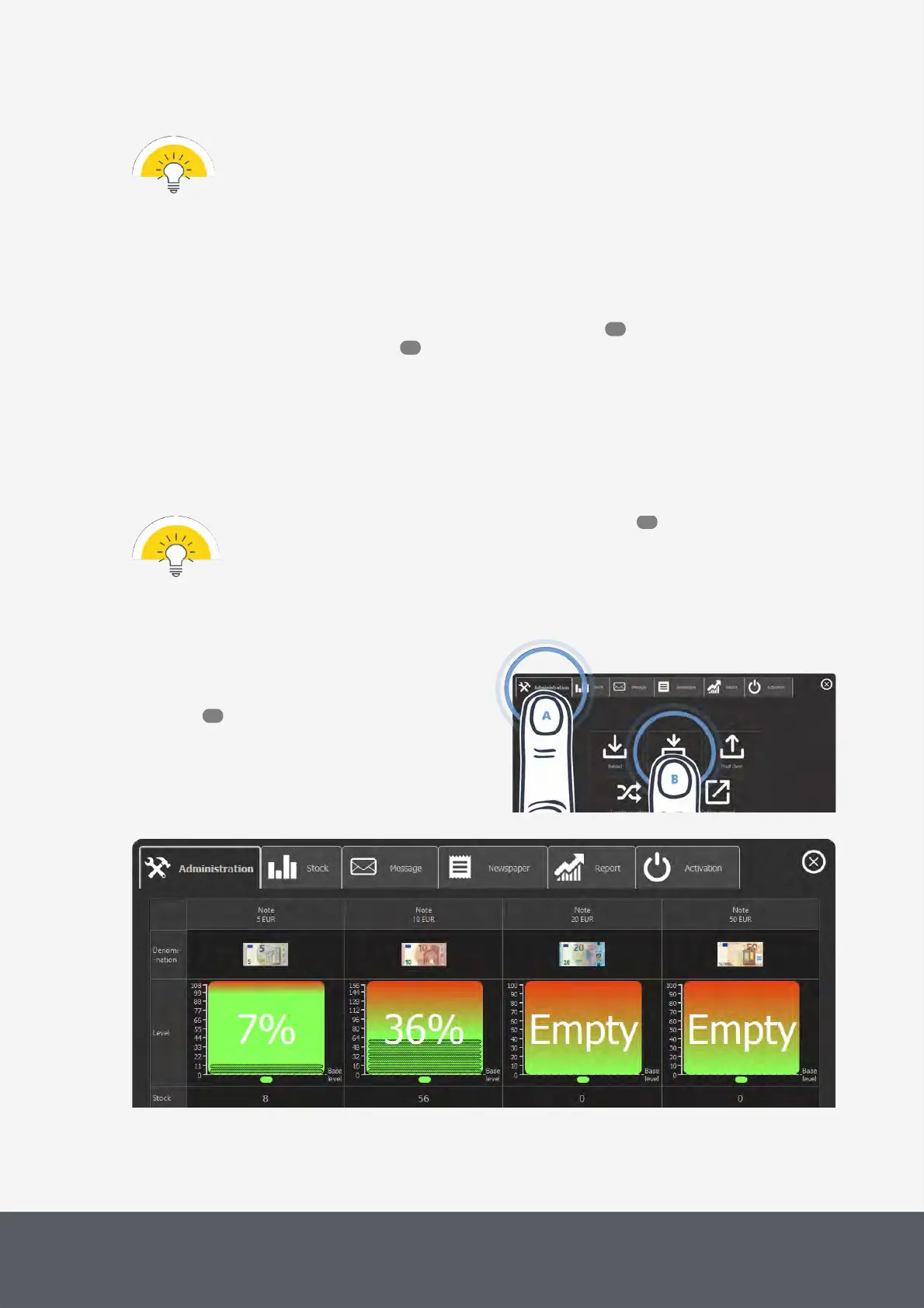
2 On the main screen of the POSlinq™ middle-
ware select the Administration tab[A] and then
Replenish[B].
The replenishment screen displays all banknote de-
nominations programmed and their relevant filling
numbers:
Opening POSlinq™ E24 Loading Unit Replenishment Screen
POSlinq™ E24 Loading Unit Replenishment Screen
76
78
131
52



 To Next Page