77
44000-UG-01-01-EN_CPI_Paypod Embedded Pay Station_User Guide_V1.1.pdf
Handling Cash
Paypod™ Embedded Pay Station
Published by CPI
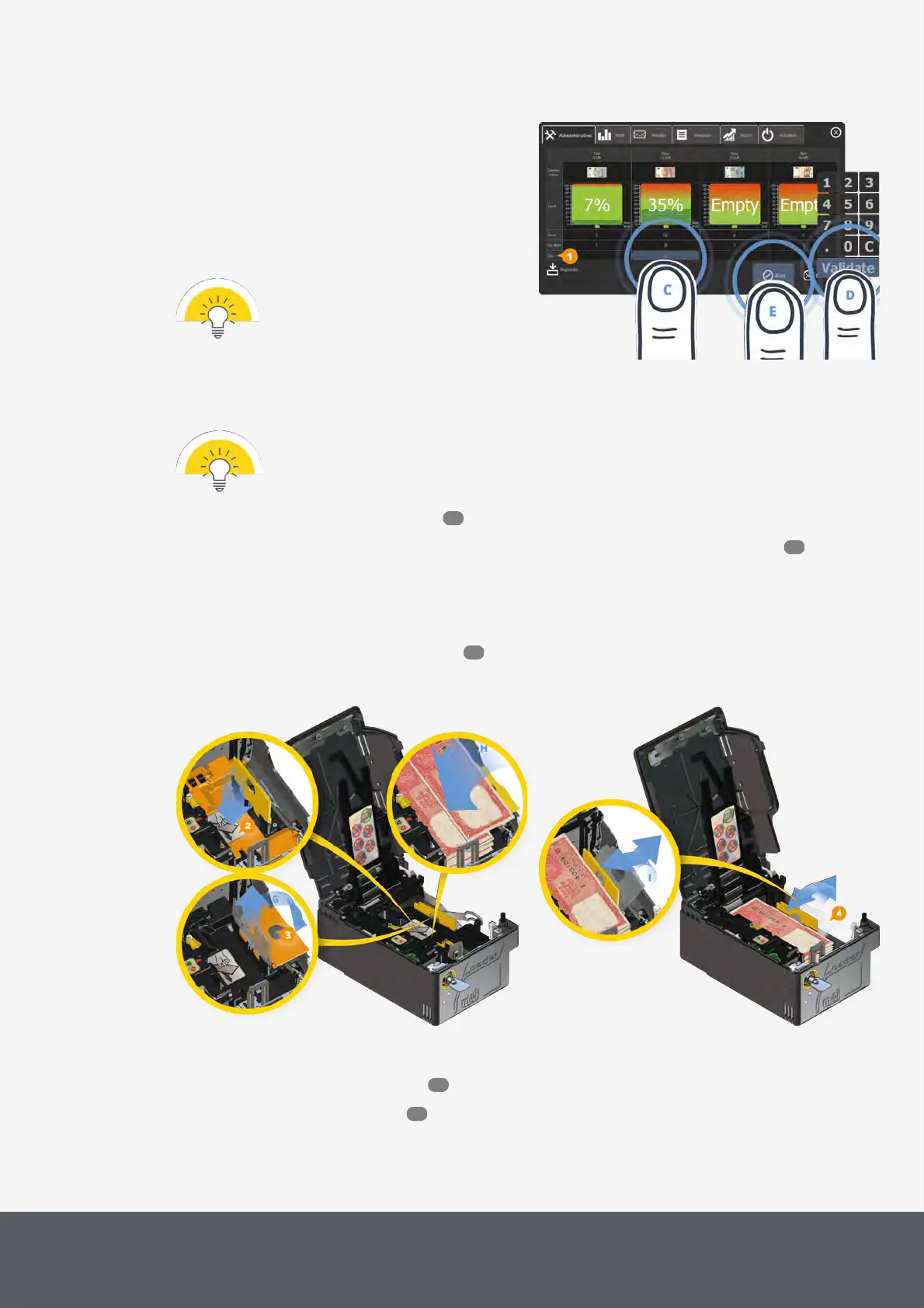
3 Tap the Quantity box(es)[1] in the relevant denom-
ination column(s)[C] to use the numeric pad to
enter the number of banknotes to be filled in the load-
ing unit.
4 Confirm number with Validate[D].
The numeric pad jumps to the next banknote's
Quantity field or closes.
Ensure that the maximum capacity of
250banknotes is not exceeded.
Entering Banknotes to be Loaded and Closing E24 Loading Unit
Replenishment Screen
6 Follow the quick guide on the screen or the detailed next steps:
Banknotes in the loading unit are not recorded in the system automatically.
Please always use the POSlinq middleware or an alternative POS software to start and end the filling
process to ensure that the banknote counter is adapted.
7 Gain access to the banknote recycler .
8 Remove and open the banknote loader cassette as well as its maximum level detection plate .
9 Push the pressure plate[2] down to the stop (instruction label)[F].
The plate locks in the bottom of the cassette.
10 Use the flap hole[3] to lift, hold and unfold the yellow banknote guide flap sidewards[G].
11 Consider banknote quality requirements and place the number of suitable banknotes you just entered on
the Replenishment screen into the cassette coming from the side[H].
Refilling the E24 Banknote Loading Unit
Reinstalling E24 Banknote Loading Unit's Guide Flap
12 Raise and lift the guide flap[4] up again[I].
13 Close and reinstall loader cassette .
14 Close the Paypod™ pay station again.
53
67
131
69
55



 To Next Page