115
44000-UG-01-01-EN_CPI_Paypod Embedded Pay Station_User Guide_V1.1.pdf
Troubleshooting
Paypod™ Embedded Pay Station
Published by CPI
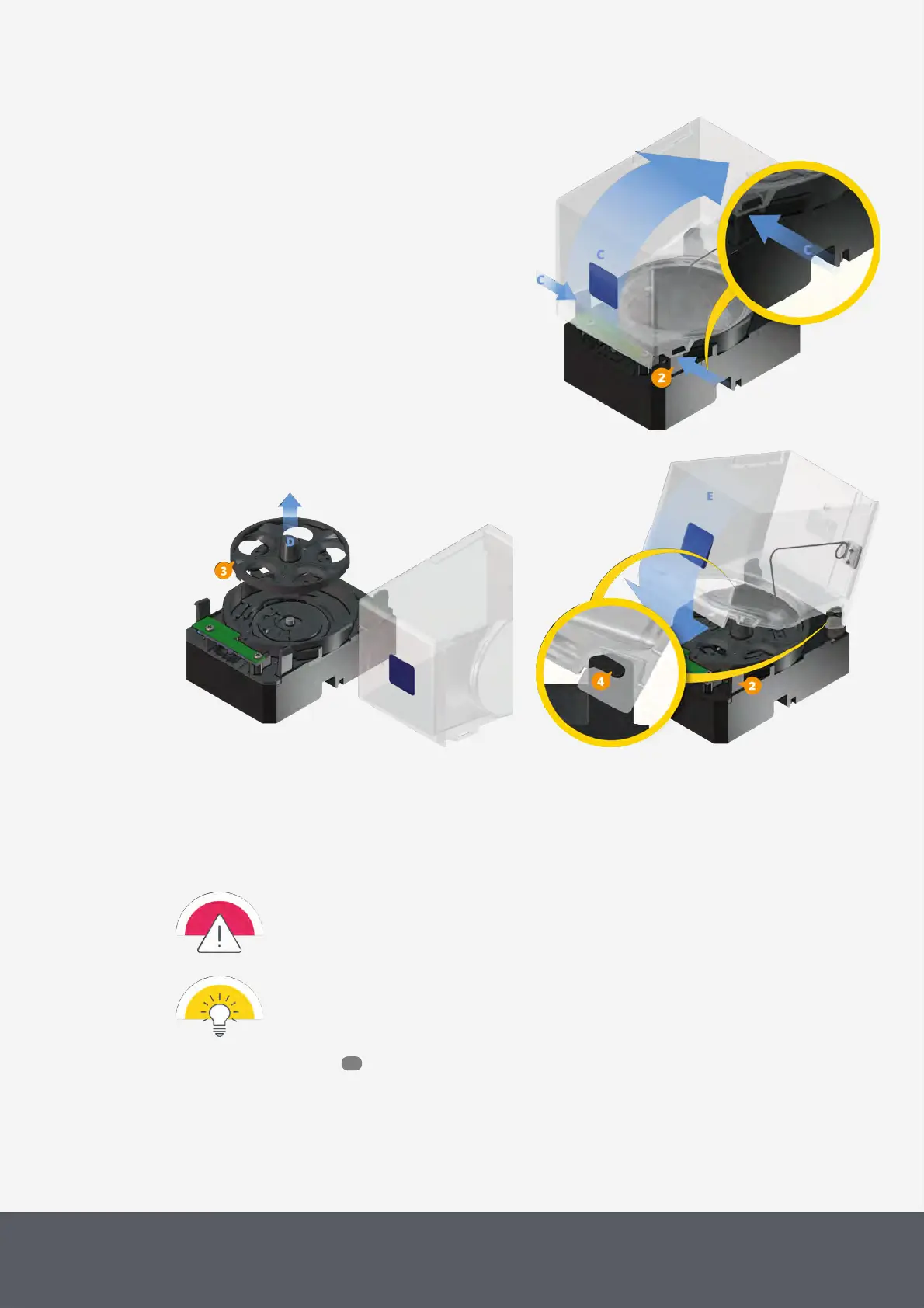
Removing Coin Hopper Bowl
Removing Coin Hopper's Payout Disc
Reinstalling Coin Hopper Bowl
7.1.2.1 Removing and Reinstalling a Coin Hopper
Clearing a coin jam in a hopper may require the removal of the coin hopper:
We recommend you empty the hoppers before removing them. Otherwise hopper coins tend to
fall out of the hopper which could affect the hopper coin counters and even damage the coin re-
cycler.
Due to the locks on the front of the coin recycler, the both front coin hoppers can only be removed
after having removed the neighbor hoppers.
1 Open the payout unit .
2 Carefully pull out the hopper[A].
To reinsert the hopper
3 Mind the color code[1] on the hopper and above the hopper position (blue hopper fits in blue position).
59



 To Next Page