113
44000-UG-01-01-EN_CPI_Paypod Embedded Pay Station_User Guide_V1.1.pdf
Troubleshooting
Paypod™ Embedded Pay Station
Published by CPI
Troubleshooting7
Whenever issues arise you will be advised on the POS screen, how to solve the problem or fix an error.
However, the next sections describe in detail how to handle the coin and banknote recycler when
· clearing a coin jam
· clearing a banknote jam
7.1 Clearing Coin Jam
In case of hard coin jams the coin recycler sends an error message and shuts down. What the message says exactly
depends on your POS control unit software.
Coins can either jam on the sorting spiral within the acceptance unit or in a coin hopper of the payout unit .
7.1.1 Clearing a Coin Jam in the Acceptance Unit
To eliminate all coins jammed in the acceptance unit of the coin recycler
and ensure that the hopper coins correspond to the coin counters we re-
commend you proceeding as follows:
1 Gain access to the coin recycler .
2 Open the lid and the upper acceptance unit .
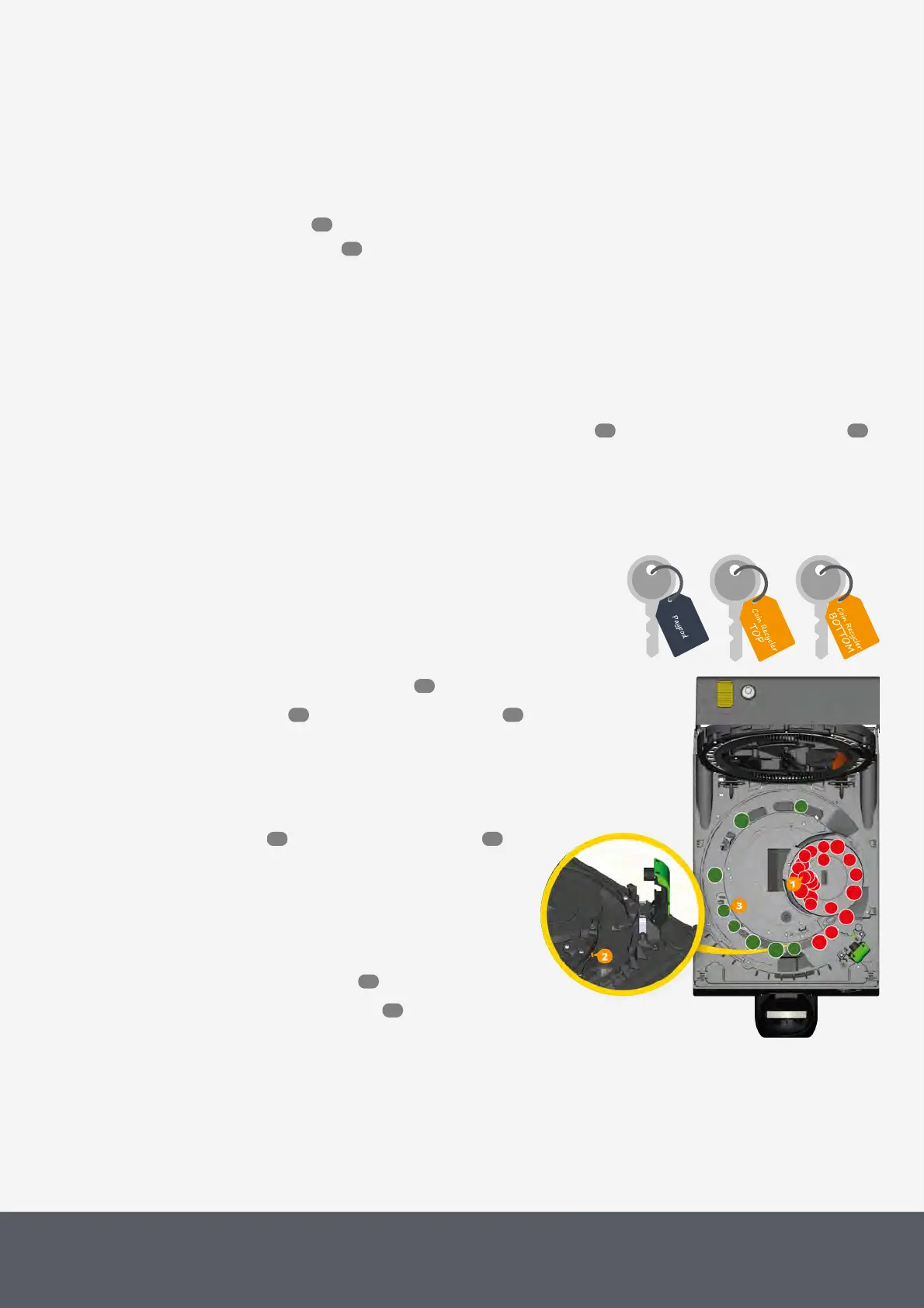
3 Remove all (red) coins[1] that have not passed the
coin ejector pin[2] yet and all rejected coins.
4 Collect all (green) coins[3] that already passed the
coin ejector pin for later deposit in the hoppers.
5 Close lid again and open the payout unit .
6 Make sure that the coin jam did not cause a missort-
ing and the coins are in the correct hoppers. If not,
put coins misrouted into their correct hoppers.
7 Put all collected (green) coins passed the ejector pin
into the appropriate hoppers.
8 Close payout unit again .
9 Close Paypod™ pay station again.
Clearing Jam in Coin Recycler's Acceptance Unit
113
116
113 114
53
56 58
57 59
60
55



 To Next Page