116
44000-UG-01-01-EN_CPI_Paypod Embedded Pay Station_User Guide_V1.1.pdf
Paypod™ Embedded Pay Station
Troubleshooting
Published by CPI
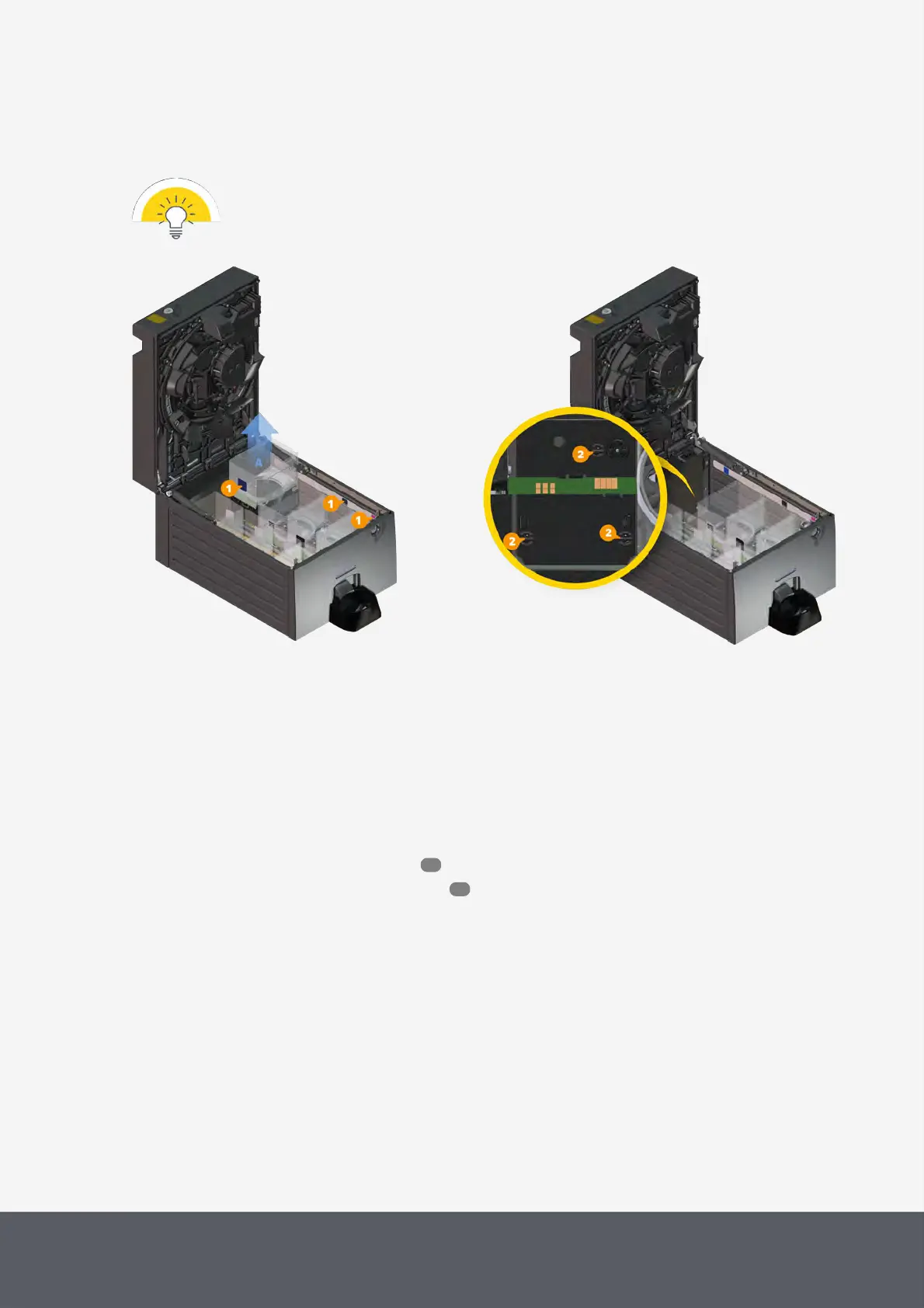
4 Reinsert hopper into its dedicated position with its label[1] pointing to the inside of the payout unit and press on
both front hopper corners (pointing to the coin return conveyor) until the hopper engages in its three latching
points[2].
Let the hopper engage correctly to ensure proper contact to the electronic board and proper opera-
tion.
Removing Coin Hopper from Coin Recycler's Payout
Unit
Coin Recycler's Payout Unit with Hopper's Latching Points
7.2 Clearing Banknote Jam
In case of a banknote jam the banknote recycler sends an error message and shuts down. What the message says
exactly depends on your POS control unit software.
Depending on the banknote recycler installed, banknotes may jam in different recycling units:
· Clearing a jam in an E22banknote recycler
· Clearing a jam in an E23/E24banknote recycler
117
123



 To Next Page