64
44000-UG-01-01-EN_CPI_Paypod Embedded Pay Station_User Guide_V1.1.pdf
Paypod™ Embedded Pay Station
Operation
Published by CPI
Opening E22 Banknote Transporting Unit
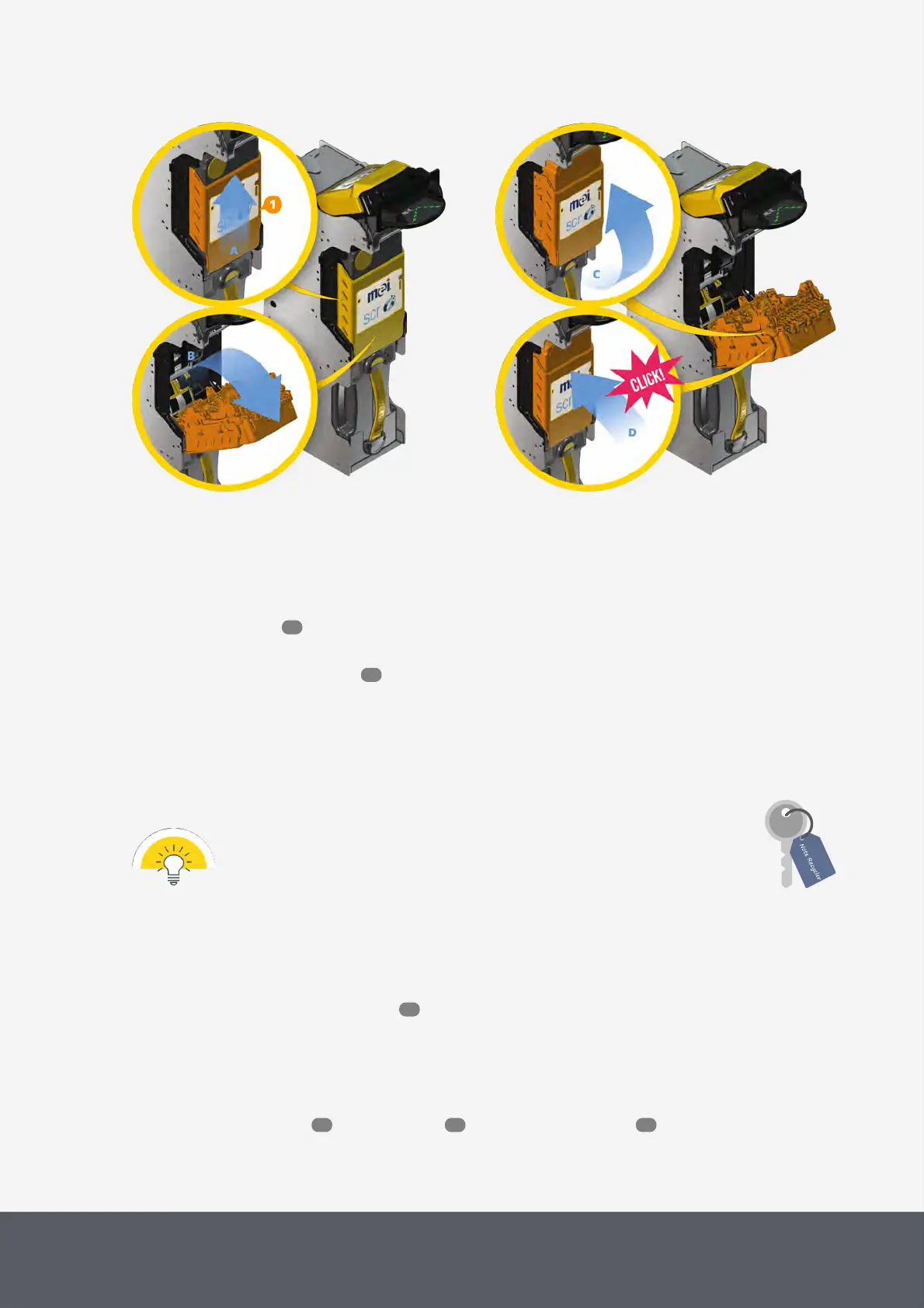
Closing E22 Banknote Transporting Unit
To reinstall the transporting unit
7 Rotate the unit back in a perpendicular position[C].
8 Then push the unit till it clicks into place[D]. If necessary, grasp both sides of the yellow cover and push it down
till it clicks in place.
9 Reinstall the vault .
The transporting unit will automatically perform a full reset.
10 Close the Paypod™ pay station again.
4.10.4 Removing and Reinstalling the E22 Banknote Cash Box
The cash box can be removed using the interlock key.
Older E22Paypod™ pay stations may have no interlock.
To remove the banknote cash box cassette
1 If necessary, wait until a transaction has been finished.
2 Gain access to the banknote recycler .
3 Insert the key in the lock.
4 Simultaneously push the key and turn it counter-clockwise as far as it will go.
5 Use the yellow handle[1] to pull the cash box cassette out of the chassis[A].
6 Continue with emptying , cleaning the unit or clearing a banknote jam .
63
55
53
86 105 121



 To Next Page