119
44000-UG-01-01-EN_CPI_Paypod Embedded Pay Station_User Guide_V1.1.pdf
Troubleshooting
Paypod™ Embedded Pay Station
Published by CPI
7.2.1.2 Clearing a Banknote Jam in the E22 Transporting or Recycling Unit
To retrieve the jammed note(s) and return functionality to the machine:
1 Gain access to the banknote recycler .
(Behind the bezel, you see the yellow LED at the top of the recycler is flashing four times.)
If the yellow LED flashes three times, please refer to Clearing a Banknote Jam in the E22 Cash
Box . If it flashes twice read here: Clearing a Banknote Jam in the E22 Acceptance Unit .
2 Open the E22 banknote transporting unit .
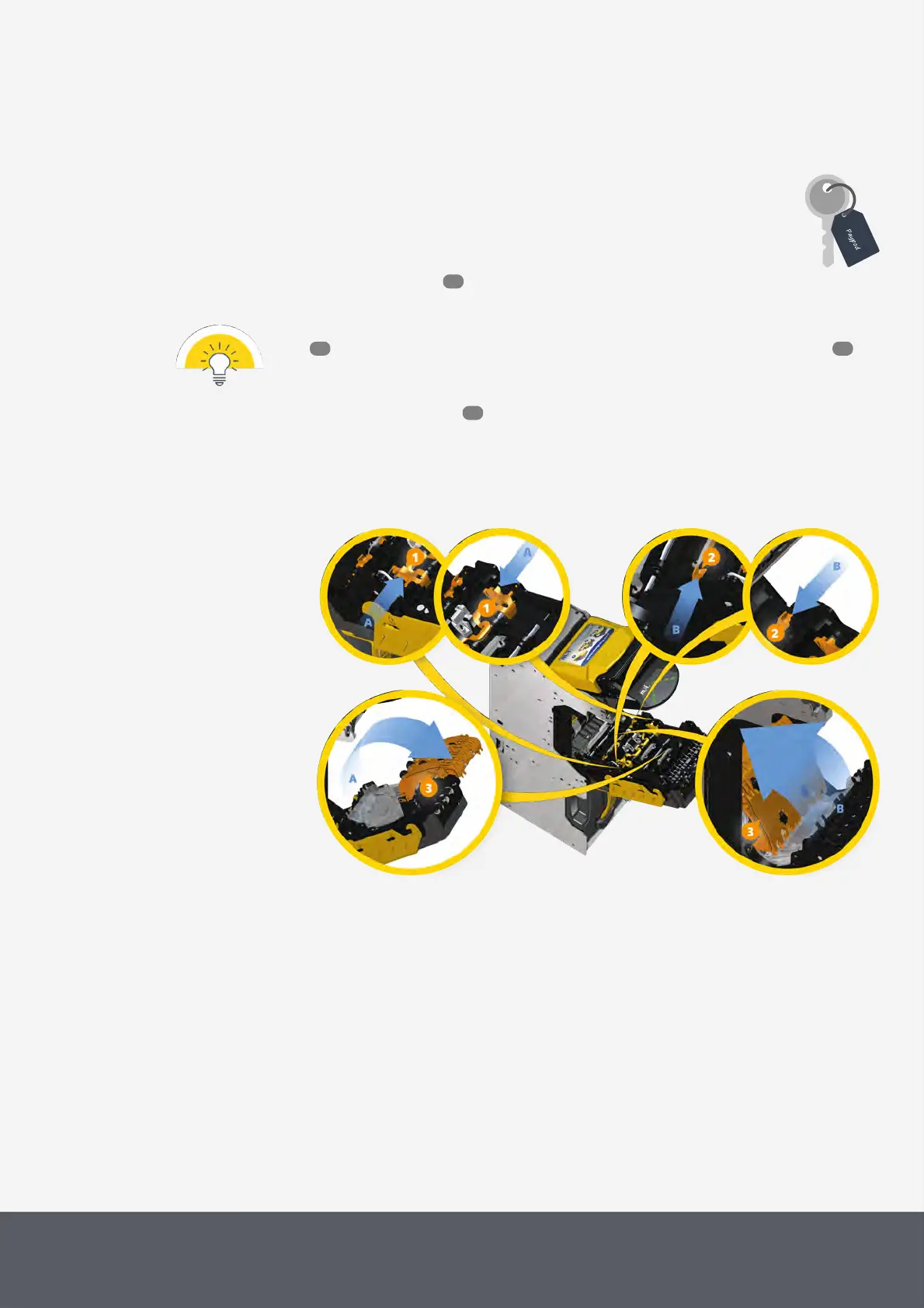
3 Use two fingers to pinch the yellow tabs of the upper[1][A] and then of the lower banknote path cover[2] in-
ward[B] and
4 simultaneously rotate the covers[3] up[A][B].
Unfolding E22 Banknote Transporting Unit's Banknote Path Covers
53
121 118
63



 To Next Page