100
44000-UG-01-01-EN_CPI_Paypod Embedded Pay Station_User Guide_V1.1.pdf
Paypod™ Embedded Pay Station
Cleaning
Published by CPI
10 Reconnect the pay station and switch it on again .
6.6 Cleaning the E22 Banknote Acceptance Unit
As needed, at least every six
months/60,000cycles, indicated
in POSlinq™ middleware
What cleaning agents do I need?
What other tools do I need?
· Disposable gloves
· Pay station key
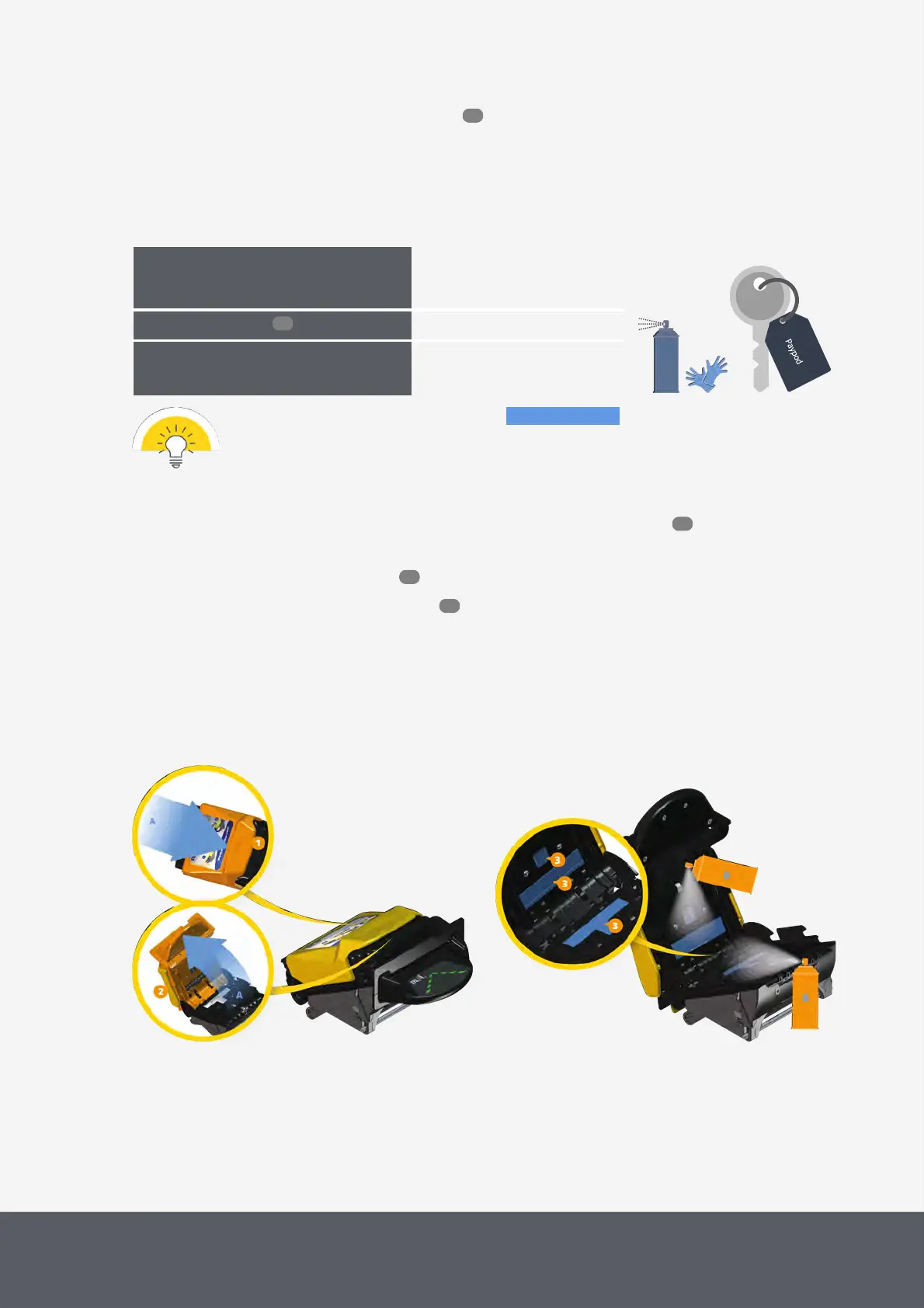
The following cleaning instructions show the parts to be cleaned in blue.
To clean the banknote acceptance unit
1 If necessary, wait until a transaction has been finished, switch the pay station off and disconnect it from
power.
2 Gain access to the banknote recycler .
3 Remove the E22banknote acceptance unit .
4 Hold the unit in one hand, use the other hand to slide the yellow top latch[1] to the front (pull) as far as it will
go[A], hold it and
5 simultaneously unfold the unit's top portion[2][A].
6 Use compressed air to blow any dust or debris from the light pipes and recognition sensors[3] on the top and
bottom part of the acceptance unit[B].
Unfolding E22 Banknote Acceptance Unit
Cleaning E22 Banknote Acceptance Unit
46
96
46
53
61



 To Next Page