99
44000-UG-01-01-EN_CPI_Paypod Embedded Pay Station_User Guide_V1.1.pdf
Cleaning
Paypod™ Embedded Pay Station
Published by CPI
1 If necessary, wait until a transaction has been fin-
ished, switch the pay station off and disconnect
it from power.
2 Gain access to the coin recycler .
3 Open the coin recycler's lid .
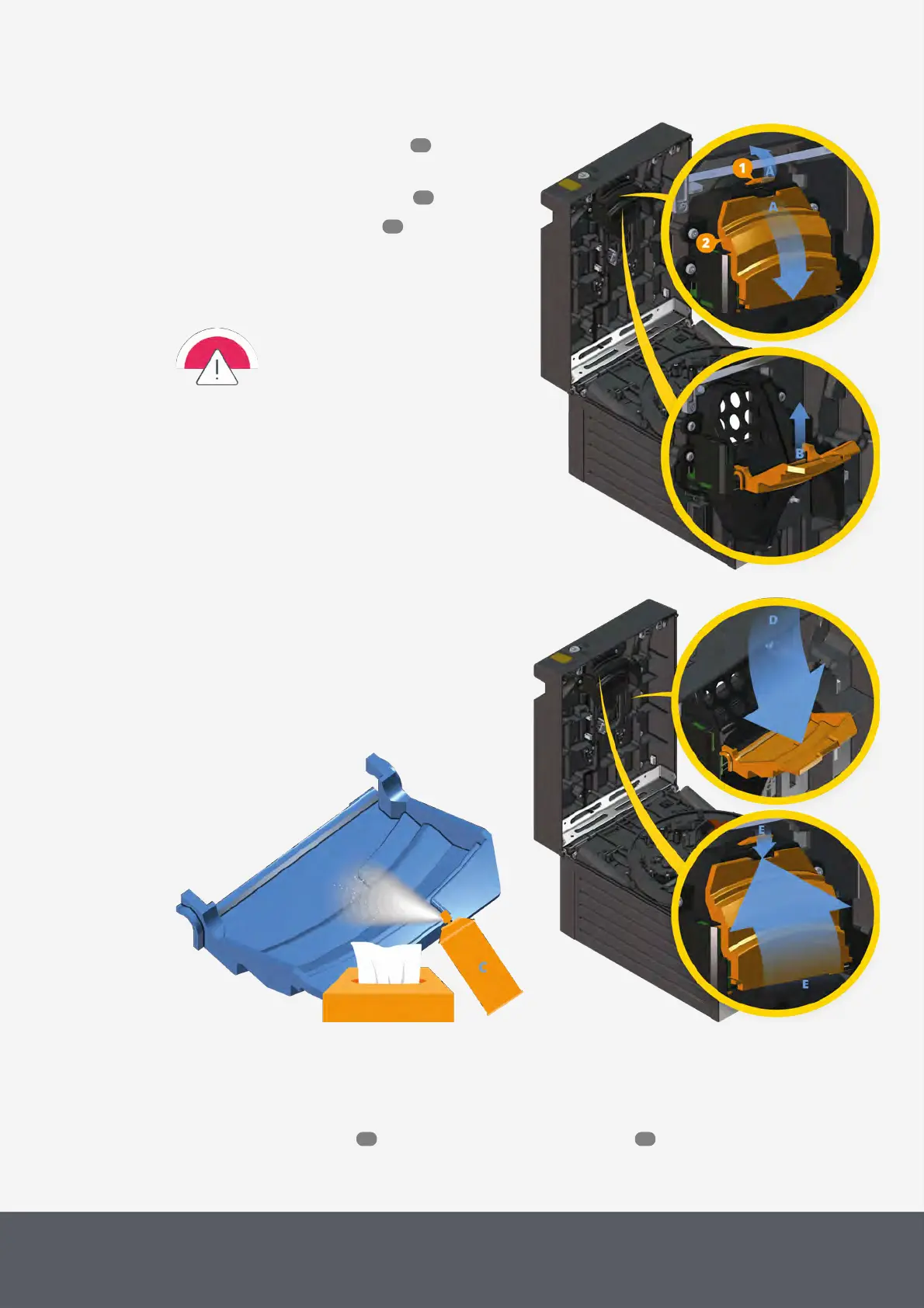
4 Lift the clip[1] and
5 carefully fold down[A] the tray[2], then unhinge the
tray[B].
Make sure that dust or foreign objects
do not fall into the coin recycler when
emptying and cleaning the dust tray. In
case of doubt just use a cloth to cover
the coin acceptance unit.
Unhinging Coin Recycler's Dust Tray
Cleaning Coin Recycler's Dust Tray
Reinstalling Coin Recycler's Dust Tray
6 Empty the tray, clean it[C] and allow to dry, if necessary.
7 Hinge the tray again[D].
8 Close the tray and snap it into the clip[E].
9 Close the coin recycler again as well as the Paypod™ pay station .
46
53
56
57 55



 To Next Page