57
44000-UG-01-01-EN_CPI_Paypod Embedded Pay Station_User Guide_V1.1.pdf
Operation
Paypod™ Embedded Pay Station
Published by CPI
1 If necessary, wait until a transaction has been finished.
2 Gain access to the coin recycler .
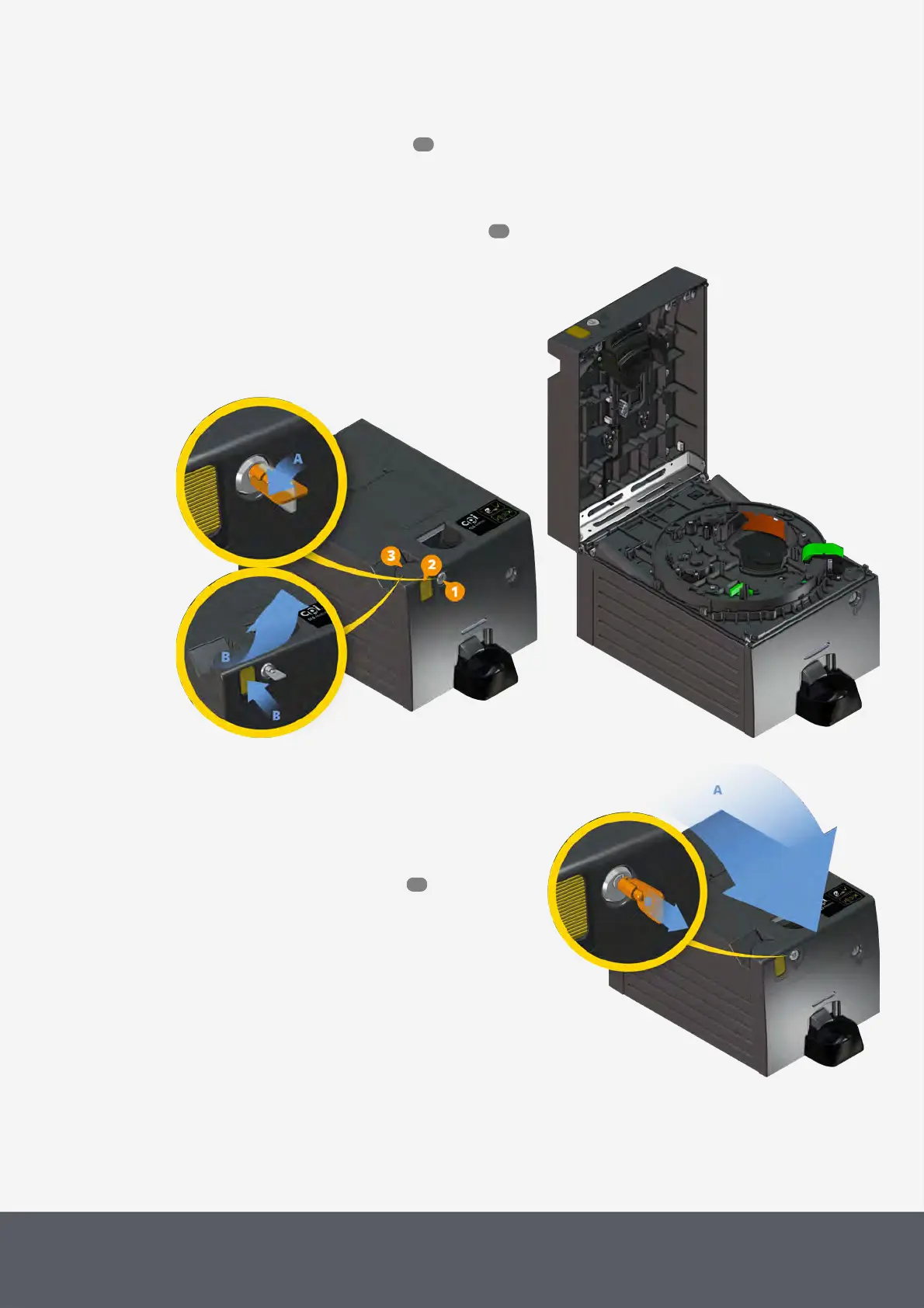
3 Insert the key in the lock[1], turn it counter-clockwise as far as it will go and hold it[A].
4 Simultaneously hold down the push-button[2] and open the lid by its handle[3] as far as it will go[B].
5 If necessary, open the lower acceptance unit .
Unlocking Coin Recycler Lid
Opening Coin Recycler Lid
To close the lid again
1 Close the lid so that it locks properly into place.
The coin recycler will automatically perform a full reset.
2 Pull the key out of the lock and store it in a safe place.
3 Close the Paypod™ pay station again.
Closing Coin Recycler Lid
53
58
55



 To Next Page