110
44000-UG-01-01-EN_CPI_Paypod Embedded Pay Station_User Guide_V1.1.pdf
Paypod™ Embedded Pay Station
Cleaning
Published by CPI
2 Gain access to the banknote recycler .
The cash box may only be reinserted in empty condition!
Before removing the cash box, please make sure, that you have access to either the key of the
cash box you want to remove or another empty cash box for replacement purposes. If not, please
continue with step4.
Please read here to empty the cash box .
3 Remove the cash box .
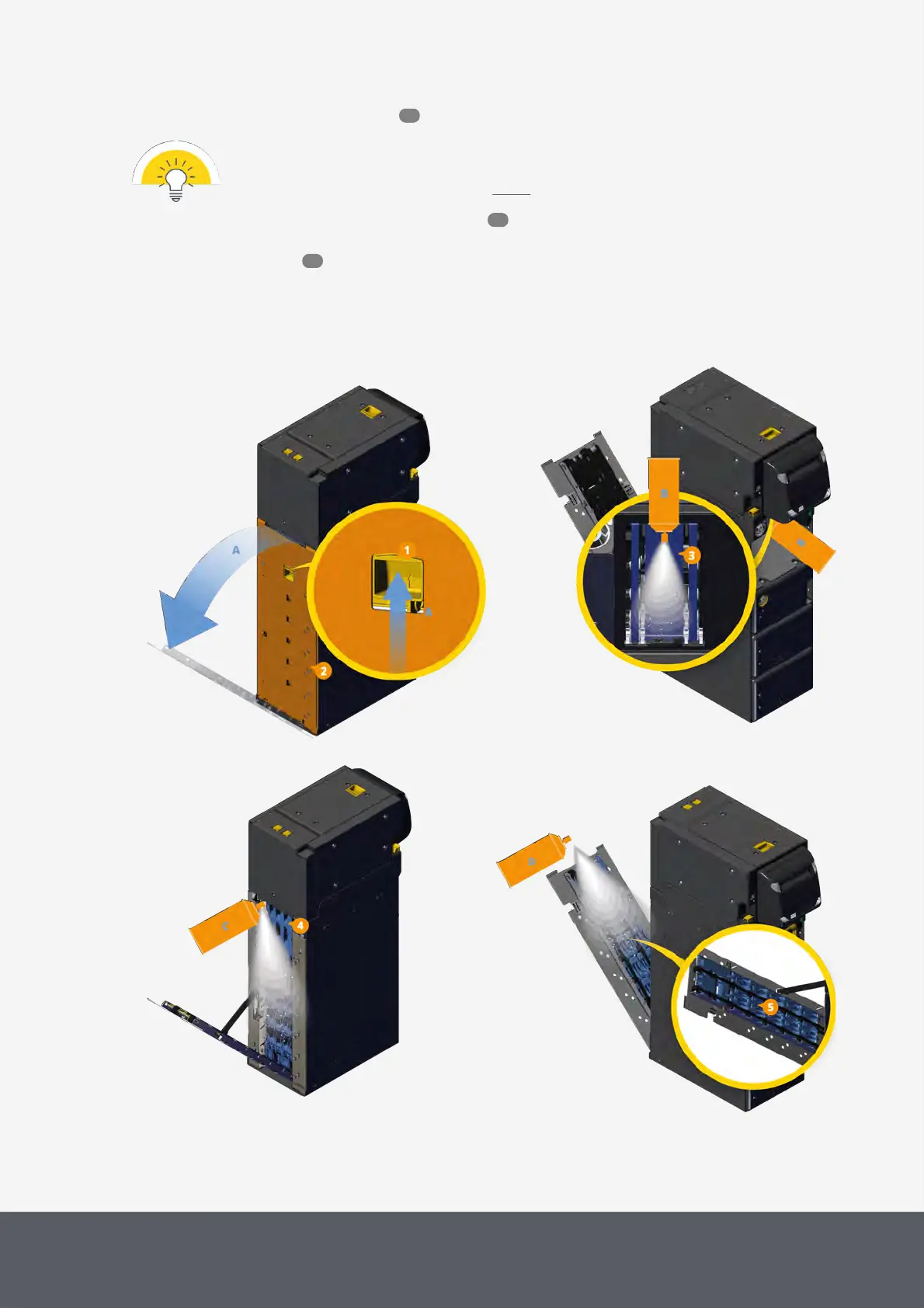
4 From the rear side of the recycler push the yellow latch handle[1] on the rear side[A] and
5 simultaneously unfold the lower rear flap[2][A].
You gained access to the spine banknote path.
Unfolding E23/E24 Banknote Recycler's Lower Rear Flap
Cleaning Bottom Side of E23/E24 Banknote Acceptance Unit
Cleaning Inner Part of E23/E24 Banknote Recycler
Spine
Cleaning Outer Part of E23/E24 Banknote Recycler Spine
6 Use compressed air to blow any dust or debris from the
53
89
65



 To Next Page