51
44000-UG-01-01-EN_CPI_Paypod Embedded Pay Station_User Guide_V1.1.pdf
Operation
Paypod™ Embedded Pay Station
Published by CPI
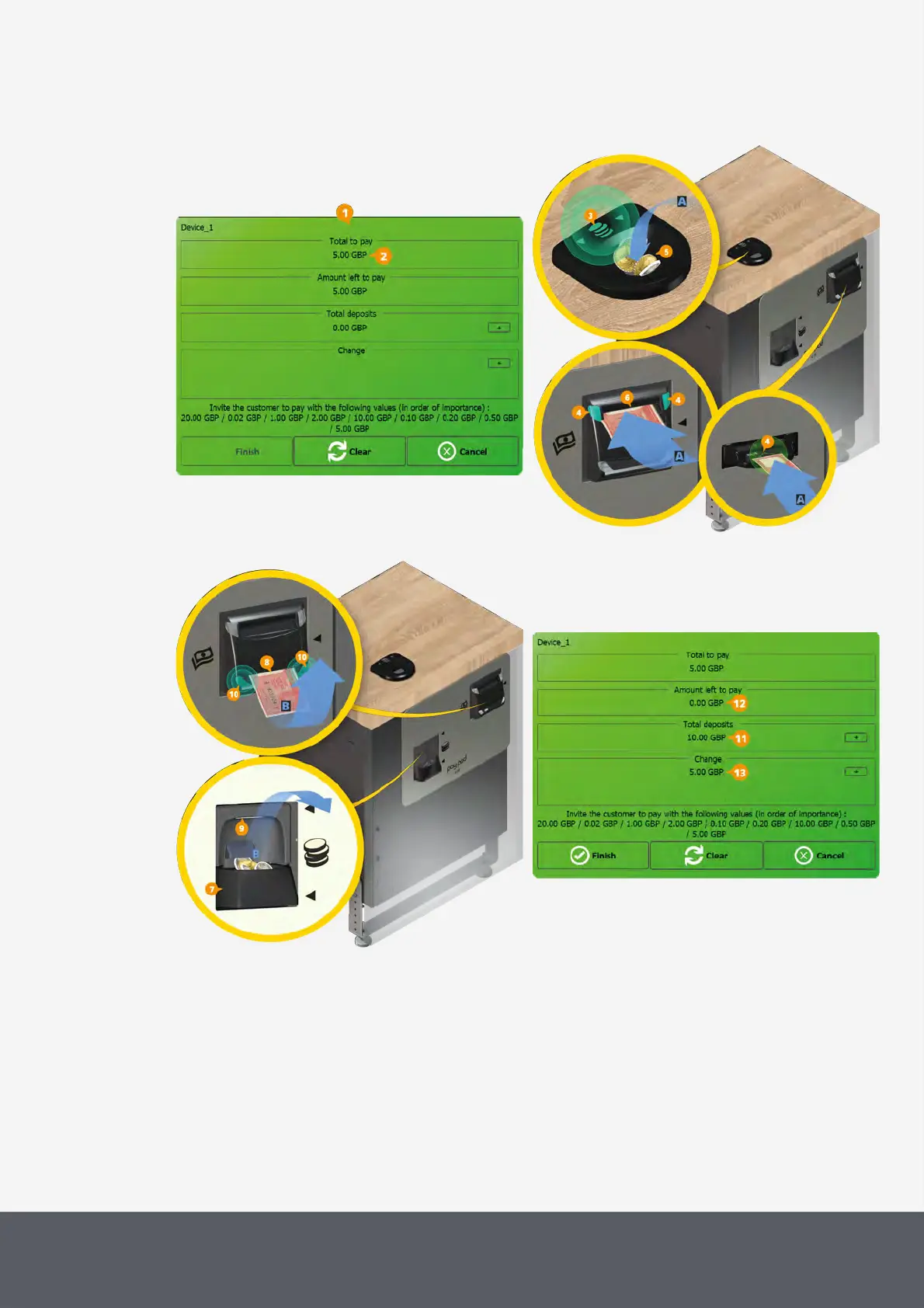
asking the customer to pay for his products selected.
POSlinq™ Screen 'Amount to pay'
POSlinq™ Screen 'Deposits and Change'
4 Let your customer pay for the products and insert enough coins into the input funnel[5] and/or insert banknotes
into the insertion slot[6][A].
The payment process will run automatically and the user interface will change back to the POS user interface fol-
lowing the transaction:
· Paypod™ pay station accepts coins and banknotes deposited by your customers whereas coins or bank-
notes which are not supposed to be accepted will be returned. As soon as the cash accepted exceeds the
Total to Pay sum, change is returned to your customer into the coin return cup[7] and/or banknote payout
slot[8][B] while the coin return LED[9] is flashing white and the E23/E24 banknote return LEDs[10] are
flashing green. The transaction session is closed.



 To Next Page