EasyManua.ls Logo

CPI Paypod Embedded - Page 72

CPI Paypod Embedded
140 pages
Print Icon
To Next Page IconTo Next Page
To Previous Page IconTo Previous Page
Loading...
72
44000-UG-01-01-EN_CPI_Paypod Embedded Pay Station_User Guide_V1.1.pdf
Paypod™ Embedded Pay Station
Handling Cash
Published by CPI
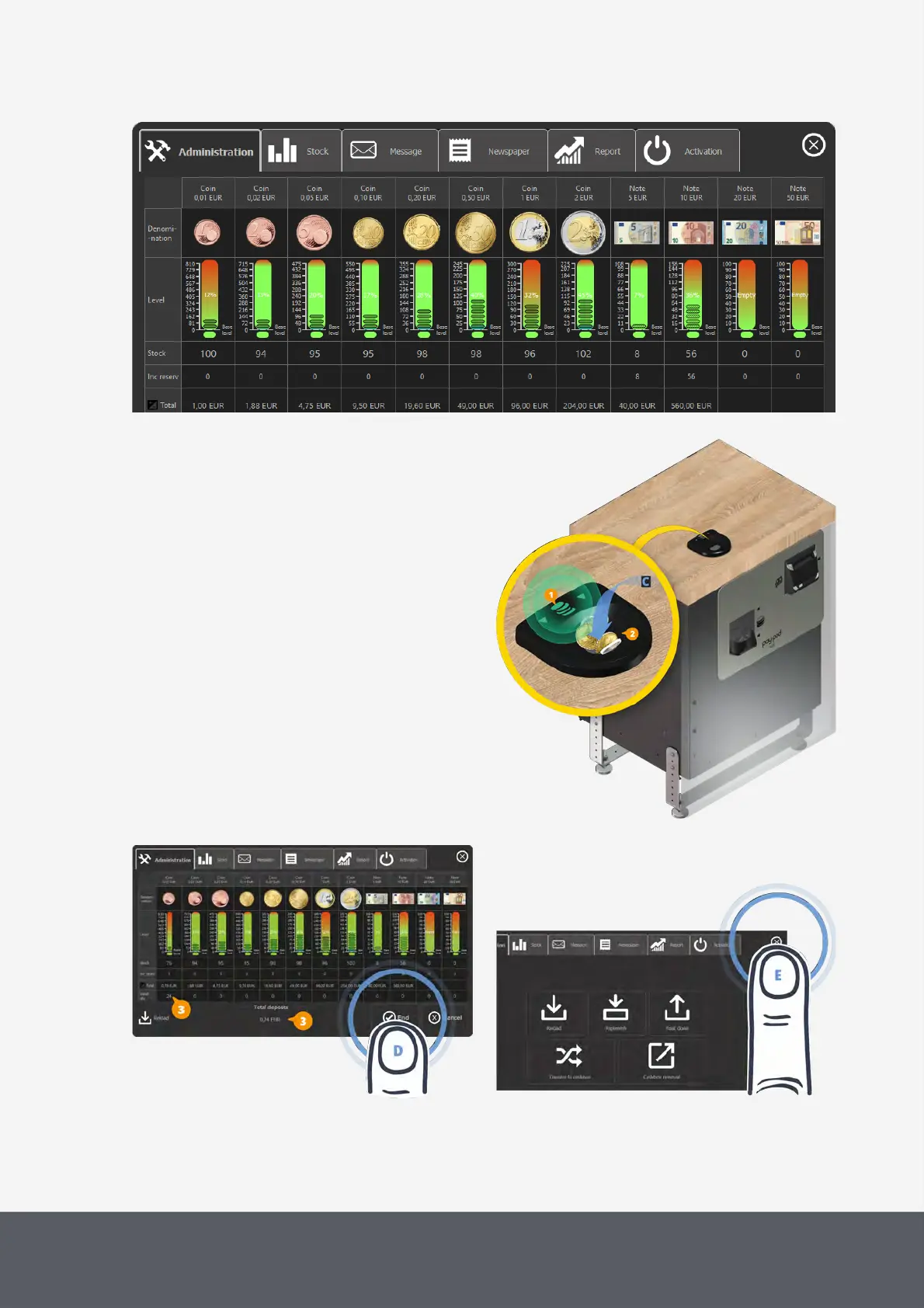
POSlinq™ Filling Screen
The coin input LEDs[1] flash green.
3 Drop coins to be filled into the coin input fun-
nel[2][C].
The filling screen increases the counters[3] in-
volved.
4 On the filling screen, select End[D].
The middleware returns to the administration screen.
5 Tap the X button to close screen[E].
The pay station is back in operating mode and ready
for the next transaction.

Refilling Paypod™ Coin Recycler
Completing Filling Process and Closing Filling Screen
Closing Administration Screen

Table of Contents