6-7
6
Top Cable Entry Cabinet
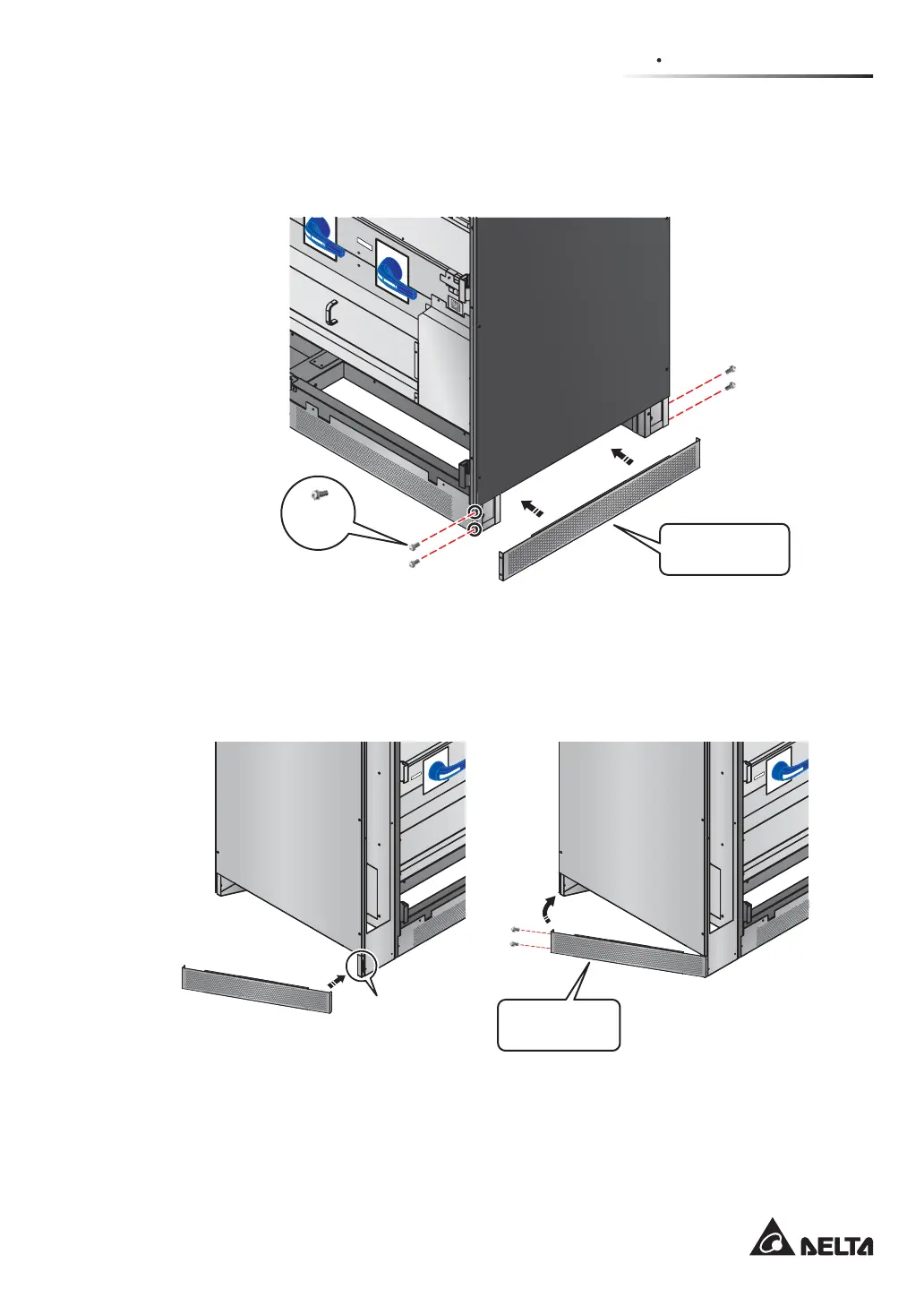
3. Face the front of the UPS and follow Figure 6-6 to install the rodent shield C at the
right side of the UPS.
(Figure 6-6: Install the Rodent Shield C at the Right Side of the UPS)
OUT
PUT
S
WITCH
M4
Screw
Rodent Shield C
(M4 Screw x 4)
(UPS : Front / Right Side)
4. Face the front of the Top Cable Entry Cabinet and follow Figure 6-7 to install the
rodent shield D at the left side of the Top Cable Entry Cabinet.
INPUT SWITCH
I
NP
UT SW
ITCH
Rodent Shield D
(M4 Screw x 2)
Latch
(Top Cable Entry Cabinet : Front / Left Side) (Top Cable Entry Cabine : Front / Left Side)
(Figure 6-7: Install the Rodent Shield D at the Left Side of the Top Cable Entry Cabinet)











 To Next Page