2-4
95-8533
18.2
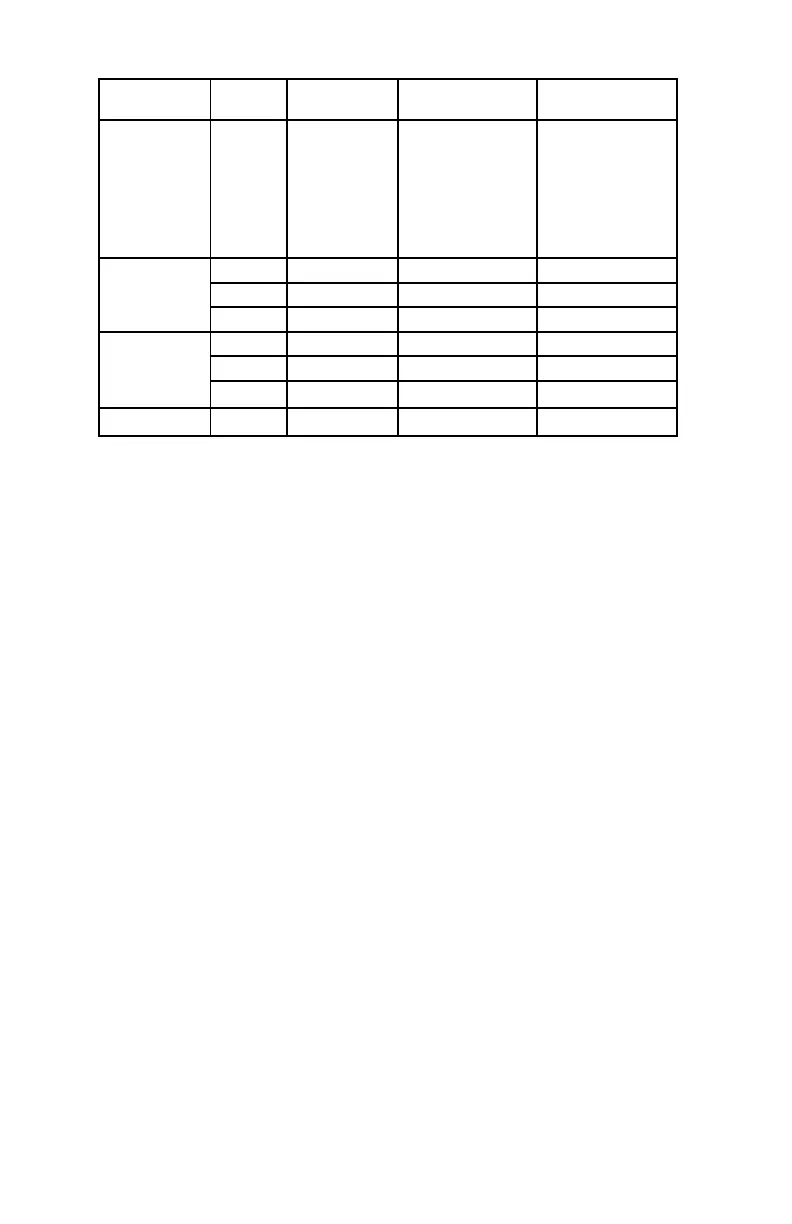
Each field device must communicate alarm
and fault conditions to the Controller. The
timing for transmitting alarms and faults to the
Controller is displayed in Table 2-3.
NOTE
All fault and alarm conditions are latched
on the Controller. To reset the Controller,
conditions indicated on the text display
must currently be in the OFF state.
Pushing the reset button then initiates a
Controller reset. Active alarms will remain
through a Controller reset.
CONTROLLER LOGS
The controller has an internal alarm and
event log. The logs can be accessed via the
S
³
software configuration ports (Configuration
Port or Port 3) using a RS-232 serial cable
and a Windows™ computer. The controller
can save up to 4,095 alarms and events in the
controller memory.
CONTROLLER USER LOGIC
The Controller continuously executes the
user logic programs that are programmed
using S
³
software. The user logic programs
are set up in the same fashion as IEC 61131-
3 programmable logic programmed into
Programmable Logic Controllers (PLCs).
Block diagram logic gates are tied together
with inputs, outputs, and other logic gates to
perform a specific task. A number of tasks can
be tied together to perform a system function.
Typical programmed functions include flame/
gas voting, timing delays, timing executions,
latching conditions, alarm and trouble
notification, suppression control, condition
control, and process shutdown notification.
The Controller executes program logic
by starting with the first logic page of the
first program and then progressing onto
subsequent pages of the same program. In
turn, subsequent programs are then executed.
Every one hundred milliseconds, the
Controller will start executing the user logic
that is programmed into the Controller. Within
this logic execution cycle, the Controller
will execute as many of the logic pages as
possible. If all programmed logic is executed
in a cycle, the Controller will start executing
program logic with the next cycle. Otherwise,
subsequence logic execution cycles are used
to finish executing the remaining logic gates.
Only when all the logic gates have been
executed will the Controller start over. The
Controller will start executing the first logic
page of the first program at the beginning of
the next logic cycle.
Table 2-3—Eagle Quantum Premier Status Update Rates
Controller Type
# of
Devices
Input –
No Exception
Input –
With Exception
Input –
With Exception
U-Series
(UV & UVIR)
DCU
DCIO, EDIO, AIM
Relay Module
ASM/ASH Module
X-Series
LS2000
PIRECL
EQ3001
1 to 100 1 Second 1 Second 1 Second
101 to 200 2 Seconds 2 Seconds 1 Second
201 to 246 2 Seconds 3 Seconds 1 Second
EQ3150
1 to 50 1 Second 1 Second 1 Second
51 to 100 2 Seconds 2 Seconds 1 Second
101 to 150 2 Seconds 3 Seconds 1 Second
EQ3016 1 to 16 1 Second 1 Second 1 Second



 To Next Page