95-8533
4-1
18.2
Section 4
Operation
SYSTEM CONTROLLER
PUSHBUTTONS
The Controller has seven pushbuttons (located
on the front panel) for user interface. These
pushbuttons allow the operator to interact with
the Controller to respond to alarms and system
status conditions, access system status
reports, and configure Controller time and date
settings.
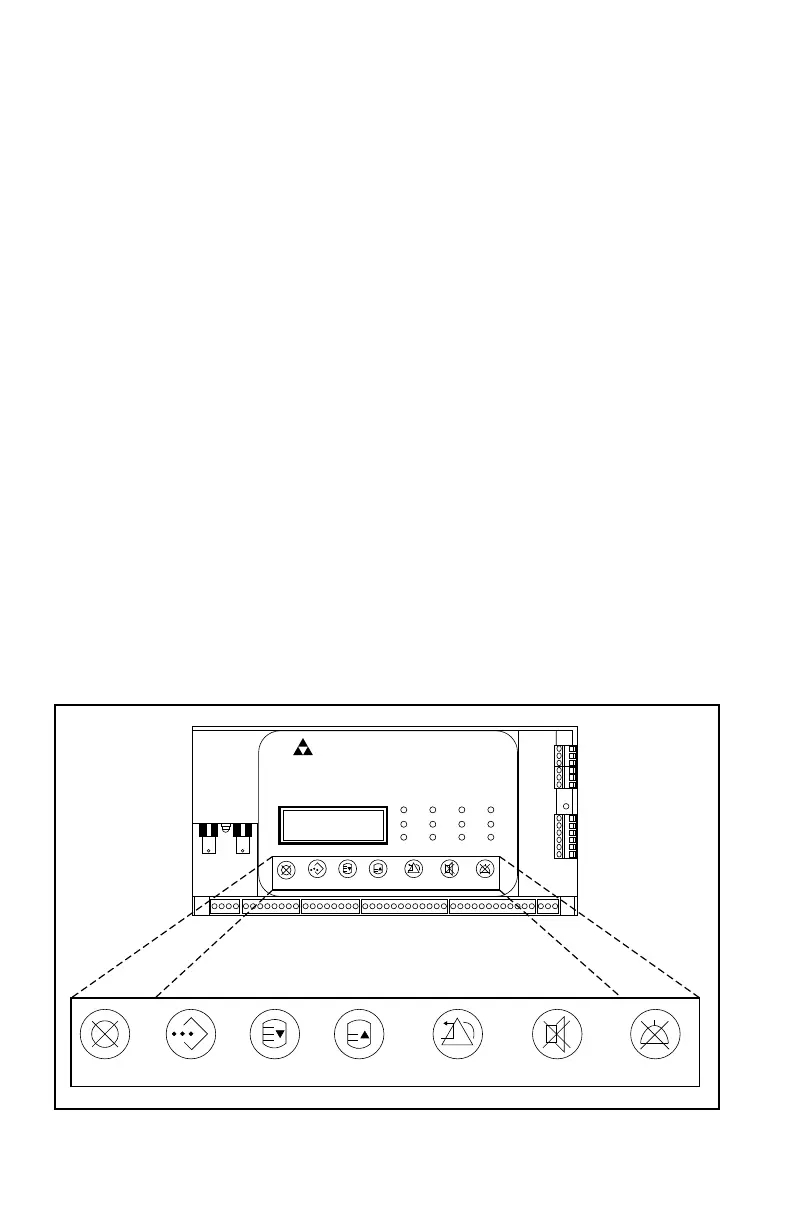
The following paragraphs describe the function
of each pushbutton. Refer to Figure 4-1 for
Controller pushbutton locations.
Cancel cancels the selected command,
and returns the menu to the last option list
displayed.
Enter chooses the menu item selected, and
advances the menu to the next options list.
(See “Controller Menu Options“ in this section
for additional information.)
NOTE
Pressing Enter while alarms are actively
scrolling returns the display to the Main
Menu.
Next allows the operator to scroll through
options listed within each menu. Each time
the NEXT pushbutton is pushed, the current
options list indexes up one list item. (See
“Controller Menu Options” in this section for
additional information)
Previous allows the operator to scroll through
options listed within each menu. Each time the
PREVIOUS pushbutton is pushed, the current
options list indexes down one list item. (See
“Controller Menu Options” in this section for
additional information)
Reset resets all controller latched outputs that
are no longer active.
Acknowledge silences the internal beeper.
Silence turns on the Silence LED and sets
Silence status in user logic.
Cancel Enter Next Previous Reset Acknowledge Silence
EAGLE QUANTUM PREMIER
Safety System Controller
Fire Alarm Inhibit Powe r
SuprHigh Gas
Trouble
Cntrl Flt
Lon FaultLow Gas Ack Silence
Out Inhibit
Eagle Quantum Premier
Time & Date
Cancel Enter Next Previous Reset Acknowledge Silence
DET-TRONICS
®
Figure 4-1—EQP Controller Pushbutton Locations



 To Next Page