95-8533
3-35
18.2
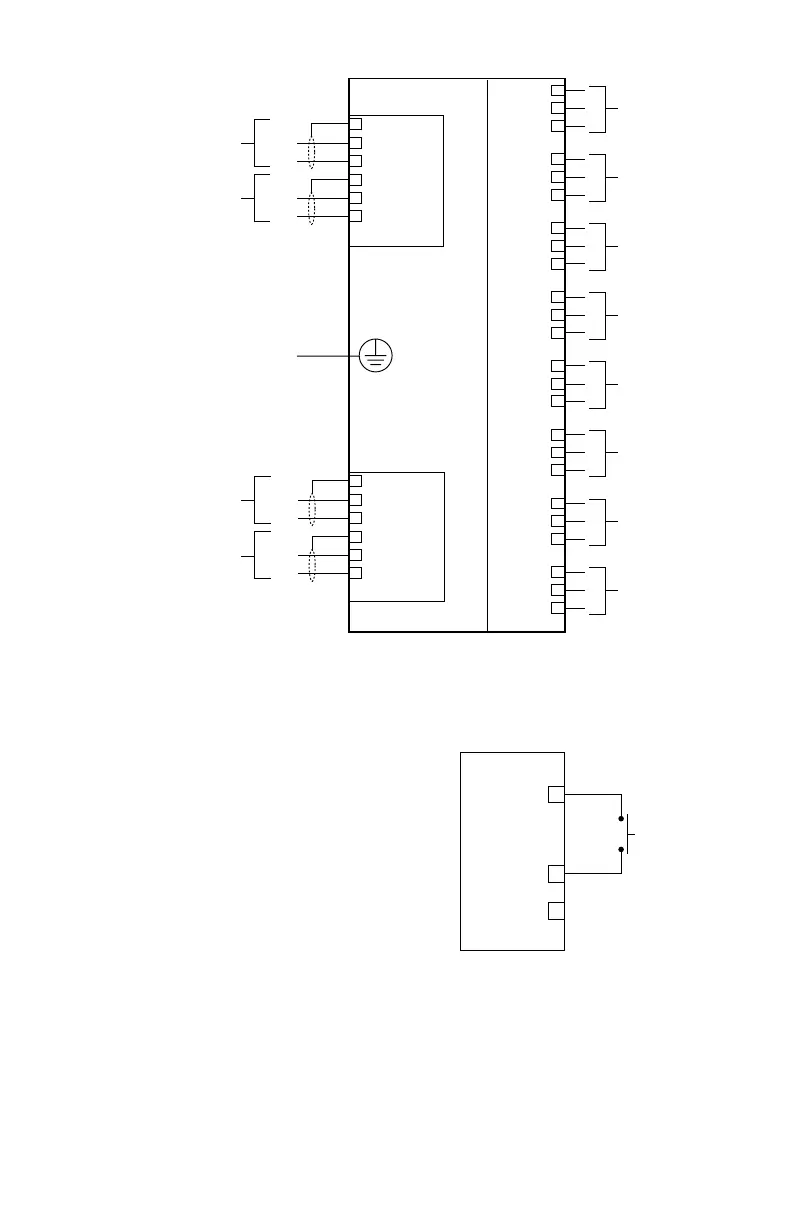
Connect the module power supply to terminals
1 and 2. If additional terminals are required for
powering other devices, these devices should
be connected to terminals 4 and 5. Shields are
to be connected to terminals 3 and 6.
COM Connector, Terminals 1 to 6
LON Terminals
Be sure to observe polarity when wiring the
LON.
1 — "A" side of signaling circuit for COM 1
2 — "B" side of signaling circuit for COM 1
4 — "A" side of signaling circuit for COM 2
5 — "B" side of signaling circuit for COM 2
3 & 6 — shield connections.
Channel Connectors, Terminals 1 to 24
Terminals A, B & C
Channels 1 to 8 Input / Output Terminals
Refer to individual wiring configurations for
terminal descriptions. Only channel 1 is shown
in each diagram. The information is typical for
channels 2-8.
Unsupervised Input
Connect external system wiring to the
appropriate terminals. See Figure 3-38.
Input to the DCIO consists of one or more
normally open or normally closed switches.
NOTE
An EOL resistor is not required.
CHANNEL 8
CHANNEL 7
CHANNEL 6
CHANNEL 5
CHANNEL 4
CHANNEL 3
CHANNEL 2
CHANNEL 1
COM
6
5
4
3
2
1
COM 2 SHLD
COM 2 B
COM 2 A
COM 1 SHLD
COM 1 B
COM 1 A
SHLD
B
A
SHLD
B
A
LON FROM
PREVIOUS DEVICE
LON TO
NEXT DEVICE
POWER
6
5
4
3
2
1
SHLD
–
+
SHLD
–
+
SHLD*
–
+
SHLD
*
–
+
24 VDC
INPUT VOLTAGE
24 VDC
INPUT VOLTAGE
EQ3700DCIO
TO
EARTH
GROUND
B2097
+ SUPPLY A
IN–/OUT+ B
COMMON C
+ SUPPLY A
IN–/OUT+ B
COMMON C
+ SUPPLY A
IN–/OUT+ B
COMMON C
+ SUPPLY A
IN–/OUT+ B
COMMON C
+ SUPPLY A
IN–/OUT+ B
COMMON C
+ SUPPLY A
IN–/OUT+ B
COMMON C
+ SUPPLY A
IN–/OUT+ B
COMMON C
+ SUPPLY A
IN–/OUT+ B
COMMON C
1
2
3
4
5
6
7
8
9
10
11
12
13
14
15
16
17
18
19
20
21
22
23
24
* SHIELDS ON POWER WIRES ARE OPTIONAL
UNLESS REQUIRED BY LOCAL CODES.
Figure 3-37—DCIO Module Wiring Terminal Conguration
+ SUPPLY A
IN– / OUT+ B
COMMON C
1
2
3
B2090
Figure 3-38—Unsupervised Input Conguration



 To Next Page