Utility mode/Copy mode parameters
7
ineo 163/213 7-3
7 Utility mode/Copy mode parameters
7.1 Utility mode
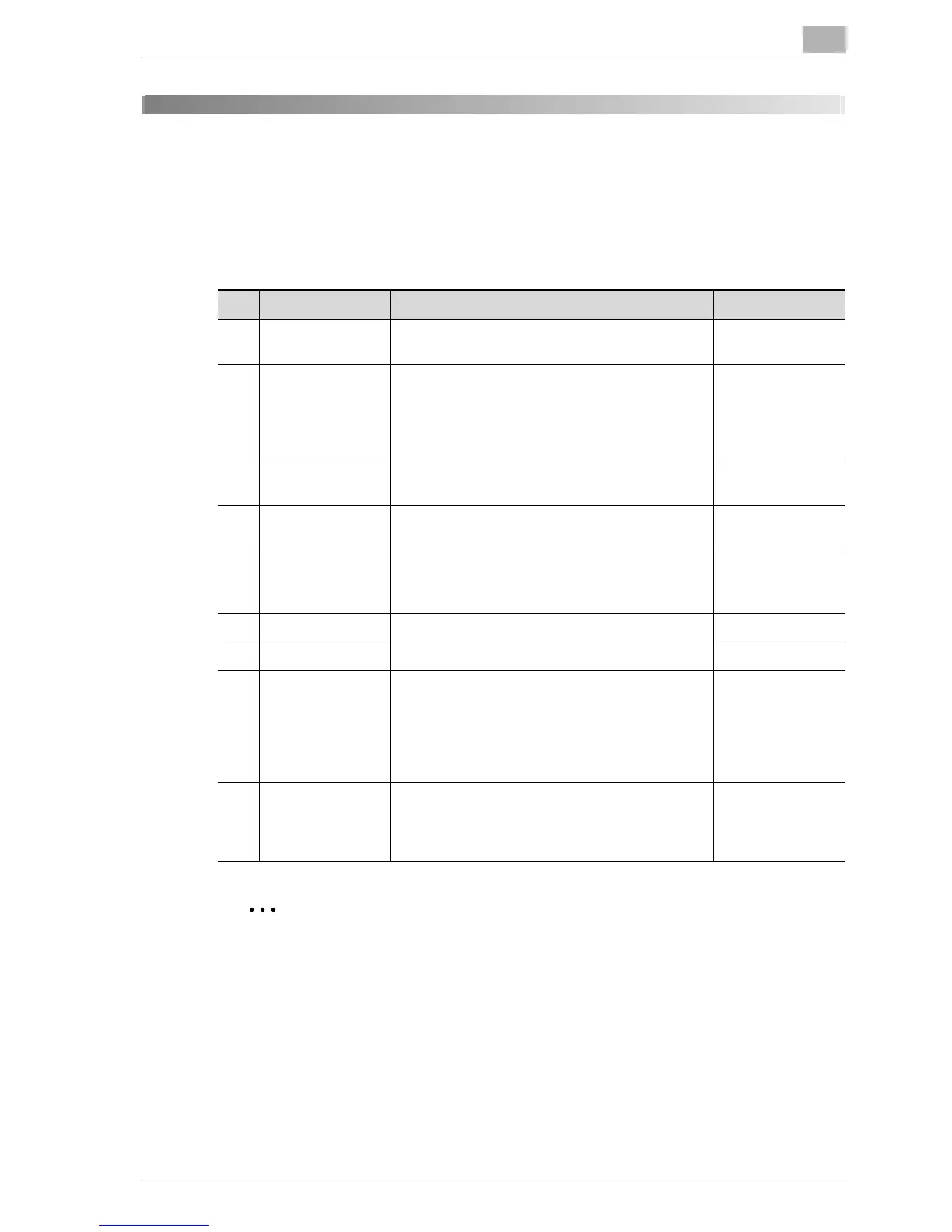
There are eight parameter in the Utility mode.
2
Note
Depending on the options installed, some parameters may not be
available. If an unavailable parameter is selected, an error message
appears.
No. Name Description Page reference
1 MACHINE SET-
TING
Used to specify settings for the machine’s oper-
ating environment.
p. 7-6
2 PAPER SOURCE
SETUP
Used to specify the size and type of paper load-
ed in the 1st paper drawer. In addition, settings
can be specified for the paper drawers that are
selected during the automatic tray switching op-
eration.
p. 7-19
3 CUSTOM SIZE
MEMORY
Used to register up to two custom paper sizes. p. 7-28
4USER MANAGE-
MENT
Used to perform maintenance operations in or-
der to maintain the machine’s efficiency.
p. 7-31
5ADMIN. MAN-
AGEMENT
Used by the administrator to specify settings for
managing the accounts and to specify remote
monitoring settings.
p. 7-35
6 COPY SETTING 1 Used to specify the default settings for the vari-
ous copy functions.
p. 7-54
7 COPY SETTING 2 p. 7-70
8 DIAL REGISTRA-
TION
This menu item appears only when optional im-
age controller IC-206 or network interface card
NC-503 is installed.
Specify speed dial settings.
For details, refer to the user manual for the cor-
responding option.
-
9 SCAN SETTING Used to specify settings when optional image
controller IC-206 or network interface card NC-
503 is installed on the machine. For details, refer
to the user manual for the corresponding option.
-










 To Next Page