7
Utility mode/Copy mode parameters
7-6 ineo 163/213
7.3 MACHINE SETTING
From the "MACHINE SETTING" menu, the following machine settings can be
changed.
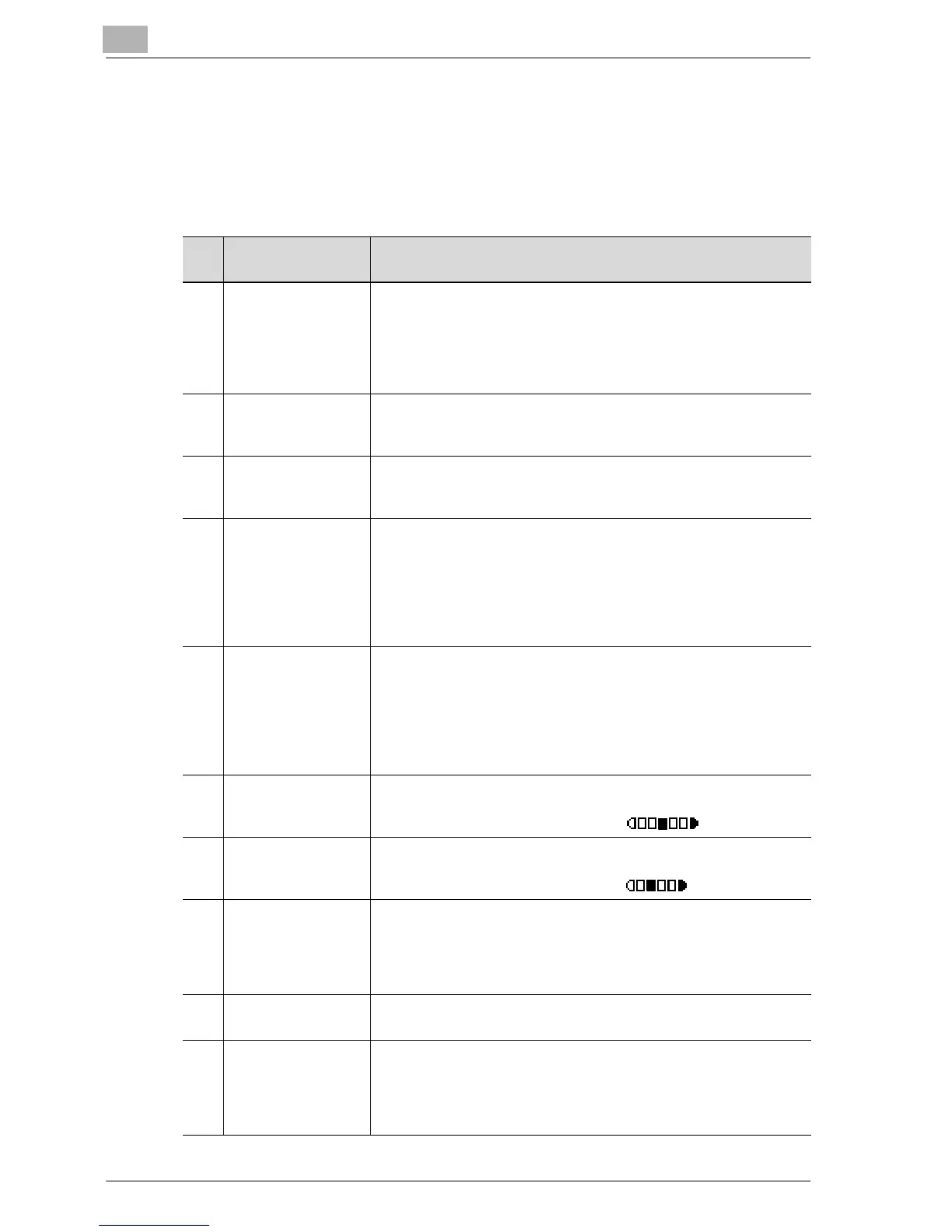
MACHINE SETTING parameters
No. MACHINE SET-
TING
Description
1 AUTO PANEL RE-
SET
This parameter can be used to specify the length of time until the
auto panel reset operation is performed after copying or the oper-
ation for the last key pressed is finished. When the auto panel reset
operation is performed, the machine automatically returns to the
default mode and the basic screen is displayed.
The manufacturer’s default setting is 1 minute.
2 ENERGY SAVE
MODE
This parameter can be used to specify the length of time that the
machine is idle before it enters Power Save mode.
The manufacturer’s default setting is 15 minutes.
3 AUTO SHUT OFF This parameter can be used to specify the length of time that the
machine is idle before it is turned off.
The manufacturer’s default setting is "OFF".
4 DENSITY (ADF) This parameter can be used to specify the image quality level when
the optional document feeder is used.
MODE1: Select this setting to lighten the copy density and reduce
spots in the copy.
MODE2: Select this setting to produce copies at the same density
as that of the document.
The manufacturer’s default setting is "MODE1".
5 DENSITY (BOOK) This parameter can be used to specify the density level when a
document placed on the original glass is copied.
MODE1: Select this setting to produce copies at the same density
as that of the document.
MODE2: Select this setting to lighten the copy density and reduce
spots in the copy.
The manufacturer’s default setting is "MODE1".
6 PRINT DENSITY This parameter can be used to select one of the five density levels
for printing.
The manufacturer’s default setting is .
7 LCD CONTRAST This parameter can be used to adjust the contrast of the control
panel display.
The manufacturer’s default setting is .
8 KEY SPEED SET-
TING
This parameter can be used to specify the length of time until re-
peating input begins after a key is held down and the repeating in-
terval.
The manufacturer’s default setting is "1.0sec" for "TIME TO
START" and is "0.1sec" for "INTERVAL".
9 LANGUAGE The display language can be selected.
The manufacturer’s default setting is "ENGLISH".
10 SCAN THRESHOLD This parameter appears only when optional image controller IC-
206 or network interface card NC-503 is installed.
This parameter can be used to specify the amount of memory that
is available before the memory becomes full and scanning stops.
For details, refer to the user manual for the corresponding option.










 To Next Page