3
Precaution
3-4 ineo 163/213
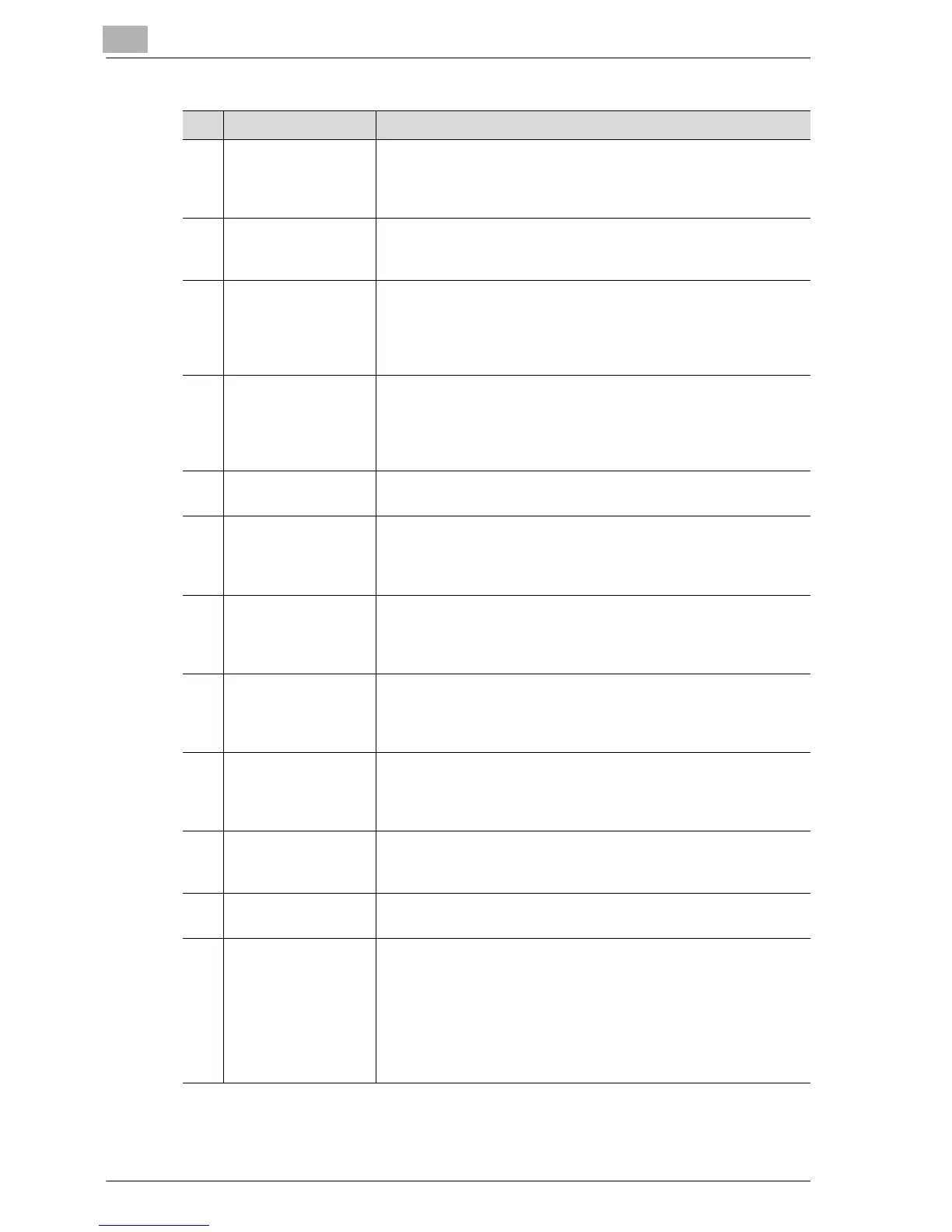
No. Part name Description
1 Original cover
OC-504
Presses down on the loaded document to keep it in place.
Referred to as the "original cover" throughout the manual.
Standard on ineo 163
Optional on ineo 213
2 Automatic docu-
ment feeder
DF-502 (optional)
Automatically feeds one document sheet at a time for scanning.
Referred to as the "document feeder" throughout the manual.
3 Reverse automatic
document feeder
DF-605
(Option for ineo 213
only)
Automatically feeds one document sheet at a time for scanning,
and automatically turns over double-sided documents for scan-
ning.
Referred to as the "reverse automatic document feeder" through-
out the manual.
4 Automatic duplex
unit
AD-504
(Option for ineo 213
only)
Automatically turns the pages over, and prints on both sides.
Referred to as the "duplex unit" throughout the manual.
If the optional multi bypass tray has not been installed, install the
enclosed tray extension.
5 Multi bypass tray
MB-501 (optional)
Can be loaded with up to 100 sheets of paper.
Referred to as the "multi bypass tray" throughout the manual.
6 Paper feed unit
PF-502 (optional)
A paper drawer that can be loaded with up to 250 sheets of paper.
Up to four can be installed on the main unit.
Referred to as the "2nd paper drawer", "3rd paper drawer", "4th
paper drawer" and "5th paper drawer" throughout the manual.
7Desk
DK-703 (optional)
The machine can be placed on the desk.
Allows this machine to be set up on the floor.
Up to four paper drawers can be installed on this desk.
Referred to as the "desk" throughout the manual.
8Desk
DK-702 (optional)
The machine can be placed on the desk.
Allows this machine to be set up on the floor.
Up to two paper drawers can be installed on this desk.
Referred to as the "desk" throughout the manual.
9Desk
DK-701 (optional)
The machine can be placed on the desk.
Allows this machine to be set up on the floor.
Only one paper drawer can be installed on this desk.
Referred to as the "desk" throughout the manual.
10 Job separator
JS-503 (optional)
Allows printed pages to be separated (available only when print-
ing from a computer).
Referred to as the "job separator" throughout the manual.
11 Shift tray
SF-501* (optional)
Shifts copies and printed pages that are fed out. If the job sepa-
rator is installed, the shift tray cannot be installed.
12 Image controller
IC-206* (optional)
Internal printer controller
• Allows this machine to be used as a computer printer (PCL).
• Enables network printing from Windows or a NetWare network
environment.
• Allows a document to be scanned so that the data can be sent
to a computer or attached to an e-mail message.
For more details, refer to the user manual for image controller
IC-206.










 To Next Page