Solving Other Problems 10-31
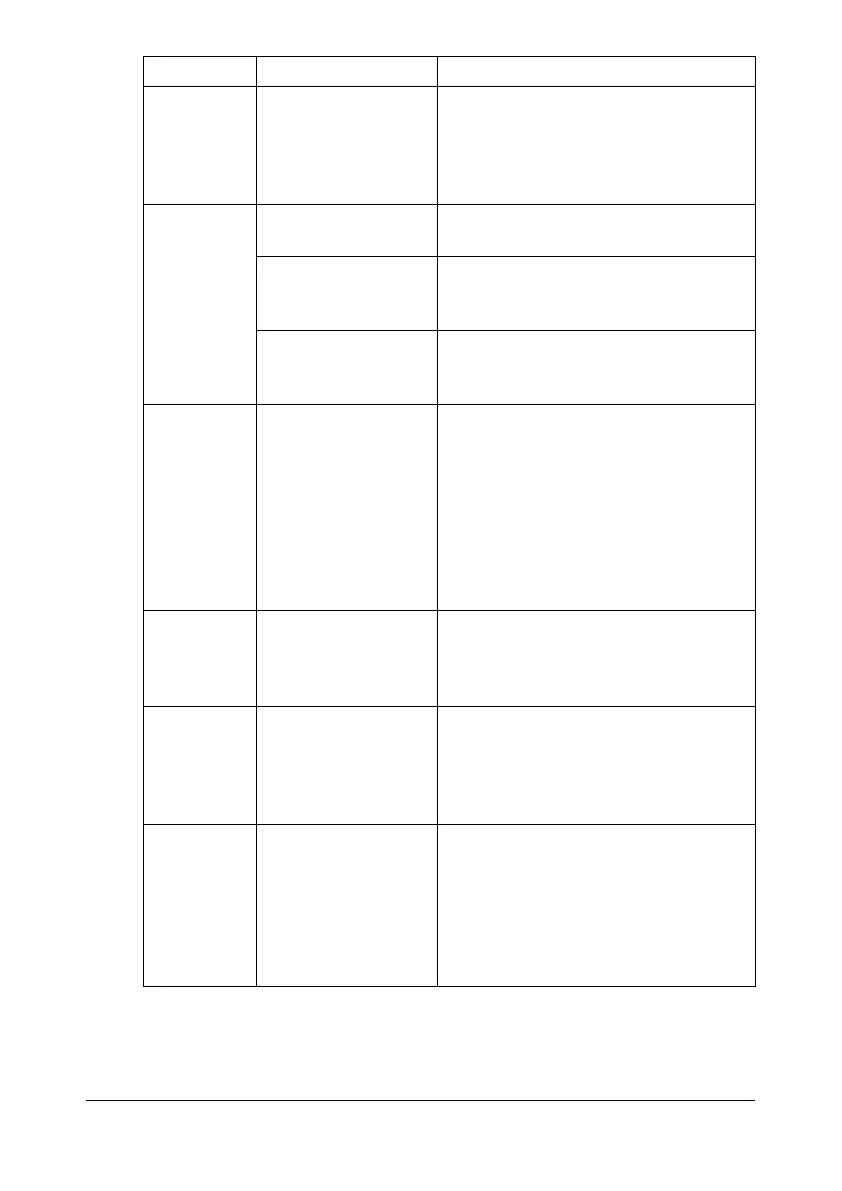
Booklet Left
and Right
Binding out-
put is incor-
rect.
Both the printer
driver and the appli-
cation have been set
for collation.
For [Booklet] ([Left Binding] and [Right
Binding]), choose [Collate] only in the
printer driver’s [Basic] tab. Do not set
collation in the application.
You hear
unusual
noises.
The machine is not
level.
Place the machine on a flat, hard, level
surface.
The tray is not
installed correctly.
Remove the tray that you are printing
from and reinsert it completely into the
machine.
There is a foreign
object stuck inside
the machine.
Turn off the machine and remove the
object. If you cannot remove it, con-
tact Technical Support.
When copy-
ing or scan-
ning with the
ADF, a band
appears at
the end of
the image or
paper (5 to 6
mm).
A malfunction may
have occurred while
paper was being
transferred with the
ADF.
If a band appears in the copy after
copying, select a copy density setting
that is one level darker.
If a band appears in the image after
scanning, scan using the original
glass.
Scanned
images are
noisy.
Resolution is set to
[150x150dpi] while
the scan mode is set
to [MIX] or [TEXT].
Set the scan mode to [PHOTO].
Some areas
of the
scanned
image are
missing.
Acrobat 8 (Macin-
tosh version) is used
for scanning the
image.
With the Acrobat Scan setting, turn off
the OCR and Filtering functions.
The
web-based
utility can-
not be
accessed.
The Web Connection
Administrator’s pass-
word is incorrect.
The Web Connection Administrator
password has a 0-character minimum
and an 16-character maximum. For
details of the
Web Connection administrator pass-
word, refer to the [Reference Guide] on
the Documentation CD/DVD.
Symptom Cause Solution










 To Next Page