Status, Error, and Service Messages10-42
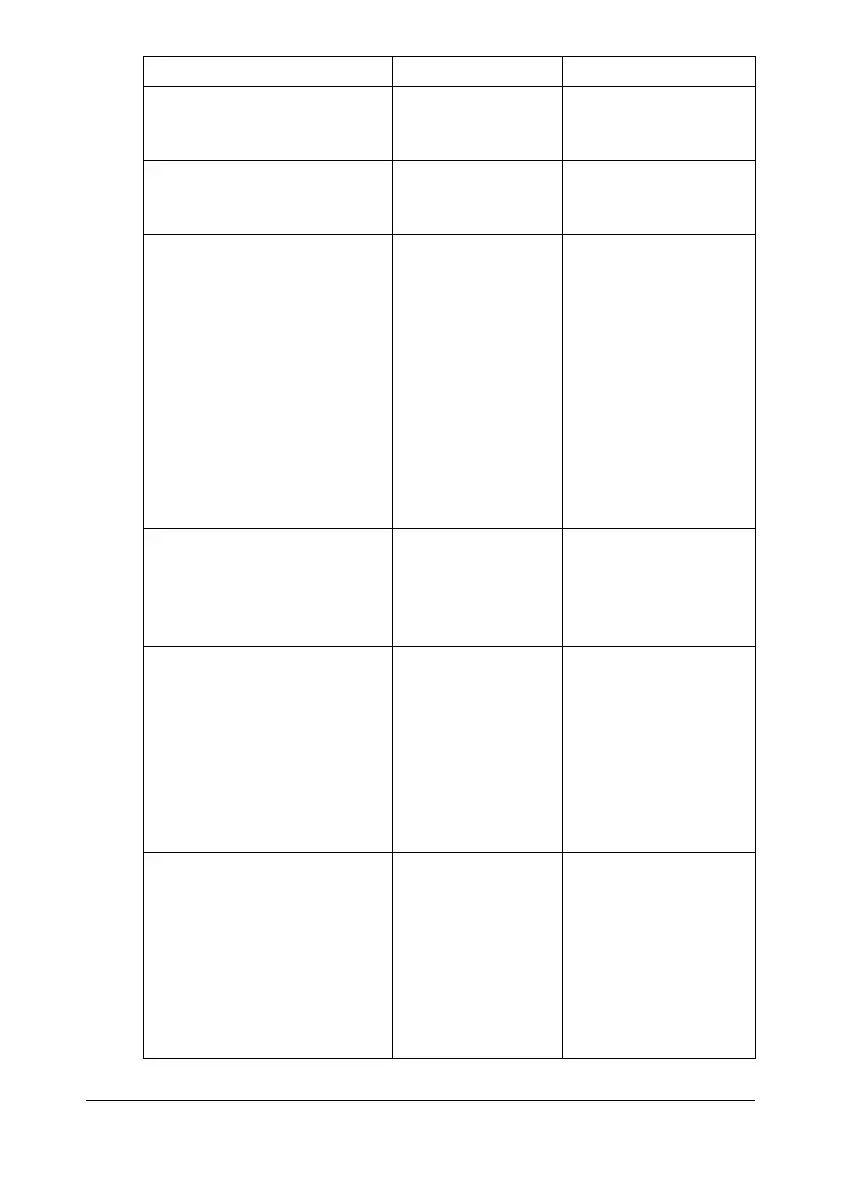
INCORRECT TONER
CHANGE x TONER
The indicated toner
cartridge is not cor-
rect.
Replace the indicated
toner cartridge with a
correct one.
INCORRECT PAPER SIZE The paper size set
in the tray is not
correct.
Follow the message
and replace the paper.
JOB CANCELED While a document
was being scanned
from the original
glass in Scan mode,
more than one min-
ute had passed
after the first page
of the document
was scanned or the
data could not be
sent. Therefore, the
scan job was auto-
matically canceled.
Turn the machine off,
and then, after waiting
a few seconds, turn it
on again. When send-
ing multiple pages, for
example, from a book,
scan the first page,
and then scan the next
page within one min-
ute.
MEMORY
NEAR FULL
There is not enough
space (less than 50
MB) available on the
CompactFlash
card.
Delete jobs stored on
the CompactFlash
card, or format the
CompactFlash card.
MEMORY FILE FULL The maximum num-
ber of 1,024 image
data files has been
reached.
Turn the machine off,
and then, after a few
seconds, turn it on
again. Decrease the
amount of data to be
printed (for example,
by decreasing the res-
olution), and then try
printing again.
MEMORY FULL The machine has
received more data
than can be pro-
cessed with its
internal memory.
Turn the machine off,
and then, after a few
seconds, turn it on
again. Decrease the
amount of data to be
printed (for example,
by decreasing the res-
olution), and then try
printing again.
This message... means... Do this...










 To Next Page