Configuration Menu Overview2-44
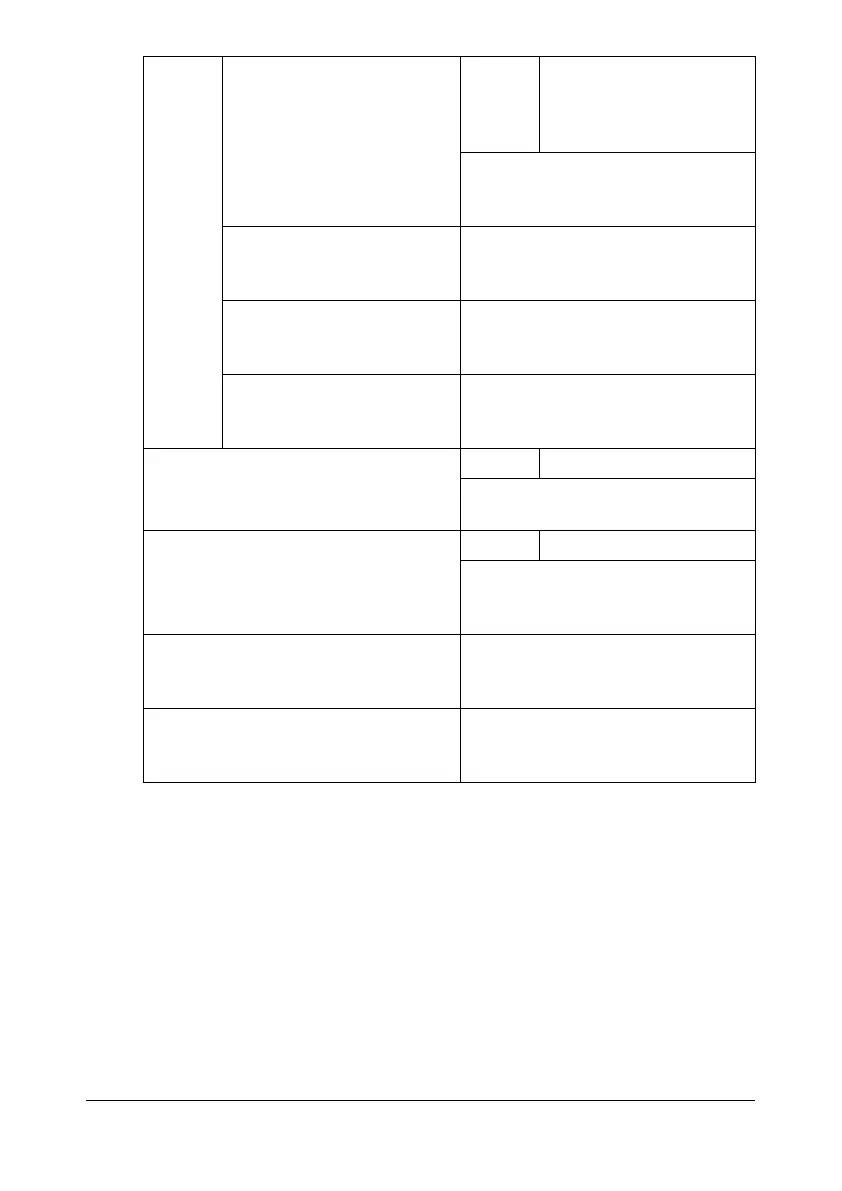
[AUTHENTICATION] Settings [ANONYMOUS] / [SIM-
PLE] / [DIGEST-MD5] /
[GSS-SPNEGO] /
[NTLMv2]
Select the authentication method
used for logging on to the LDAP
server.
[LDAP ACCOUNT] Specify the account (up to 64 char-
acters) used to connect to the
LDAP server.
[LDAP PASSWORD] Specify the password (up to 32
characters) used to connect to the
LDAP server.
[DOMAIN NAME] Specify the domain name (up to 64
characters) used to connect to the
LDAP server.
[MEMORY DIRECT] Settings [DISABLE] / [ENABLE]
Select whether or not to enable the
Memory Direct function.
[USB SETTING] Settings [Windows] / [Mac]
Select the operating system of the
PC to which this machine is con-
nected with a USB cable.
[FAX SETTING] For details, refer to the [Facsimile
User’s Guide] on the Documenta-
tion CD/DVD.
[COMM. SETTING] For details, refer to the [Facsimile
User’s Guide] on the Documenta-
tion CD/DVD.










 To Next Page