Manual D900 Maintenance
49-MD900EN05
109
3.10.4.11.Memo weight zero
Disabled
– Does not allow to memorize with Weight Zero
Enabled
– Allows to memorize with Weight Zero
3.10.4.12.Automatic Mode
There are two possible values:
‘MANUAL’ – Manual Operation
Every time an article with traceability is sold, the display shows the article and product to which it is
associated, and the possibility is offered to change this association through the association menu.
‘AUTOMATIC’ – Automatic Operation
Every time an article with traceability is sold, the sale is applied to the last product belonging to the
associated article. It is also permitted to enter the product /article association menu manually through a
combination of keys.
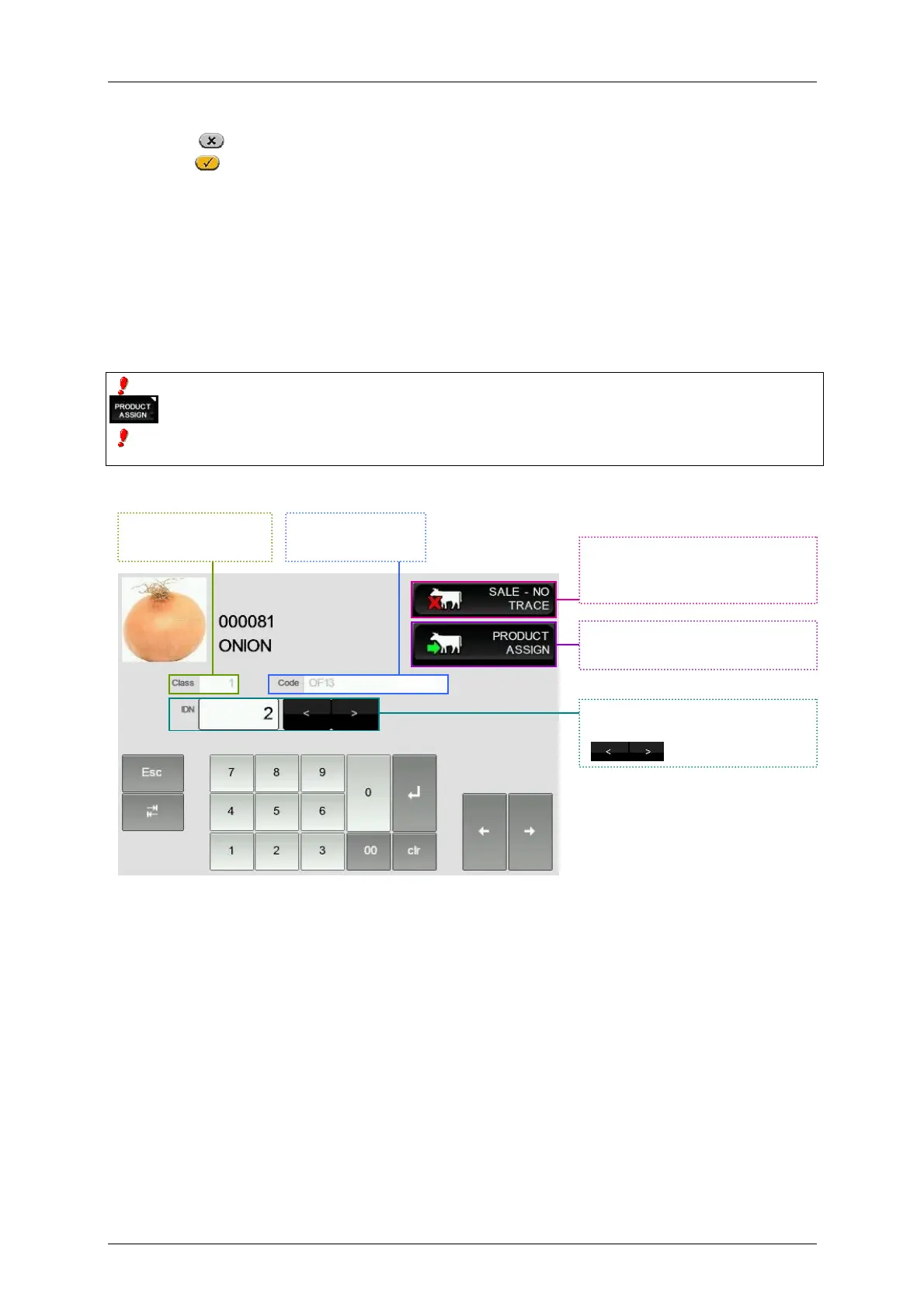
Whatever the working mode, it can be accessed to the product association menu with articles by pressing
, once selected the traceability article.
In this association menu, it is shown in the display the code and the article denomination, the fast identification of
the product and the identification number of the product.
The menu of articles with traceability is the following:
3.10.4.13.Wholesalers Limit
The wholesalers limit is the quantity of the amount from which a customer is considered a wholesaler.
Enter a value between 0 and 9999,99 (default value: 1000,00).
3.10.4.14.Group
To send data from the computer to the scales as well as from the scales to the computer, you need to
know which group and which master you must address. This is important when setting up the scale
network and the computer program.
With the numeric keypad, type a two-digit number between 00 and 99 (default value: 50).
Traceability Class
of the Product
Code of the
product.
Enter the code of the product or
search it with the keys
.
Press to make the sale without
selecting any Traceability
Product.
Assign the product to the article
and end the sale.



 To Next Page