Operation Manual D900
49-MD900EN05
16
6. Enter the price/unit of the product (see sect. 2.8.1.1 Direct Price) and press or
(on
Receipt-2 mode, press ).
7. If you wish to add or subtract more than one unit before recording, enter the number of products
and press
(on Receipt-2 mode, press
).
8. Record the operation in the corresponding cashier.
If the MULTIPLICATION parameter is set to “Force units” (User menu
Settings
Keyboard Configuration
Multiplication
Force Units), then the units must be indicated in all unit sales. Therefore, if an attempt is made to
memorize a unit sale that is not multiplication, the scales will beep and the message “UNITS”
will appear on the display:
2.8.1.4.Manual zero
The scales are equipped with a manual reset to zero mechanism. If, for any reason the value of the
weight is not zero, but it is within a certain range, press key , to reset the weight to zero.
2.8.1.5.Price increase or decrease
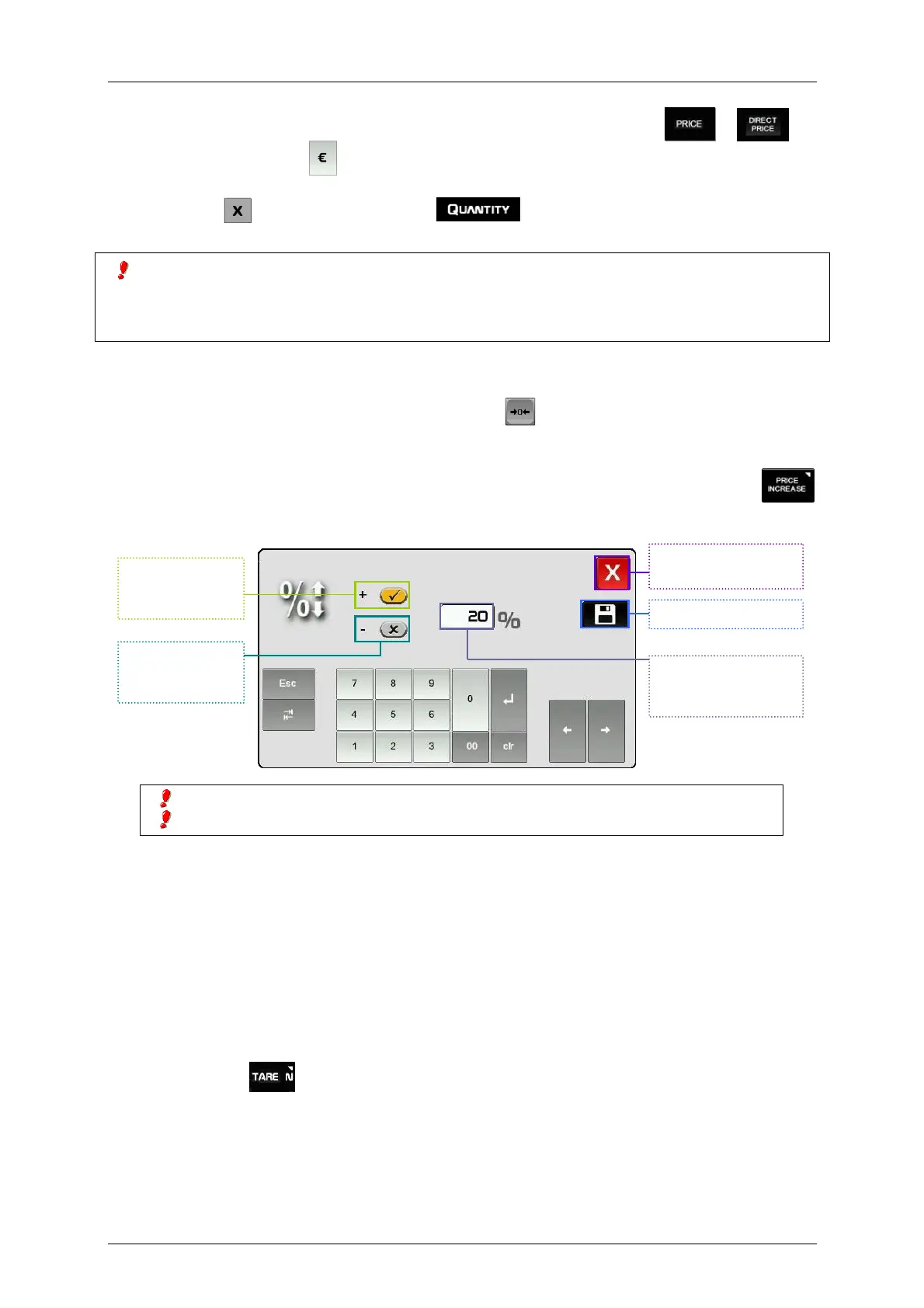
If the parameter Price increase is activated (see sect. 3.10.4.9 Price increase) and we press
after entering a price, the next window will be shown. We can enter the percentage value to increase the
price.
2.8.1.6.Operations with Tare
There are three types of tare: Tare associated with each PLU, preset tares or manual tare.
The tare is shown in bottom left side of the metrologic part of the display.
The TARE ASSOCIATED WITH EACH PLU is programmed in the tare field when creating or modifying
the PLU’s (see paragraph 3.1 Articles).
To work with PROGRAMMABLE TARES:
1. Place the product to be weighed,
2. Enter the number of a programmable tare
3. Press the key .
4. Enter the price and record the operation.
The preset tares are programmed in menu 3.4.6 Tares.
This procedure is compatible with adding and subtraction of one or more articles to be weighed.
In-line discount is not compatible with this procedure (see sect. 2.8.2.1 Discount in line).
Exit without saving
changes.
Save and exit.
Enter the percentage
to increase or
decrease the price.
Select to
increase the
price.
Select to
decrease the
price.



 To Next Page