Operation Manual D900
49-MD900EN05
26
2.8.2.7.Subtotal
This function makes a subtotal of a receipt. There are two possibilities to make it.
1. Make the subtotal from the first line.
2. Make the subtotal since the last printed subtotal
To use this function, firstly we have to assign a programmable key to subtotal operation , (see
section 3.7.2.1 Ticket operations).
Once articles will be recorded, press the key to make the subtotal.
Press the vendor which has been stored products.
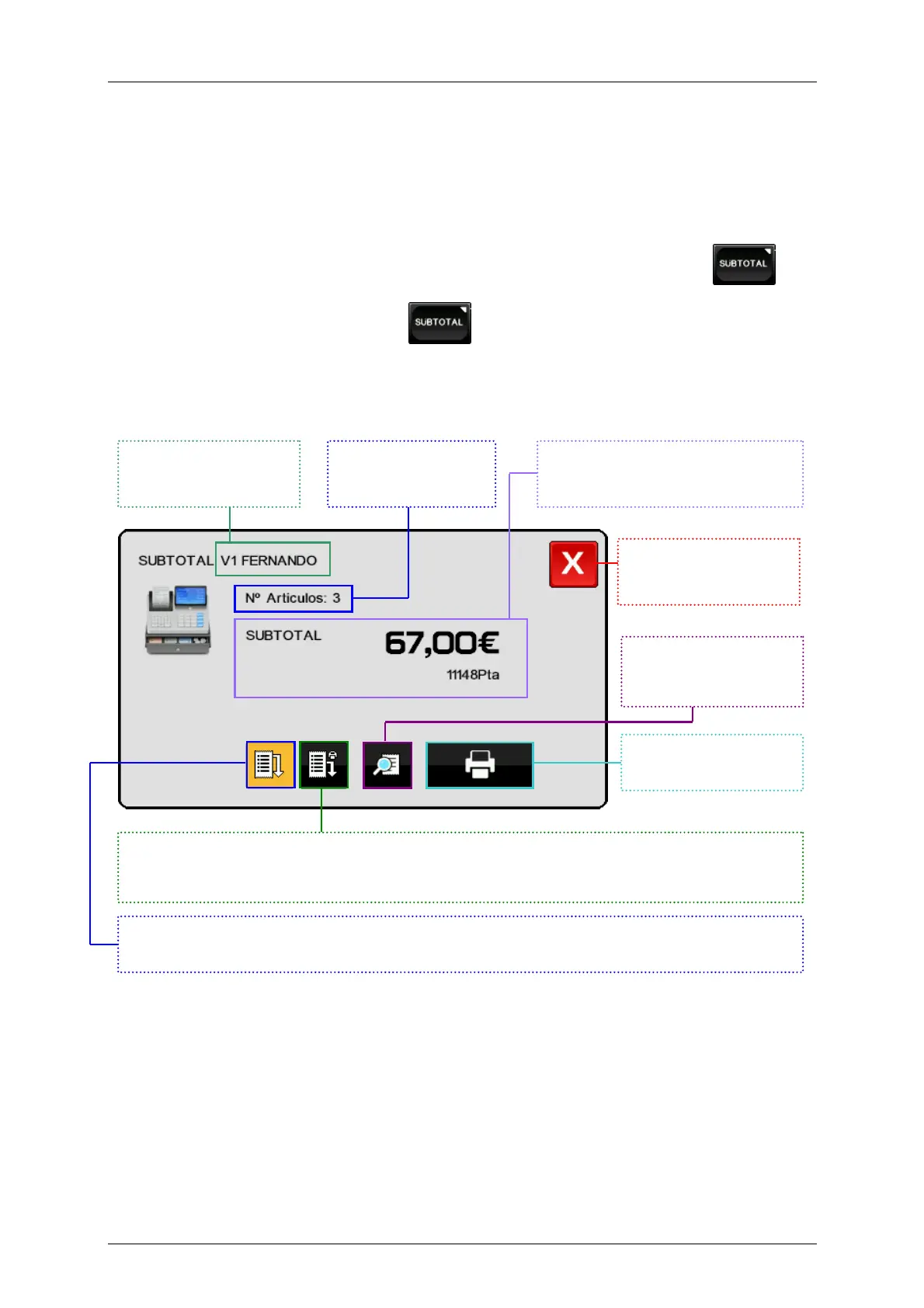
The following screen will be shown.
Vendor who make the
subtotal.
Number of articles.
Amount of articles in primary and
secondary currency (if the option is
Exit without saving
Direct access to receipt
review screen.
Subtotal printing.
This button makes the subtotal since the last printing. It will appears selected by default if you have
already printed a subtotal for this ticket.
This button makes the subtotal from the first line. It will appears selected by default if is the first
subtotal in the receipt.



 To Next Page