OPERATOR’S MANUAL
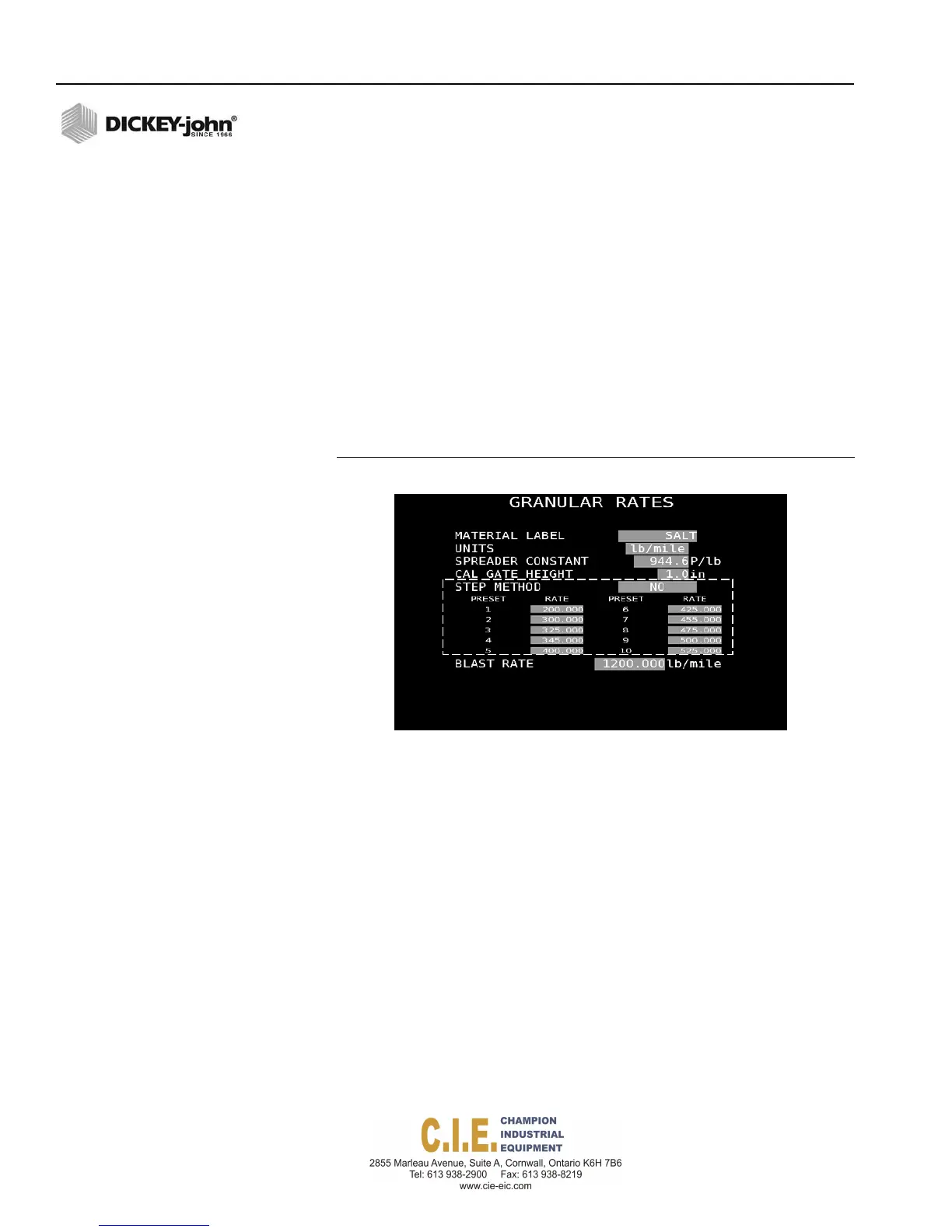
To select the Rate Method:
Rate Method allows ten user-defined application rates to be entered. Rates
can be adjusted during operation using the Rate Increase/Decrease
buttons on the switch module.
1.
Highlight the Step method selection box and press the Enter key on
the keyboard.
2.
Select No and press the Enter key again.
3.
Enter desired rates (Rates 1-10). If less than 10 rates are desired,
enter a zero (0) for each rate following the last programmed rate. The
initial rate displayed during operation is Rate 1. Other rates are
selected by pressing the Rate Increase/Decrease button on the
switch module.
4.
Enter a desired blast rate that applies a higher-than-normal, spot
application when the Blast button is pressed during operation.
Figure 54
Step Method Screen
BLAST RATE
A Blast Rate (lbs per mile) defines a higher than normal spot-application
rate that is applied when the Blast button is pressed. A time and speed to
simulate the length of time and ground speed to apply material when the
vehicle is stationary can be entered at the (F10) System Setup screen.
When the Blast Speed is set to zero, blasting cannot be initiated when the
vehicle is stopped.
58 / SYSTEM PROGRAMMING
Flex4 Pro
TM
Control System
6010541 Rev A



 To Next Page