OPERATOR’S MANUAL
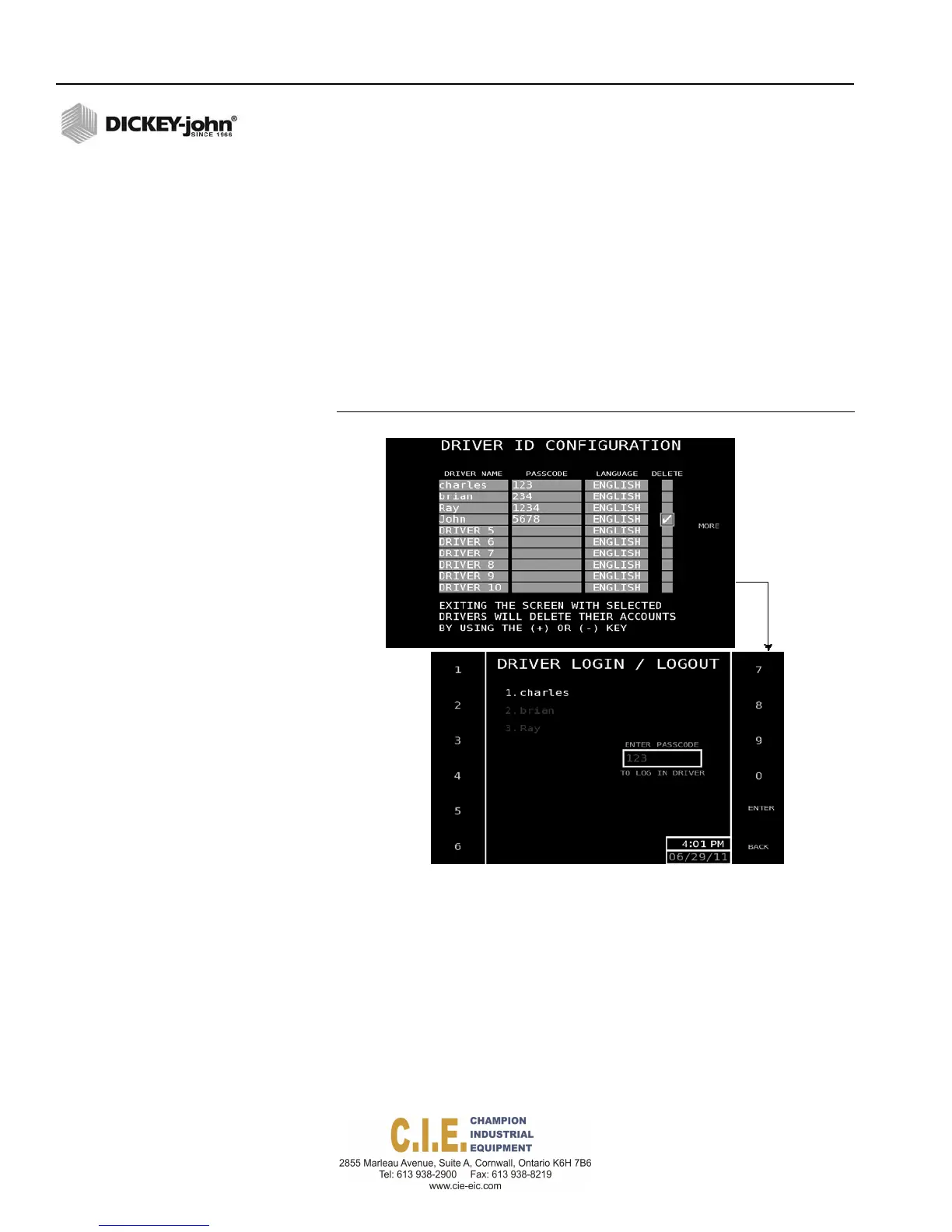
To enable a Driver Passcode:
1.
At the Driver Details screen, press 1 to display the Driver ID
Configuration screen.
2.
Highlight the Driver Name input box and type in a user name.
3.
At the passcode input box, enter a passcode for each user. To ensure
that individual driver’s data is recorded separately a different passcode
should be used for each driver name.
4.
Select the appropriate language, if available.
–
To remove a driver’s name and passcode, highlight the
corresponding delete input box located next to the user.
–
Use the + or - key to enter a checkmark to select. Upon exit of this
screen, the selected driver and passcode will be removed.
Figure 89
Driver ID Configuration and Login Screen
After Driver ID Configuration is setup, the Driver Login/Logout screen
appears requiring the driver’s personal passcode before gaining access to
the Operate screen. Refer to the Operation section for additional
information.
96 / SYSTEM PROGRAMMING
Flex4 Pro
TM
Control System
6010541 Rev A



 To Next Page