C
HAPTER
16
| IP Configuration
Setting the Switch’s IP Address (IP Version 6)
– 615 –
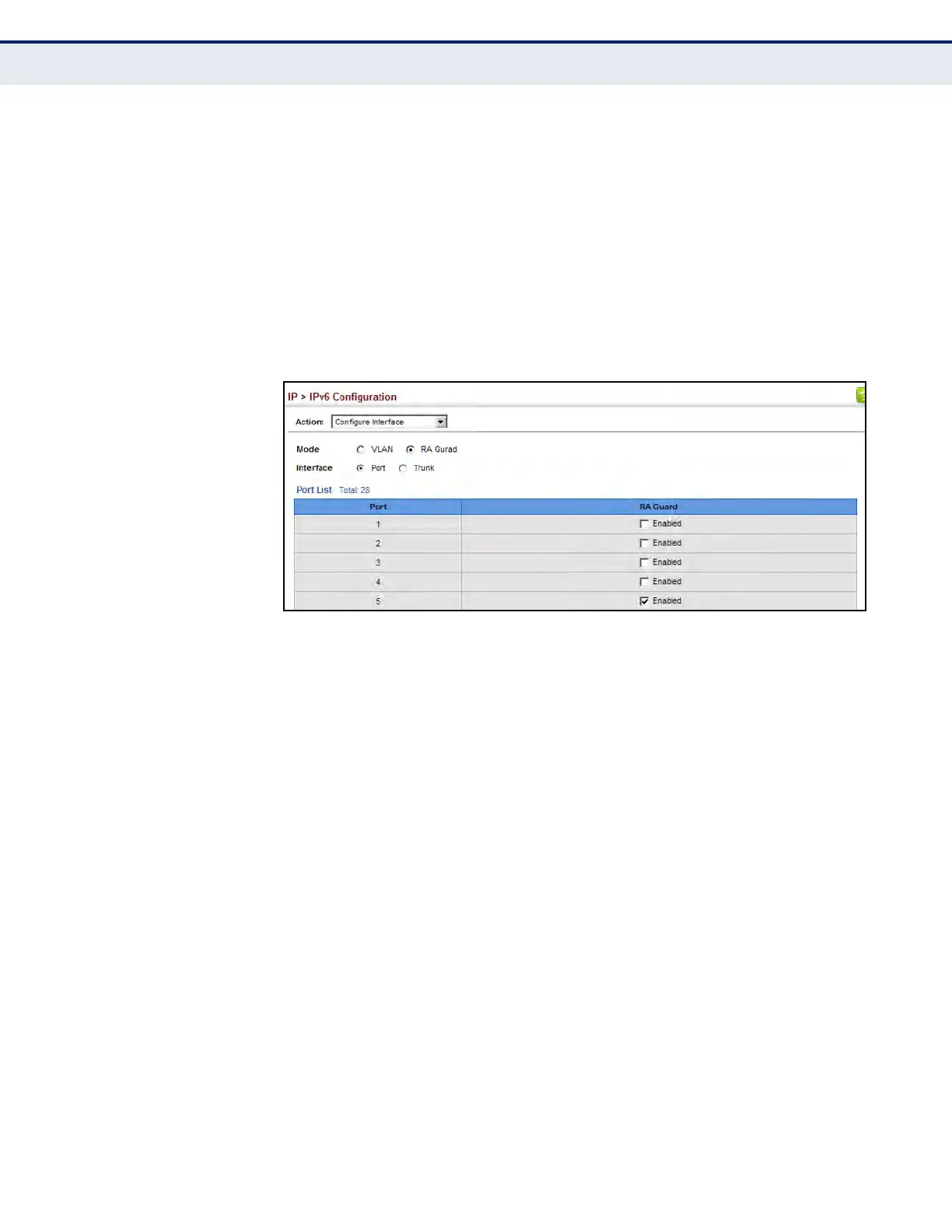
To configure RA Guard for the switch:
1. Click IP, IPv6 Configuration.
2. Select Configure Interface from the Action list.
3. Select RA Guard mode.
4. Enable RA Guard for untrusted interfaces.
5. Click Apply.
Figure 372: Configuring RA Guard for an IPv6 Interface
CONFIGURING AN IPV6
ADDRESS
Use the IP > IPv6 Configuration (Add IPv6 Address) page to configure an
initial IPv6 interface for management access over the network, or for
creating an interface to multiple subnets.
CLI REFERENCES
u "IPv6 Interface" on page 1360
COMMAND USAGE
u All IPv6 addresses must be formatted according to RFC 2373 “IPv6
Addressing Architecture,” using 8 colon-separated 16-bit hexadecimal
values. One double colon may be used in the address to indicate the
appropriate number of zeros required to fill the undefined fields.
u The switch must always be configured with a link-local address.
Therefore, explicitly enabling IPv6 (see "Configuring IPv6 Interface
Settings" on page 610) or manually assigning a global unicast address
will also automatically generate a link-local unicast address. The prefix
length for a link-local address is fixed at 64 bits, and the host portion of
the default address is based on the modified EUI-64 (Extended
Universal Identifier) form of the interface identifier (i.e., the physical
MAC address). Alternatively, you can manually configure the link-local
address by entering the full address with a network prefix in the range
of FE80~FEBF.




 To Next Page