Vigor3900 Series User’s Guide
168
E
E
x
x
a
a
m
m
p
p
l
l
e
e
3
3
:
:
H
H
o
o
w
w
t
t
o
o
C
C
u
u
s
s
t
t
o
o
m
m
i
i
z
z
e
e
a
a
S
S
e
e
c
c
u
u
r
r
e
e
R
R
o
o
u
u
t
t
e
e
b
b
e
e
t
t
w
w
e
e
e
e
n
n
H
H
e
e
a
a
d
d
q
q
u
u
a
a
r
r
t
t
e
e
r
r
a
a
n
n
d
d
B
B
r
r
a
a
n
n
c
c
h
h
b
b
y
y
U
U
s
s
i
i
n
n
g
g
P
P
o
o
l
l
i
i
c
c
y
y
R
R
o
o
u
u
t
t
e
e
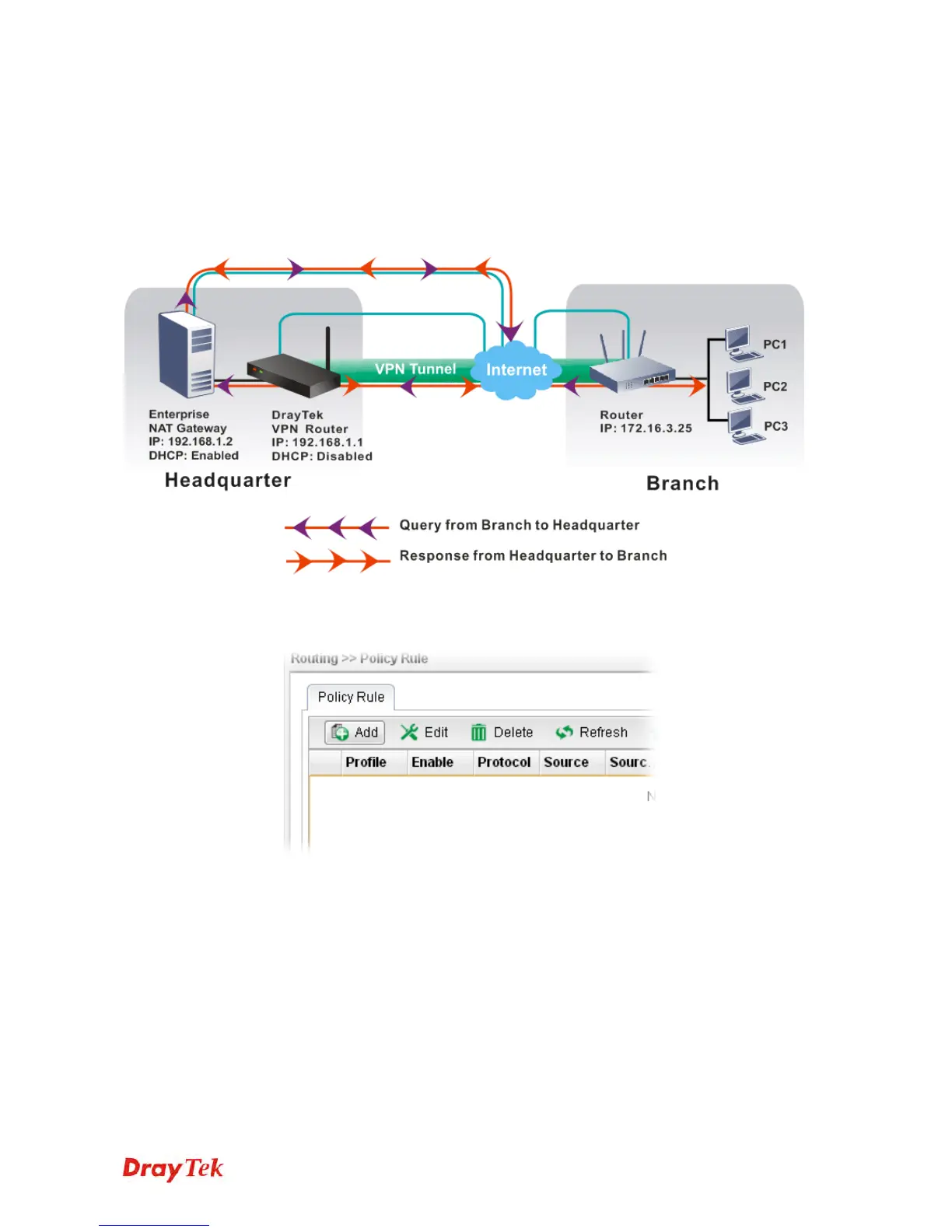
A LAN to LAN VPN tunnel is built between DrayTek VPN router (e.g., Vigor3900) and the
remote router. Enterprise firewall router (in Headquarter) can control the all of the traffic
coming from the remote PC (in Branch) which wants to access into Internet.
1. Access into web user interface of Vigor3900.
2. Open Routing>> Policy Route and click Add to create a new profile.














 To Next Page