Machine description
4812164901_A.pdf2022-11-14
Submenu - Error log/Error code list
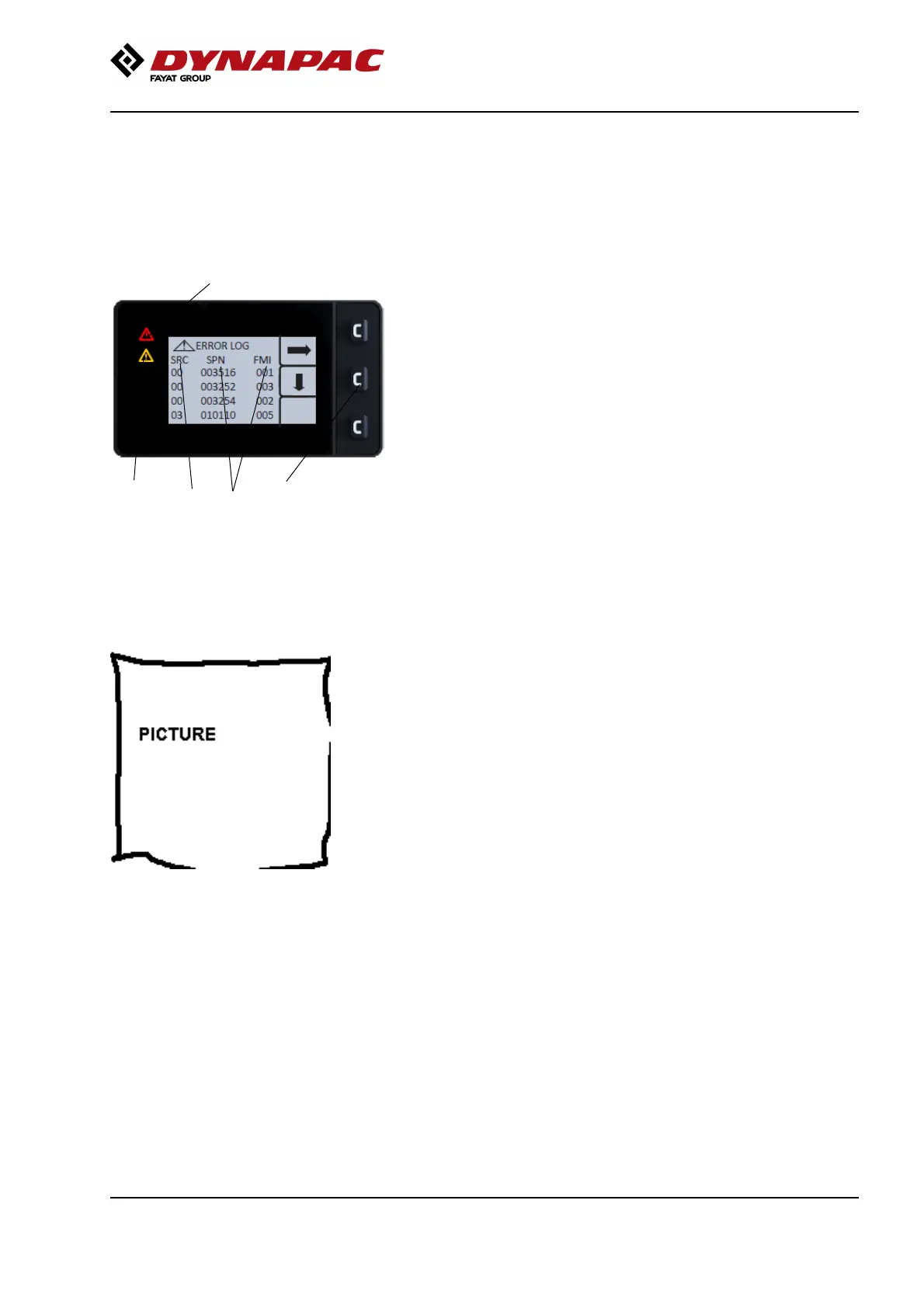
1. The alarm symbols are shown on the left-hand side
of the display. At the top is the red (5) warning symbol
and at the bottom the yellow (6).
Alarms are categorized in different degrees of severity:
1
2
4
5
6
Fig. Submenu, Error code list
1. SRC: Error source
2. SPN / FMI: Error code type
5. Red warning symbol (Serious fault)
6. Yellow warning symbol (Less serious
fault)
White alarm: The lowest degree of severity. These do
not result in any of the warning lamps lighting, but are
intended as information.
Yellow alarm: The middle degree of severity.
Together with the error code or popup, the yellow
warning light will also come on.
Red alarm: The highest degree of severity. Together
with the error code and/or popup, the red warning light
will also come on.
Fig. Submenu, Error code list
1. SRC: Error source
2. SPN / FMI: Error code type
5. Red warning symbol (Serious fault) 6.
Yellow warning symbol (Less serious
fault)
1
2
4
5
6
2. The middle button (4) on the side menu shows a
downward arrow. This arrow is used to scroll through
the list.
3. A Red or Yellow control lamp gives a reminder until
the error is rectified
37



 To Next Page